Start by measuring the space available for your keyboard and mouse, then decide whether you’ll mainly be writing long passages or entering budget figures. A compact keyboard without a separate number pad can save space; check that its connection and layout are compatible with your device. If you’ll be entering lots of figures, consider whether you need an integrated number function or a separate number pad.
Who might benefit from a compact keyboard?
Writer with limited desk space
Mostly writes application text and wants to keep room beside the keyboard for a mouse and source documents. BakkerElkhuizen offers a range of compact keyboards; the space you save will depend on the dimensions of the model you choose.
Writer tackling long application sessions
Wants a suitable key layout and a workstation that can be adjusted for comfortable use. Arboportaal points out that working at a screen can put strain on your hands, neck, shoulders and arms. A compact keyboard alone won’t determine whether your whole workstation is suitable.
Applicant who also works on budgets
Switches between continuous text and budget figures, and needs to choose between an integrated number function and a separate number pad that can be put away. BakkerElkhuizen describes both options across different keyboard models.
What should you look for when choosing?
| What to consider |
What should you check? |
Who should give this more weight? |
| Space for your keyboard, mouse and documents |
Measure the available desk width, including the space for your mouse; compare the dimensions and check the full key layout. |
If I’m writing application text and want my mouse and source documents within easy reach, I focus on the space beside the keyboard. Around 26% of consumers put space at the top of their list. |
| Layout and posture for long writing sessions |
Check the letter, arrow and editing keys, and also consider your screen height and mouse position. |
For long writing sessions, I want a layout I find comfortable to use and a workstation I can adjust to suit me. Around 26% of consumers prioritise extended typing. |
| Carrying and storage |
Compare the dimensions and weight of the exact model; think about how you’ll protect the keyboard in transit. |
If I’m taking the keyboard between workstations, I want to know whether it will fit in my bag and on my desk. Around 21% of consumers prioritise portability and storage. |
| Connection and device compatibility |
Check support for your device and operating system, the connection type and the available keyboard layout. |
If I use a laptop or tablet with a specific connection, the keyboard’s connection needs to be compatible. Around 16% of consumers start with device compatibility. |
| Overall cost and power supply |
Check how the model is powered and whether you’ll need a separate number pad for entering lots of figures. |
If I’m entering budget figures, I want to consider in advance whether I need a separate number pad and how the keyboard is powered. Around 11% of consumers give the most weight to these costs and upkeep. |
Common pitfalls when choosing a compact keyboard
-
Looking only at the width
With a compact layout, the number, arrow and editing keys may be in different positions or harder to reach. You’re most likely to notice this when switching between application text and budget figures.
Check the full key layout. If you enter lots of figures, choose deliberately between an integrated number function and a separate number pad.
-
Treating “quiet” as a measured claim
Logitech and Trust describe their keys as quiet, but these brand descriptions aren’t comparable sound measurements.
Treat the description as a guide, and, if possible, try the sound and feel of the keys for yourself.
-
Confusing a charging port with wired typing
Charging and sending keystrokes through a cable are two different features.
Check whether the exact model supports typing via Bluetooth, a USB receiver or a wired connection.
Brands to consider
Logitech
The Pebble Keys 2 K380s is a compact Bluetooth option for switching between devices.
- Logitech says the K380s can switch between three devices.
- The description of the keys as quiet isn’t an independent sound measurement. Also check the available key layout and Bluetooth compatibility with your device.
BakkerElkhuizen
The UltraBoard 950 Wireless has an integrated number function; the UltraBoard 950 V2 is a separate wired USB-C model.
- For the Wireless model, BakkerElkhuizen specifies a scissor mechanism, 19 mm key spacing and a numeric keypad available via NumLock.
- Don’t confuse the wireless UltraBoard 950 Wireless with the wired UltraBoard 950 V2; check which model you’re looking at.
Trust
The Lyra is a compact option for multiple devices, with a USB receiver and Bluetooth.
- Trust lists low-profile scissor keys, adjustable feet and a rechargeable battery.
- The stated battery life is a manufacturer specification and may differ from your own experience. Check the exact layout and connection options.
Keychron
The K3 Max is a compact, low-profile mechanical option for anyone who wants to customise key functions.
- Keychron specifies a 75% layout, dimensions of 306 × 116 mm, a weight of 525 g, and Bluetooth, 2.4GHz and wired connections for the K3 Max.
- According to Keychron, hot-swap is limited to the specified RGB variant. Check the model, switches and layout.
Apple
The Dutch-layout Magic Keyboard (USB-C) is designed for Mac, iPad and iPhone systems supported by Apple.
- Apple specifies a width of 27,89 cm and a weight of 239 g for this model.
- This model has no Touch ID or separate number pad. Compare the minimum system versions with your device; compatibility with other systems hasn’t been confirmed.
Compact keyboards at Joybuy
These keyboards offer options for writing at a small desk, with differences in layout, connection and portability.
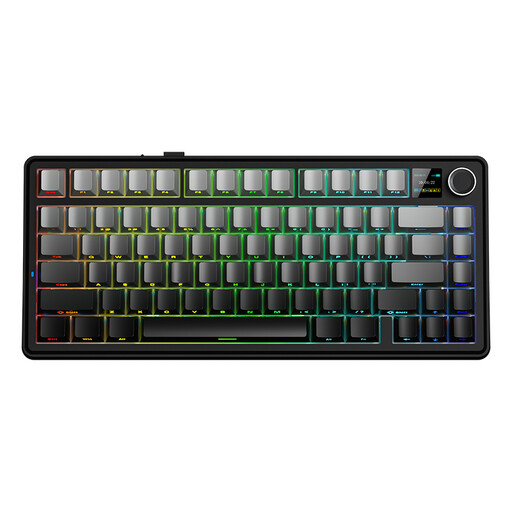 Image unavailable
AULA F75 MAX 75%, QWERTY US, Gradient Grey, Reaper Switch
The 75% layout may suit you if you want to save space on a small desk and have a choice of connection options.
The product name describes a mechanical keyboard with wired, Bluetooth and 2.4G connections, and a QWERTY US layout.
Joybuy
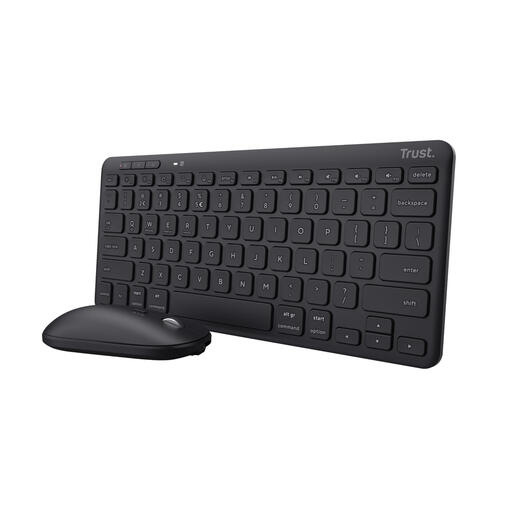 Image unavailable
Trust Lyra wireless keyboard and mouse set, QWERTY US
This compact set may suit you if you’re looking for a keyboard and mouse together for a smaller workspace.
The product name describes a rechargeable set with a QWERTY US layout and support for multiple devices.
Joybuy
 Image unavailable
Ajazz AK820 Pro 75%, QWERTY US, Gray Flying Fish Switch
This compact mechanical model may suit you if you’re looking for a 75% layout and a choice of connections for a small workspace.
The product name lists wired, Bluetooth and 2.4G connections, plus hot-swap.
Joybuy
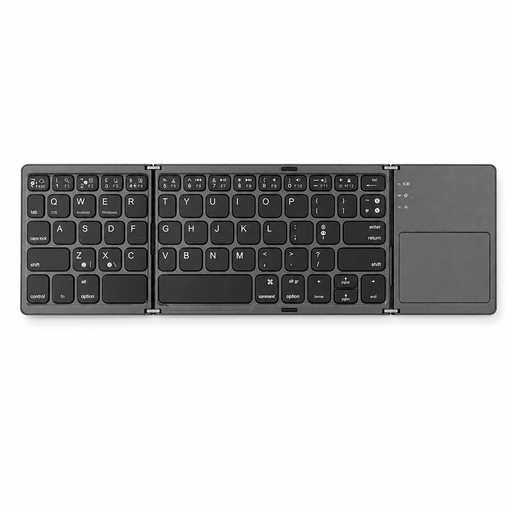 Image unavailable
Voxis B033 foldable Bluetooth keyboard with touchpad
A foldable model may suit you if portability and storage are priorities. Check that the unfolded layout feels comfortable for writing long application texts.
The product name lists Bluetooth, a touchpad and compatibility with multiple systems.
Joybuy
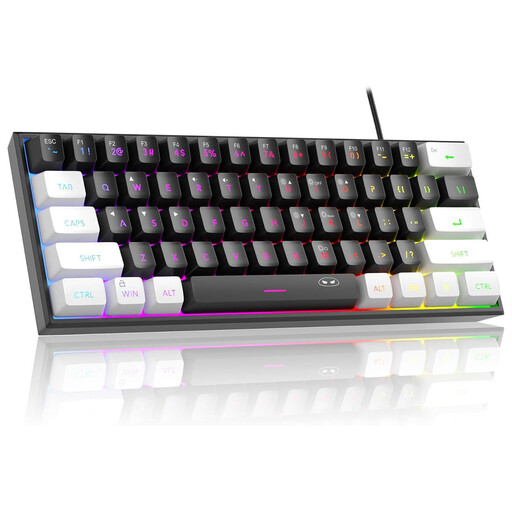 Image unavailable
MageGee TS91 60%, wired, QWERTY US, WhiteBlack
The compact layout may suit a fixed workstation where you want to save desk space.
The product name lists 61 keys, a wired connection and a QWERTY US layout. This model is wired, so it’s less flexible if you often move between workstations.
Joybuy
Frequently asked questions
How can you set up a small desk for longer writing sessions?
Leave enough room to position your arms and mouse comfortably, adjust your workstation where possible and change your posture regularly. Arboportaal recommends this as workstation advice; a compact keyboard alone won’t automatically make your entire setup suitable.
Can you keep typing on a Bluetooth keyboard while it’s connected to the charging cable?
It depends on the model. Trust says the Lyra can be used while charging; don’t assume other models support wired typing just because they have a USB-C charging port.
What if a keyboard you bought online is uncomfortable to type on or breaks early?
For eligible online consumer purchases, ACM ConsuWijzer says you generally have a statutory cooling-off period of up to 14 days after delivery. Your statutory guarantee is separate from a manufacturer’s warranty: if a product breaks earlier than you could reasonably expect during normal use, the seller is responsible for providing an appropriate solution.
Are you legally required to use a separate keyboard when working on a laptop?
This doesn’t apply to every buyer or every short writing task. Arboportaal states that for employees who work at a screen for more than 2 hours a day, the screen and keyboard must not be attached to each other. When using a laptop, it must then be possible to use a separate screen or keyboard; whether this applies to your working situation depends on your duties.


