Start by measuring the space available for your keyboard and mouse, then decide which navigation and function keys you need when editing dialogue branches. A flat, compact keyboard takes up little room, a TKL model retains the main typing area, and a programmable 75% model lets you customise keys but requires more attention to layout and software. A more compact keyboard won’t automatically make an awkwardly arranged workspace more comfortable.
Who is a compact keyboard suitable for?
Writer with limited desk space
Writes a lot of dialogue and wants to keep the mouse next to the keyboard. Measure the space available for both devices; TNO/CBS lists a narrow keyboard as an option for screen-based work in its Display Screen Work factsheet.
Editor working with lots of branches
Frequently navigates through text and dialogue branches and wants easy access to navigation keys or customisable shortcuts. Compare the layout with the actions you repeat while editing.
Typist during long sessions
Pay attention to your workspace setup, key feel and the need to vary your activities during long typing sessions. A keyboard or break indicator alone won’t prevent discomfort.
What should you consider when choosing one?
First, measure the space available for your keyboard and mouse. Then compare how easily you can reach the keys you use for editing, the feel you prefer and any extra features you might need.
| What to consider |
What to look for when buying |
Who should give this extra thought? |
| Space for your keyboard and mouse |
Measure the available width and compare it with the dimensions of the model you’re considering. |
If I want to keep the mouse right next to the keyboard while writing, I look at the total space needed for both. Around 33% of consumers prioritise having enough room for their keyboard and mouse. |
| Navigation and shortcut keys |
Check where the arrow and function keys are, and whether any key customisation works with your system. |
When editing branches, I want quick access to the keys I use often. Around 27% of consumers give navigation and customisable shortcuts top priority. |
| Key feel and sound |
Check the switch type and layout; treat claims about quiet operation as manufacturer descriptions. |
If I write a lot or share my workspace, I consider how the keys feel and how much noise they make. Around 20% of consumers prioritise a quiet, comfortable typing experience. |
| Posture and breaks |
Assess your setup separately and check whether an indicator requires software. |
During long typing sessions, I want to be able to set up my workspace comfortably and remember to take breaks. Around 20% of consumers prioritise support for long sessions. |
Pitfalls to avoid when buying a compact keyboard
-
Choosing based on the ‘compact’ label alone
Compact layouts don’t always keep the same keys within easy reach. This can matter if you frequently switch between text and branches while editing.
Compare the layout of the exact model with the keys you use for those tasks.
-
Assuming a break indicator will prevent physical discomfort
An indicator is a product feature, not proof that the keyboard prevents discomfort. Arboportaal also highlights the importance of a suitable workspace and varying your tasks or taking breaks.
Choose this feature only if you want the reminder, and check which software it requires. Assess your workspace and how you vary your activities separately, too.
-
Overlooking the layout or connection you need
Keyboards can differ in layout and connectivity. A model that doesn’t suit your computer or typing style may be less practical.
Check the full model name, key layout, connections and included accessories on the product page.
Brands worth comparing
Logitech
The MX Keys Mini and Pebble Keys 2 K380s are compact options with different layouts and features.
- Logitech says the MX Keys Mini has smart illumination and programmable keys. According to Logitech, the Pebble Keys 2 K380s can switch between three devices and has flat keys that the manufacturer describes as quiet.
- Check the layout variant and which keys you can reach easily for your editing tasks.
CHERRY
The STREAM KEYBOARD TKL is designed for anyone looking for a wired keyboard without a number pad.
- CHERRY describes it as a TKL keyboard with SX scissor switches and the same main typing area as the larger STREAM.
- The cable takes up desk space, and you’ll need a suitable connection. The manufacturer’s description of the keys as quiet isn’t based on an independent sound measurement.
Keychron
The K3 Max is a compact 75% option for anyone who wants to customise key functions.
- Keychron lists wired, Bluetooth and 2.4GHz connections, along with key customisation options.
- Several layout and switch variants are available. Check the exact model, layout and software requirements before buying.
R-Go Tools
The Compact Break is a compact option with a break indicator.
- R-Go says the indicator is powered by R-Go Break software.
- A reminder to take breaks doesn’t prove that the keyboard prevents discomfort. Check the connection, layout and software requirements of the model you choose.
BakkerElkhuizen
The UltraBoard 950 Wireless is a compact Bluetooth option with an integrated number pad.
- The manufacturer lists scissor keys, shortcut keys and pairing with up to five devices.
- An integrated number pad won’t replace a separate number pad for everyone. Compare the available layouts with the way you use your keyboard, too.
Joybuy products for a small desk
This selection features compact wired keyboards in TKL, 75% and 60% layouts. They’re for anyone who wants to leave room for a mouse and choose a layout that suits their editing tasks.
 No image available
Trust GXT 833 Thado Wired Gaming Keyboard, TKL, PC/PS5, QWERTY, Black
The TKL layout may suit you if you want to leave room for a mouse without giving up the main typing area.
Wired; QWERTY US layout.
Joybuy
 No image available
Corsair K70 CORE TKL Mechanical Gaming Keyboard, BE AZERTY, MLX Red, Black
This TKL model may suit a compact workspace if you’re looking for the Belgian AZERTY layout.
Mechanical keyboard; BE AZERTY layout; MLX Red.
Joybuy
 No image available
AJAZZ AK820 75% Wired Mechanical Keyboard, QWERTY US, Hot-Swappable Linear Switches, White Backlight, 83 Keys, CNC Volume Knob, Red Switch-Black
The 75% layout may suit you if you’re looking for a compact keyboard with a volume knob.
Wired; QWERTY US layout; 83 keys; hot-swappable linear switches; white backlight; volume knob.
Joybuy
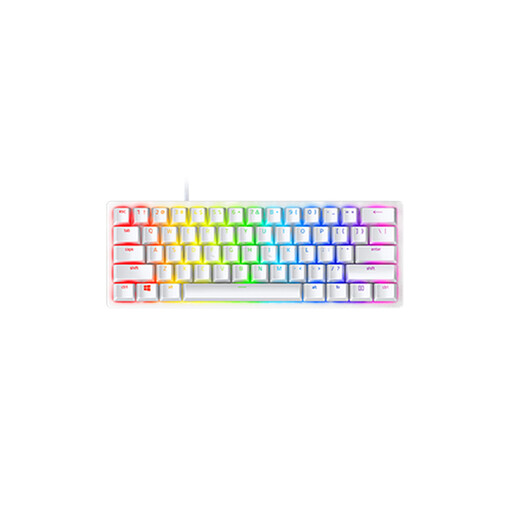 No image available
Razer Huntsman Mini, Linear Optical Switch, US, Mercury
The 60% form factor may be worth considering if desk space is a priority; check that the navigation keys you need suit the way you work.
Linear optical switch; US International layout.
Joybuy
 No image available
MageGee TS91 60% Wired Gaming Keyboard, QWERTY US, RGB Backlit, 61 Key, WhiteBlack
The 60% layout may suit you if you’re looking for a compact wired keyboard; check which keys you need for editing dialogue before you buy.
QWERTY US layout; 61 keys; RGB backlight.
Joybuy
Frequently asked questions
Should I choose the smallest possible keyboard for a dialogue tree?
No. Don’t choose based on the smallest case alone. First measure the space available for your keyboard and mouse, then check that you can reach the navigation keys easily. A TKL model can retain the main typing area without a number pad, while a programmable 75% model offers different options.
How can I set up a small desk for long typing sessions?
Position your keyboard and mouse so you can work comfortably, and vary your tasks or take breaks. Arboportaal lists a narrow keyboard as one way to position the mouse closer. A break indicator can remind you to take breaks, but it can’t replace them.
What if the keyboard doesn’t meet my expectations after I buy it?
For online purchases from a business, you’re often entitled to a 14-day cooling-off period; the Dutch Government explains the period and its conditions. Dutch law also provides a legal guarantee: if there’s a problem with a product, contact the seller. Check the keyboard layout and connection before buying, too.
Am I legally required to use a separate keyboard with a laptop?
According to Arboportaal, for employees who work with a screen for more than two hours a day, the screen and keyboard must not be attached to each other. In that case, laptop users must be able to use a separate screen or keyboard. This isn’t a general requirement to buy one for every home user.


