
Gamer recording at a small desk
You want to game and record at the same time, while still leaving room for your screen and cables. Compare the dimensions and connections of the exact configuration with your workspace.


Start by checking the dimensions, connections and clearance for ventilation of the exact PC configuration: it needs to fit your small desk. Then choose a configuration that can handle your game and recording settings at the same time. A compact case takes up less space, while a larger tower may offer more scope for future upgrades. A hardware encoder can take some of the load off the processor, but it won’t automatically prevent the graphics card or other components from becoming overloaded.
You want to game and record at the same time, while still leaving room for your screen and cables. Compare the dimensions and connections of the exact configuration with your workspace.
You save longer gaming sessions or create clips for your guide later. Check the included SSD, options for adding more storage and the file formats accepted by your editing software.
If the PC is close to your microphone, consider its ventilation and noise during use. A compact case alone doesn’t tell you how loud a specific configuration will be while recording.
Choose this option if: space is the deciding factor and the dimensions, connections and configuration suit your desk.
Bear in mind: a small case doesn’t prove that the PC will fit on your desk or run quietly, and upgrade options vary by configuration.
Choose this option if: you have enough space and upgrading the memory or storage later is important to you.
Bear in mind: extra room for upgrades doesn’t tell you how loud the PC is or how well it can handle your recording workload.
| What to consider | What should you check? | Who should pay particular attention? |
|---|---|---|
| Space and connections | Measure the available width, depth and height, allowing for cables and ventilation clearance. Compare these with the dimensions and ports of the exact configuration. | I want to fit my PC, screen and cables on a small desk and check in advance that the connections will remain accessible. Around 34% of consumers give space and connections top priority. |
| Gaming and recording at the same time | Check which encoder the configuration has and make a test recording with your game, resolution, frame rate and scenes. OBS Project points out that an overloaded GPU or another system bottleneck can cause problems. | If I want to make a usable recording while playing, I want to test my settings together rather than relying on the graphics card name alone. Around 33% of consumers prioritise gaming and recording at the same time. |
| Storage for games and recordings | Check the SSD capacity of the exact configuration and whether there’s a spare storage bay. Also check which recording formats your editing software supports. | I want to save gaming sessions and make clips later, so enough storage included and a useful upgrade option matter. Around 20% of consumers give saving recordings top priority. |
| Cooling noise while recording commentary | Look for measurements of the exact configuration under a similar workload, or assess the noise during a test recording of your own. Keep the vents clear. | When I record commentary close to the PC, I want to know whether its noise will be audible in my recording. Around 13% of consumers prioritise clear commentary recordings. |
Even a compact PC needs depth and enough room for cables, accessible ports and airflow.
Measure your complete setup and compare it with the external dimensions and connections of the configuration you want to buy.
OBS Project explains that the GPU or another system bottleneck can affect recording, even if your game seems to run well on its own.
Make a test recording with the game, resolution, frame rate and scenes you plan to use before relying on that combination.
Games and saved recordings share the available storage space. Whether you can add more later depends on the configuration you choose.
Check the SSD capacity and whether the exact configuration has a spare internal storage bay.
The MPG Trident AS 14th range may be worth considering if a compact case is important to you.
The OMEN 16L range includes compact gaming desktop configurations with different processors and graphics cards.
The Legion Tower 5i Gen 10 is a larger tower to consider if upgrading the memory or storage later is important to you.
The Predator Orion 3000 is a tower option for anyone who can make more room than a compact desktop requires.
This Joybuy selection includes compact gaming desktops and larger towers for people who play games and want to save recordings. Check the space, ventilation and configuration of the specific model against your desk and recording settings.
 No image available
A gaming desktop to consider if the listed configuration and the clearance needed suit your recording setup.
Core i7-14700F, RTX 5060, 16 GB DDR5 memory and 1 TB SSD. According to the product description, the memory is upgradeable to 128 GB; the case measures 21 × 40,80 × 41 cm. Leave at least 10 cm of clearance on all sides and don’t place the PC in an enclosed cabinet.
 No image available
The 16L case makes this model a good option if you’re looking for a compact gaming desktop and its stated dimensions fit your desk.
Core Ultra 7 265F, RTX 5050, 16 GB DDR5 memory and 1 TB PCIe SSD. According to the product description, the memory is upgradeable to 32 GB; the stated dimensions are 15,50 × 33,70 × 15,50 cm. Leave at least 10 cm of clearance on all sides and don’t use the PC in an enclosed cabinet.
 No image available
This configuration is designed for anyone looking for a compact gaming desktop, provided its dimensions and ventilation needs can be accommodated in the available space.
Ryzen 5 5500, RTX 5060, 16 GB DDR4 memory and 500 GB NVMe SSD. The stated dimensions are 388 × 200 × 423 mm. Place the PC on a stable, well-ventilated surface and keep the vents clear.
 No image available
Check the case and where you’ll place it before choosing this model: the product description doesn’t list its dimensions.
AMD Ryzen 7 5700X, GeForce RTX 5060 Ti 8GB, 16 GB DDR4 memory and 480 GB NVMe PCIe SSD.
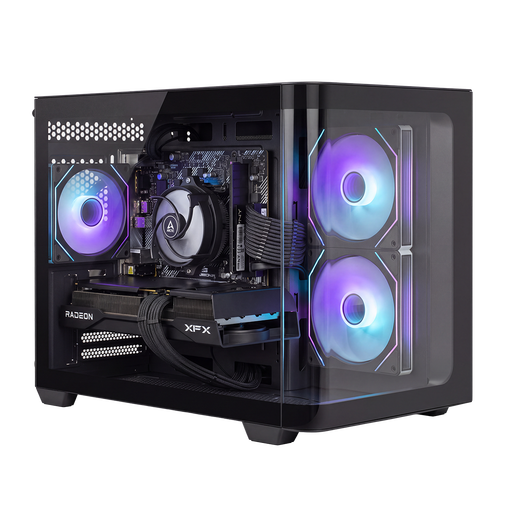 No image available
This larger tower suits anyone with more space available who values the option to upgrade their storage.
Ryzen 7 5700X, Radeon RX 9070 GRE, 16 GB DDR4 memory and 1 TB NVMe SSD. The product description mentions options for upgrading the memory and storage, but doesn’t give the dimensions. Keep the vents clear and ensure there’s plenty of airflow.
No, a hardware encoder doesn’t guarantee that every recording will run smoothly. OBS Project generally recommends hardware encoding to take the load off the processor, but the GPU also has to process the scenes. Test your game and recording settings together, and adjust the frame rate, graphics settings or recording workload if needed.
OBS Project recommends MKV for many recording situations and offers a feature for converting recordings to MP4. Check in advance which video and audio formats your editing software accepts.
No. ACM ConsuWijzer describes the statutory guarantee as your right to a product that, under normal use, meets what you could reasonably expect. If something goes wrong, the seller must offer an appropriate solution at no extra cost; an additional manufacturer’s guarantee doesn’t replace this statutory right.
Not always. According to the Dutch government, many distance purchases come with a 14-day cooling-off period, but there are exceptions. Check the terms for your specific purchase, especially if it’s a custom-built configuration.