
Gamers with limited mouse space
If your desk is narrow, you’ll want to keep some space beside your keyboard. Compare the dimensions of the exact version with the space you have, and consider which keys you’d be giving up.


Start with the amount of mouse space you need and the keys you want to use directly while gaming. A 75% keyboard combines a compact layout with function keys and arrow keys on the Razer and Keychron models reviewed. TKL takes up more width, while 60% saves desk space but more often requires a function-key layer. Then check the exact layout, switch type and connection.
If your desk is narrow, you’ll want to keep some space beside your keyboard. Compare the dimensions of the exact version with the space you have, and consider which keys you’d be giving up.
If you often open menus or navigate while gaming, check which keys are available directly and which require a second key layer.
If you play near other people, key feel and noise may matter. Check the switch type on the specific version; the word ‘mechanical’ alone doesn’t tell you how a keyboard sounds.
First, measure the space available for your keyboard and mouse. Then compare the layout with the shortcuts you use most often.
| What to consider | What to look for | Who this matters to |
|---|---|---|
| Space for your keyboard and mouse | Measure the available width and compare it with the dimensions of the exact version. Check which keys the layout leaves out or moves. | On a narrow desk, I want to leave enough room for my mouse without losing an important key. Space for a keyboard and mouse is the top concern for around 31% of consumers. |
| Gaming keys you can reach directly | Check whether frequently used function keys and arrow keys are available directly, accessed through a key layer or can be reassigned. | If I use shortcuts a lot in my games, I want to use them without extra key combinations. Direct access to gaming keys is the main concern for around 31% of consumers. |
| Key feel and noise | Check the switch type and any sound-dampening features on the version you’ve chosen. A manufacturer’s claim about dampening isn’t a comparative sound measurement. | When gaming in a shared space, I want to be able to take key feel and noise into account. These are the top concern for around 23% of consumers. |
| Connection and settings | Check whether the version is wired or wireless, and whether the key settings you want require software. | I want to know in advance how the keyboard connects to my desk setup and how to configure it. Connection and customisable controls are the main concern for around 15% of consumers. |
On a 60% keyboard, secondary functions may be accessed via a function key. SteelSeries documents this for the Apex Pro Mini; the RimWorld controls reviewed use function keys for menus, among other things.
Compare the shortcuts in your own games with the keyboard layout. Choose a keyboard with direct-access keys if you don’t want to use an extra key combination.
A more compact layout may mean using extra key combinations or spending time adjusting your in-game controls.
A version may be wired or wireless. Check the full product name and the connection type of the version you’re considering.
Check the product details and images for the version you’ve chosen; don’t base your decision on a partial model name alone.
For the K2 Version 3 reviewed, Keychron lists separate ISO variants, including UK, German, Swiss and Nordic. The physical key legends may therefore differ between versions.
Check the version you’ve chosen and its product images, not just the ‘75%’ or ‘ISO’ label.
A different physical layout may mean the key legends aren’t what you’re used to.
The wired G515 TKL reviewed is aimed at anyone looking for a low-profile keyboard with a TKL layout.
The BlackWidow V4 75% reviewed has a compact layout with a function row and arrow keys.
According to Keychron, the K2 QMK Wireless Mechanical Keyboard (ISO Layout) - Version 3 reviewed combines a 75% layout with Bluetooth, a wired option and key programming.
The Apex Pro Mini Wireless - US reviewed is a 60% option for anyone prioritising a very small layout.
These models include 75% and TKL layouts for anyone looking to save space on a small desk and match the keyboard layout to the gaming controls they use most.
 Image unavailable
The 75% layout may suit anyone looking for a compact keyboard who wants to check that frequently used keys are in the right places.
The product name lists Bluetooth, 2.4G and USB-C wired connectivity, RGB lighting and PBT keycaps. This version has a US QWERTY layout.
 Image unavailable
This 75% model is worth comparing if you’re looking for a compact layout and want to be able to adjust the switch feel.
The product name lists a TFT display, rotary knob, tri-mode wireless connectivity and hot-swappable Star Vektor switches.
 Image unavailable
This model’s 75% layout is presented as a way to save desk space while keeping the function keys and arrow keys.
The product name lists wired, Bluetooth and 2.4G connectivity, a TFT display, RGB lighting and hot-swappable switches. This version has a US QWERTY layout.
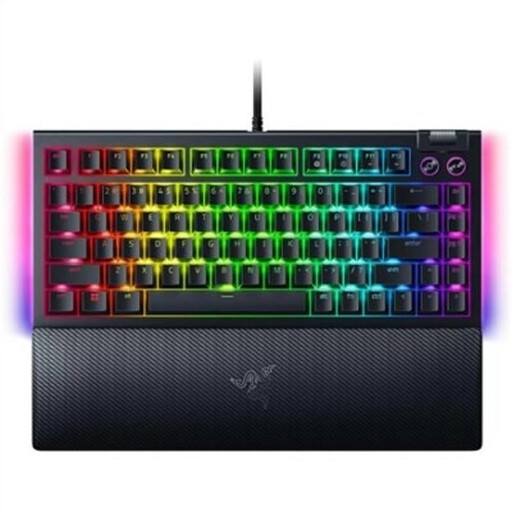 Image unavailable
This 75% model may suit you if you’re looking for a compact layout with a function row and arrow keys; Razer lists both on the BlackWidow V4 75%.
The product title mentions hot-swappable mechanical switches. This version has a US QWERTY layout.
 Image unavailable
A TKL layout may suit you if you can do without a number pad but want to keep a dedicated function row and arrow keys. Bear in mind that it’s wider than a 75% layout.
The product information lists linear MLX Red v2 switches, sound-dampening foam and a detachable USB-C cable. This version has a BE AZERTY layout.
Sometimes you can remap keys, but it depends on the game and keyboard. The Official Factorio Wiki describes customisable key bindings; the RimWorld Wiki lists function keys for menus, among other things. Check your own game’s settings and try the secondary keys on a 60% keyboard before you choose.
First, check the connection type and the exact keyboard version. Keychron recommends Launcher for configuring keys on the K2 Version 3 reviewed; SteelSeries Support explains how the Apex Pro Mini’s function key accesses secondary functions. For maintenance, refer to the manual for the version you buy.
No. You don’t need an extended warranty to have statutory consumer rights when buying from a retailer. According to the Dutch Government, the Netherlands has no fixed statutory warranty period; if a product is faulty, you should contact the seller. Separately, consider whether a paid extended warranty actually gives you additional rights.
When you buy from a business at a distance, you generally have a 14-day cooling-off period. The Dutch Government says the seller must provide information about matters including the product and the cooling-off period. These are consumer rights relating to the purchase, not a special registration or usage permit for keyboards.