
Vandaag of morgen in huis

Kwaliteit gegarandeerd

Welkomstaanbiedingen ontgrendelen: GRATIS bezorging | Tot 80% korting | Gratis 30 dagen JoyPlus-proefperiode
Download de app
A compact gaming keyboard fits on a small desk, gives you more room for mouse movements and is easy to take with you. However, a smaller size can also have drawbacks. If you only look at RGB lighting or a low price, you may not discover until after purchase that the function keys are missing, the layout is inconvenient or the connection is not suitable for your setup.
As a Joybuy Product Recommendation Officer, I filter the most important product specifications and marketing claims, so you can compare products more effectively. Below, you can read what to look for in a 60% gaming keyboard, TKL model or 75% variant.
A 60% model usually has 61 keys and no numeric keypad, separate arrow keys or F-row. These functions are generally available through combinations with the Fn key. This saves space, but is not always convenient for spreadsheets, programming or games in which you use many keyboard shortcuts.
A 75% or TKL model may therefore be more practical. You retain more functions, while the keyboard is still narrower than a full-size model.
Some affordable models use membrane keys with a mechanical feel. They can be pleasant to type on, but technically they are different from a mechanical gaming keyboard. Always check the switch type:
A keyboard with a “fast response time” will not automatically feel faster to every user. Software, the USB connection, your PC configuration and your own playing style also play a part.
An RGB keyboard can improve visibility in a dark room and give your desk a personal touch. However, it does not automatically change accuracy, durability or response time. Check how it is controlled: does the lighting work with Fn shortcuts, or is software required? Also check whether you can configure individual keys or only use pre-set effects.
Use this layout as a practical starting point:
A wired gaming keyboard usually uses USB and does not need charging. It is a logical choice for a fixed gaming PC or if working without cables is less important to you.
A wireless gaming keyboard offers greater flexibility. Check which modes are supported: Bluetooth, 2.4 GHz with a dongle and USB cable each have their own use case. Many users choose a wired connection or 2.4 GHz for competitive games. Bluetooth is often more convenient for laptops, tablets and phones. When choosing a gaming keyboard for Mac, also check operating system support and the available key functions.
Many compact models in the range use a QWERTY US keyboard or US International layout. The physical symbols and position of some special characters may differ from a Dutch ISO layout. Before purchasing, check the following:
Choosing the wrong layout is one of the most difficult purchasing mistakes to rectify, because you will either need to get used to it or configure software-based alternatives.
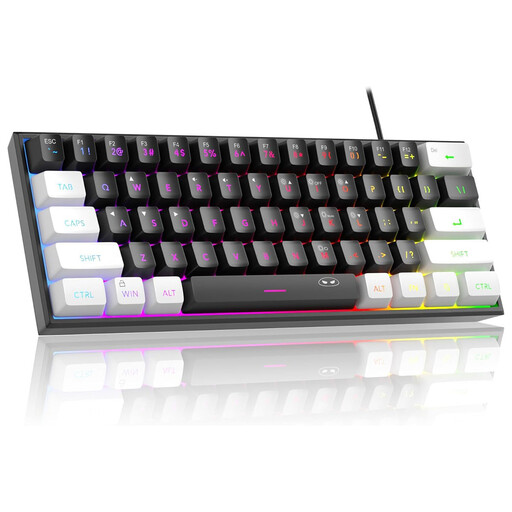
Why it suits this profile: This 60% model is compact, wired and designed for basic use with PCs, Macs and certain consoles. According to the product description, it uses a membrane system with a mechanical feel and RGB lighting.
The specifications clearly state that it has 61 keys and a US layout. According to the product information, the IPX4 rating applies to the circuit board; the connection itself is not waterproof.
61 keys, RGB modes and dimensions of approximately 29.2 × 10.1 cm. The cable connection works without a battery.
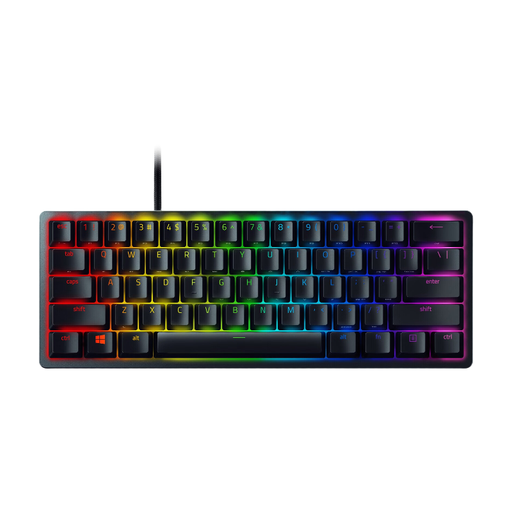
Why it suits this profile: This 60% keyboard uses optical switches, an aluminium case and a detachable USB-C cable. It is suited to players who want a fixed, compact PC setup with software customisation options.
The product details specify the switch type, 61 keys, US International layout and wired connection. This makes it clear in advance that there is no numeric keypad or separate F-row.
Optical click switches, per-key RGB, built-in memory for up to five profiles and anti-ghosting with N-key rollover, according to the product description.
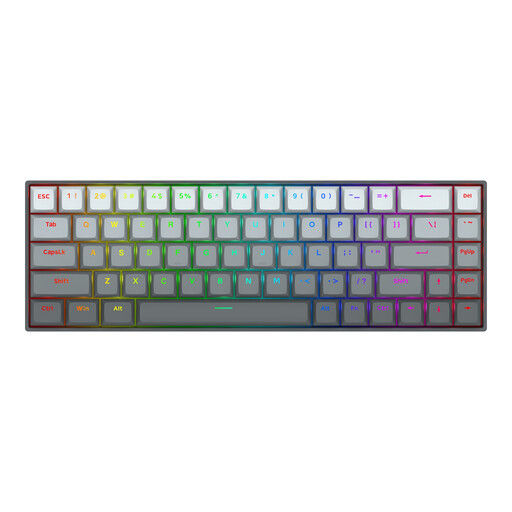
Why it suits this profile: The 65% layout with 68 keys is designed for FPS players who want plenty of mouse space. According to the product description, Hall effect magnetic switches, Rapid Trigger and adjustable actuation are available through software.
The stated polling rate and response time come from Redragon’s product information. Treat these values as technical specifications, not a guarantee of winning or a noticeable advantage in every game.
68 keys, adjustable actuation from 0.2 to 4.0 mm according to the listing, aluminium top plate, RGB and detachable USB-C cable.

Why it suits this profile: The 75% layout retains more everyday keys than a 60% model. This makes the wired keyboard suitable for gaming, typing, studying and office work on Windows or Mac.
The product details specify 82 keys, a US layout and a USB-C cable. This makes it easier to assess your need for function keys than with a 60% model.
Hot-swappable 3- and 5-pin PCB, PBT keycaps, volume knob, RGB modes and gasket construction, according to the product description.
We have compiled a complete, up-to-date list of products that fully meet these strict selection criteria and the applicable European safety regulations.
Use this quick checklist:
For extended typing, the case is not the only important factor. An adjustable foot, a comfortable wrist position, keycap profile and pleasant actuation can make the keyboard more comfortable to use. The term ergonomic keyboard is not a uniform technical standard, so assess the actual construction and adjustment options rather than relying on the label alone.
Yes, as long as you can work comfortably with the chosen layout. For a lot of word processing, a 75% or TKL model is more practical than a 60% model because it retains more standard keys. If you work with lots of figures, a full-size keyboard with a numeric keypad remains more convenient.
That depends on the connection. Bluetooth is primarily designed for versatility and energy-efficient use. A 2.4 GHz connection or wired mode may be better suited to players who want a stable connection and predictable response time. Always check the specified connection modes and software requirements.
Lifespan varies depending on the switches, construction and usage. Manufacturers may specify a particular number of keystrokes, but this is not a guarantee for every user. Clean the keyboard carefully, keep moisture away from the connection and choose a hot-swappable model if you want to replace the switches later.
