
Vandaag of morgen in huis

Kwaliteit gegarandeerd

Welkomstaanbiedingen ontgrendelen: GRATIS bezorging | Tot 80% korting | Gratis 30 dagen JoyPlus-proefperiode
Download de app
A compact gaming keyboard gives you more room for your mouse and fits better with a minimalist desk setup. However, a smaller size is not automatically more practical. Some models hide important functions behind key combinations, while others use a layout that does not suit the way you use your keyboard every day.
So do not just look at RGB lighting or terms such as “ultrafast”. Pay particular attention to the layout, switch technology, connections and software options.
A 60% gaming keyboard usually has 61 keys and leaves out the number pad, arrow keys and function row. This saves space, but you will often need the Fn key for functions such as Home, End, the F keys or the arrows.
A 65% gaming keyboard generally adds arrow keys. A 75% gaming keyboard usually retains even more functions, often in a compact vertical layout. If you do a lot of typing or switch quickly between functions, a 65%, 75% or TKL gaming keyboard may therefore be more comfortable.
A keyboard with a US QWERTY layout has a different key arrangement from a Dutch or Belgian ISO layout. Consider the position of Enter, Shift and special characters. Also check the language settings in Windows or macOS.
A product with “QWERTY” in its title is not always the same as US International. So check the stated language, ANSI or ISO structure and number of keys. This prevents you having to get used to a layout after purchase that does not match your software settings.
A high polling rate and rapid trigger sound appealing for competitive gaming. However, the experience also depends on your PC, game settings, monitor and network connection. A claimed response time is therefore no guarantee that you will automatically play better.
With a Hall Effect gaming keyboard, the key position is measured magnetically. Some models offer adjustable actuation and rapid trigger. This may appeal to players who value short key movements, but for office work or relaxed gaming, a traditional mechanical gaming keyboard is often simpler.
Use this overview as a practical guide:
Measure your desk in advance. Also check the dimensions in millimetres, as two keyboards with the same percentage layout may still have different-sized cases.
A gaming keyboard with mechanical switches uses individual switches beneath the keycaps. Linear switches generally feel smooth and consistent; clicky switches provide a distinct click and audible feedback. Optical switches detect an interruption in light, while magnetic switches use Hall Effect sensors.
Pay attention to the following details:
A hot-swappable keyboard allows you to replace compatible switches without soldering. Check whether the PCB is suitable for 3-pin or 5-pin switches, and only use compatible components.
A wired model using USB-C does not need a battery or wireless receiver. With a wireless gaming keyboard, check whether Bluetooth, 2.4 GHz or both are supported. Also look at battery capacity, charging time and whether the keyboard can be used in wired mode while charging.
An RGB gaming keyboard may offer per-key adjustable lighting, but not every model provides the same software features. Check whether you can adjust profiles, macros, brightness and lighting effects. Some keyboards save settings in internal memory, so you do not have to configure them again on every computer.
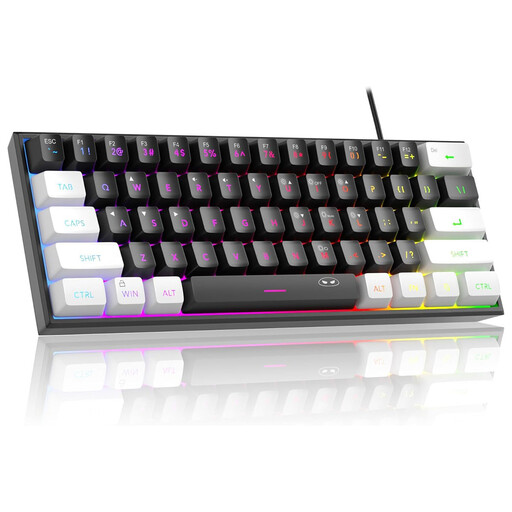
Why it suits this profile: The 60% layout takes up very little space, and the US QWERTY layout is suitable for users who have deliberately chosen ANSI. The manufacturer lists RGB lighting and a wired connection.
The product information explicitly states 61 keys, a compact size and US QWERTY. However, check that “mechanical feeling” does not mean genuine mechanical switches in this case.
60% size, RGB lighting and compatibility with Windows and Mac OS. The keyboard connects via USB.
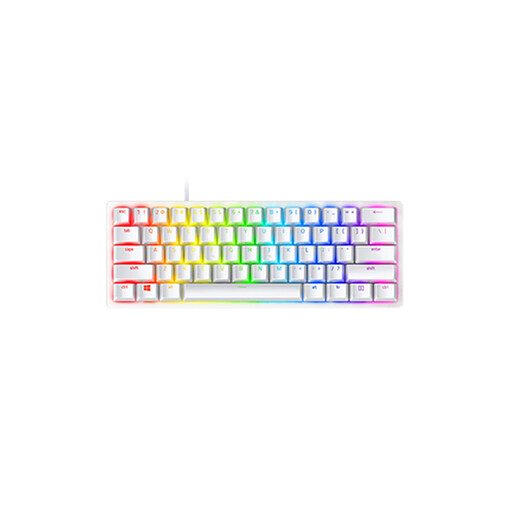
Why it suits this profile: This wired 60% gaming keyboard combines an aluminium construction with optical linear switches, PBT keycaps, RGB lighting and internal memory for up to five profiles.
The stated US International ANSI layout and the 61-key count make it clear what you are getting. The dimensions are 294.6 × 104.1 × 38.1 mm.
Detachable USB-C cable, per-key RGB and N-key rollover with anti-ghosting, according to the product details.
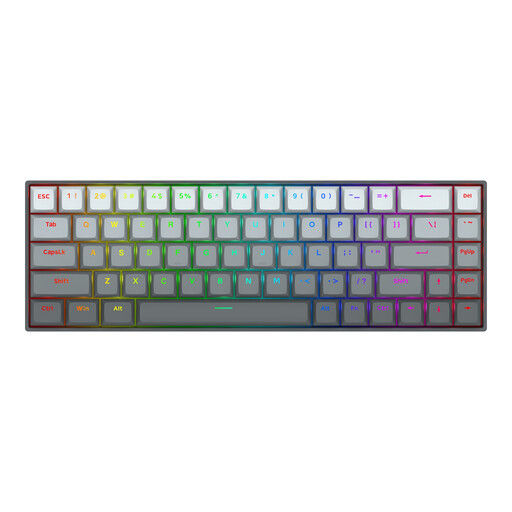
Why it suits this profile: Players of fast-paced competitive games may want to consider the 65% layout with 68 keys, Hall Effect magnetic switches and software settings for actuation.
The listed specifications state adjustable actuation from 0.2 to 4.0 mm and rapid trigger. These are adjustment options, not a guarantee of better gaming performance.
Magnetic switches, US layout, RGB and a stated polling rate of 8000 Hz. The USB-C cable is detachable.
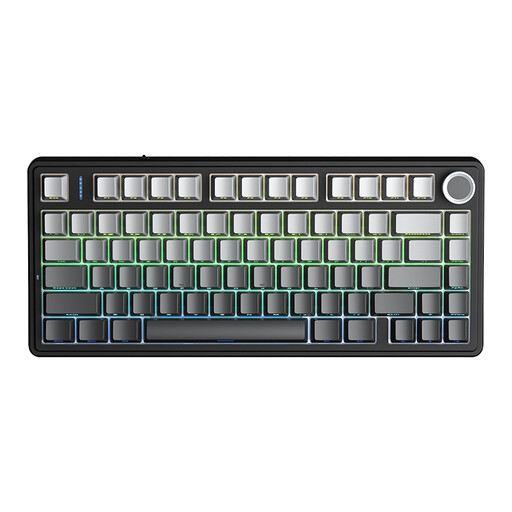
Why it suits this profile: The 75% layout provides arrow keys in a compact case. Bluetooth, 2.4 GHz and USB make it possible to switch between a PC, laptop and other compatible devices.
The product information states 81 keys, a US layout and hot-swappable support for 3-pin or 5-pin switches. This makes the size and expandability clearer than a generic “compact” description.
Tri-mode connectivity, 4000mAh battery, RGB lighting, programmable knob and gasket mount, according to the product description.
We have compiled a complete, up-to-date list of products that fully meet these strict selection criteria and the applicable European safety regulations.
It can be, but you will often need to use Fn combinations for the arrow keys, function keys and navigation. For a lot of written work, a 65% or 75% model may be more practical. Also check beforehand that the US QWERTY layout matches your keyboard settings.
Mechanical switches use physical contacts or an optical detection system. Hall Effect switches measure the position of a magnet and, on suitable models, can offer an adjustable actuation point and rapid trigger. Check which software and settings the specific model supports.
Power consumption depends on the battery capacity, connection and RGB lighting. With intensive lighting, battery life is generally shorter than when the lighting is switched off. A wired model does not need a battery, but it does require a free USB port.
Lifespan varies depending on the switch, keycap material, usage and maintenance. Manufacturers sometimes state a number of keystrokes; this is a product specification, not a guarantee for every usage situation. Keep the keyboard dry, do not pull the cable sharply from the connection and only clean the device according to the instructions. European consumer rights include at least two years’ statutory warranty for the models mentioned, in addition to any further rights.
