
Vandaag of morgen in huis

Kwaliteit gegarandeerd

Welkomstaanbiedingen ontgrendelen: GRATIS bezorging | Tot 80% korting | Gratis 30 dagen JoyPlus-proefperiode
Download de app
A compact gaming keyboard gives you more room for your mouse and fits more easily on a small desk, in a student room or next to a laptop. However, a smaller size is not automatically more practical. Some models lack arrow keys, function keys or a numeric keypad. Terms such as “mechanical feel”, “waterproof” and “fast response” can also mean something different from what you expect.
With this buying guide, you can compare a mechanical gaming keyboard, a 60% keyboard and other compact models based on verifiable specifications.
A keyboard described as having a “mechanical feeling” may actually be a membrane model. This means that the keys are designed to imitate a clicky or firmer feel, but do not use individual mechanical switches. If you specifically want a keyboard with a mechanical feel, check the “key type” or “switch type” specification.
A genuine mechanical model will often mention terms such as linear switches, Hall Effect magnetic switches or hot-swappable switches. A membrane keyboard may be quieter and more affordable, but it offers a different typing experience.
A 60% keyboard usually has around 61 keys. Arrow keys, F keys and navigation keys are often accessed via an Fn combination. This works well for gamers who mainly use WASD, but is less intuitive for spreadsheets, programming or extensive text editing.
A 65% or 75% model generally retains more functions. Also check whether you need a numeric keypad. For accounting and data entry, a full-size model such as the Logitech K120 may be more practical, even though it takes up more desk space.
According to MageGee’s product information, the TS91 has an IPX4-certified circuit board, while the connection is not waterproof. This does not mean you can submerge the keyboard. If you spill liquid on it, disconnect the USB cable and allow the device to dry completely.
For every model, check the difference between a spill-resistant design, a protected circuit board and a fully waterproof housing. These terms are not interchangeable.
The main sizes are:
Do not compare only the percentage; check the dimensions too. According to the product details, the MageGee TS91 measures 29,2 × 10,1 × 3,8 cm. At 32,7 × 13,6 × 4 cm, the AJAZZ AK820 is slightly larger, but has a 75% layout and 82 keys.
A membrane model is often a sensible choice if you have a limited budget or prefer quieter typing. A mechanical model gives you more choice when it comes to key feel:
According to the product description, the Redragon M68 features Hall Effect magnetic switches, adjustable actuation from 0,2 to 4,0 mm and Rapid Trigger. Redragon’s own product information states that this is aimed at competitive FPS gaming. Treat these features as technical capabilities; the actual benefit depends on your game, settings and personal preference.
A QWERTY US keyboard has a different key layout from a Dutch ISO keyboard. Pay particular attention to the position and shape of Enter, Shift and special characters. This is often not a problem for gaming, but switching layouts can take some getting used to when typing in Dutch.
A wired gaming keyboard usually uses USB and does not require a battery or wireless receiver. Check whether the cable is fixed or detachable and whether your PC, Mac or console has the correct connection. A converter may sometimes be needed for PS4, Xbox or PS5. For example, the AJAZZ AK820 states that a converter for consoles is not included.
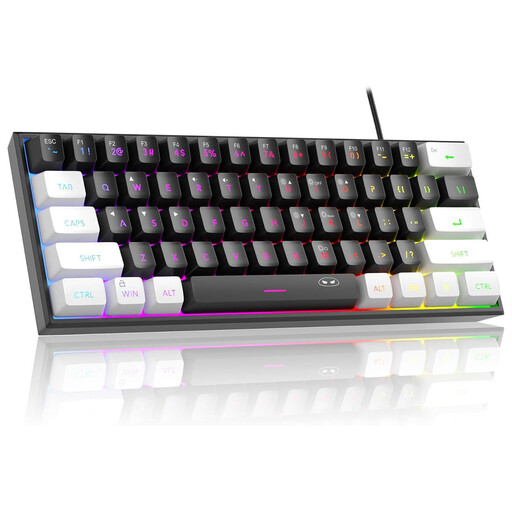
Why it suits this profile: This mini keyboard is designed for people with limited desk space who want RGB lighting without switching to a more advanced mechanical model.
The product details clearly state that it has a membrane construction with a mechanical feel. They also mention IPX4 for the circuit board, not for the USB connection.
61 keys, a wired USB connection, adjustable RGB modes and stated support for PC, Mac, PS4 and Xbox One.
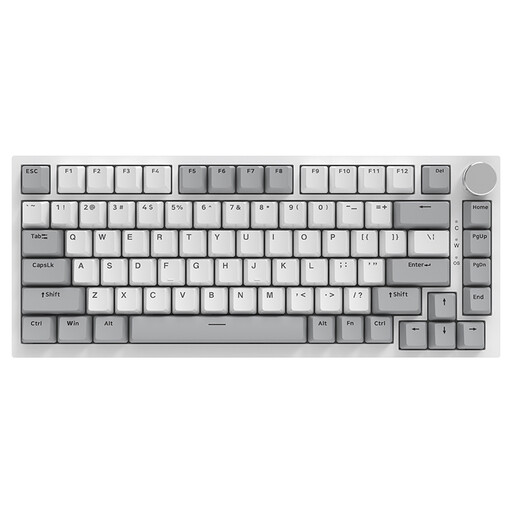
Why it suits this profile: The 75% layout provides more everyday keys than a 60% keyboard, while remaining compact enough for gaming and working from home.
The specifications describe a mechanical keyboard, hot-swappable design and QWERTY US layout. This gives a clearer description of the key feel than models described simply as having a “mechanical feeling”.
82 keys, PBT keycaps, gasket mount, volume knob, USB-C cable and RGB lighting according to the product description.
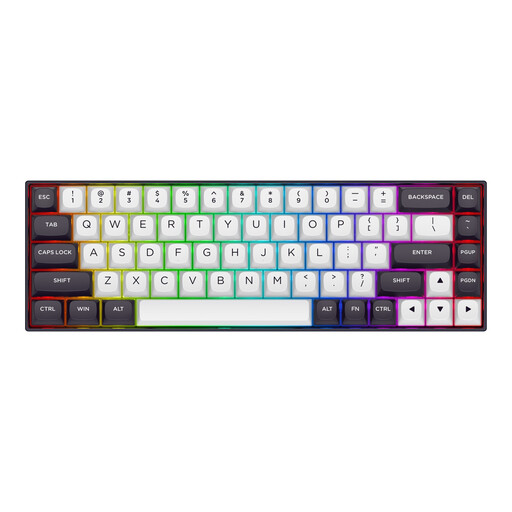
Why it suits this profile: According to the manufacturer, this 65% model is aimed at competitive FPS gaming and users who want to make use of adjustable actuation and Rapid Trigger.
The product information lists the switch type, adjustable actuation and 8000 Hz polling rate separately. However, check that your software and game support these features.
68 keys, aluminium top plate, detachable USB-C cable, RGB lighting and compatibility with Windows and macOS according to the product details.
We have put together a complete, up-to-date list of products that fully meet these strict selection criteria and the applicable European safety regulations.
Yes, but the layout determines how easy it is to use. A 75% model retains more keys for text editing than a 60% model. For entering lots of figures, a full-size keyboard with a numeric keypad remains more practical.
A mechanical model uses individual switches beneath the keys. A membrane model works with a membrane layer. According to the product information, the MageGee TS91 is described as a membrane keyboard with a mechanical feel. So check the technical specification rather than relying on the title alone.
A wired keyboard draws power via USB. RGB lighting uses some of that power, but there is no separate battery to recharge. The exact impact depends on the brightness, lighting mode and specific model.
