Start with your system and local co-op game: these will determine whether two small, separate controllers will do, or whether each player needs more buttons and sticks. On a Switch 2, two Joy-Con 2 controllers can be used separately in supported games, while a compact full-size gamepad is a better fit when the game’s controls call for it. A mini model saves space, but check in advance which features it lacks.
Who are these controllers for?
Switch duo with limited space
You want to play together on one system and first check whether your chosen game works with two Joy-Con controllers used separately. Nintendo says a Joy-Con 2 can be used horizontally as a separate controller, depending on the software.
Players who need full controls
You’re looking for a controller that’s compact to store but still has the sticks and buttons your game requires. Check the controls for each model: a small casing doesn’t, by itself, tell you which features are available.
PC duo looking for a straightforward connection
You want to check whether both controllers work with your Windows PC and chosen local co-op game. Xbox lists USB, Bluetooth and the Xbox Wireless Adapter as connection options for the Xbox Wireless Controller on Windows; you’ll need to check game support separately.
What should you look for when choosing?
Use existing Joy-Con 2 controllers separately
A good fit if: you have a Switch 2 and your game supports playing with one Joy-Con held horizontally per player.
Keep in mind: Joy-Con 2 does not work with the original Switch; the permitted play style varies by game.
Compact full-size gamepad
A good fit if: each player needs sticks and a wider selection of buttons, but you want to use less storage space than a large gamepad would.
Keep in mind: check support for the exact model and system; a compact design doesn’t guarantee that the controller will be comfortable for every hand.
Mini controller for simple controls
A good fit if: saving as much storage space as possible is your priority, and the game doesn’t require more advanced controls.
Keep in mind: according to 8BitDo, the Zero 2 has no motion controls or vibration; check whether your game needs these features.
Controller for Windows
A good fit if: you play on Windows and connection options and full controls matter more to you than the smallest possible size.
Keep in mind: connecting a controller to a PC doesn’t prove that every game supports local co-op or all controller features.
| What to consider |
What should you check? |
Who should pay particular attention? |
| Compatibility |
Check the exact system, local co-op support, player count and controller layout supported in the game. |
If I want to play a puzzle game with two players on one system, I want to be sure first that the game supports our controllers and preferred way to play; around 36% of consumers give system and game compatibility top priority. |
| Storage space |
Compare the dimensions and check whether you can use your existing controllers separately in the game you’ve chosen. |
When every bit of shelf space counts, I want to store as few extra controllers as possible; around 29% of consumers make minimal storage space their top priority. |
| Controls and size |
Compare the buttons and sticks you need with those on the exact model, and consider whether the grip suits you. |
If my game requires different actions from each player, I want enough buttons and a manageable size; around 21% of consumers say full controls and ease of handling are their top priorities. |
| Connection and charging |
Check the model’s connection and charging methods, and whether any required cable or adapter is included. |
If I want to keep extra cables and accessories around my gaming area to a minimum, I check how the controller connects and charges in advance; around 14% of consumers give connection and power top priority. |
Common buying mistakes
-
Confusing ‘two controllers’ with ‘two players in this game’
On a Switch 2, two Joy-Con 2 controllers can work separately, but the game determines whether that play style is available.
Check the game information and try your existing controllers in the intended horizontal play style first.
-
Choosing a mini model without checking which buttons you need
According to the manufacturer, the 8BitDo Zero 2 has no motion controls or vibration. So a very small controller won’t automatically suit every game.
Compare the controls required by the game with the features of the exact controller model.
-
Assuming controllers for different systems are interchangeable
Nintendo says Joy-Con 2 does not work with the original Switch. Other manufacturers specify compatibility by model and sometimes by system version.
Before buying, check the full model name, supported system and any version requirements.
Brands to consider
Nintendo
Joy-Con 2 is worth considering if two players can use separate controllers on one Switch 2.
- Nintendo says each Joy-Con 2 can be used horizontally as a separate controller, depending on the software.
- Joy-Con 2 does not work with the original Switch; check the game before relying on this play style.
8BitDo
The Zero 2 is designed for ultra-compact control, while the Lite 2 is a compact model with sticks.
- According to 8BitDo, the Zero 2 measures 73 × 36,5 × 14,7 mm. For the Lite 2, the manufacturer lists compatibility with Switch, Switch 2 and Android, subject to specific system requirements.
- According to the manufacturer, the Zero 2 has no motion controls or vibration. Check compatibility and features for the exact model.
PowerA
The Nano Enhanced Wireless Controller is a compact wireless controller sold as a Nintendo Switch controller.
- PowerA describes it as having standard-size buttons and controls, motion controls and a rechargeable battery.
- According to the product information, this Nano model does not support HD rumble, IR or amiibo NFC. Don’t assume it’s suitable for Switch 2 without checking the model.
Xbox
The Xbox Wireless Controller is a reference point for Windows players who value several connection options and full controls.
- Xbox lists USB, Bluetooth and the Xbox Wireless Adapter as ways to connect the controller to Windows.
- A connection to Windows doesn’t guarantee that every PC game supports local co-op or all controller features.
Controllers at Joybuy
This selection includes controllers for co-op gaming with compact or separate controls on systems including Nintendo Switch, Switch 2 and PC. Check that each model’s controls are suitable for the game you want to play.
 No image available
Hori Wired Controller Horipad Turbo for Switch and Switch 2, Pokémon Eevee Cottage Core Edition
A good fit for players looking for a wired controller for Switch or Switch 2; check that your game supports it.
The description lists a USB connection, analogue sticks, programmable rear buttons and a turbo function. The USB cable is not included.
Joybuy
 No image available
KONIX JoyPad controller pair, blue and red
A pair for players looking for two controllers for Switch, Switch OLED or Switch 2; check that your game supports them.
The description lists Bluetooth, a gyroscope, vibration and a stated battery life of up to 8 hours.
Joybuy
 No image available
Nintendo Switch Joy-Con pair, neon green and neon pink
A pair of controllers for players looking for Joy-Con controls on a Nintendo Switch; check which play styles the game supports.
The product description says that each Joy-Con can be used separately and that they charge when attached to the console.
Joybuy
 No image available
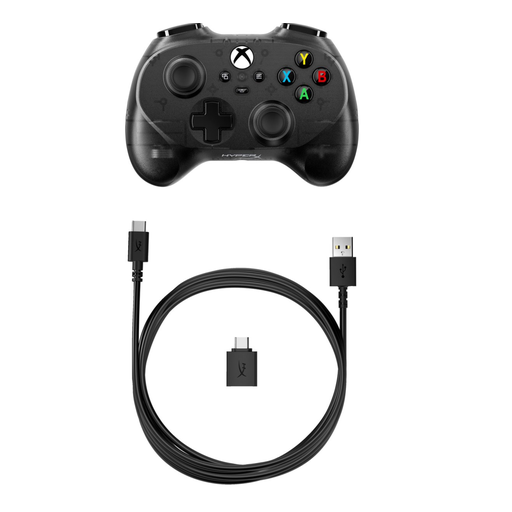
HyperX Clutch Tanto Mini WD gaming controller
A good fit for players looking for a compact, wired controller for Xbox or PC; check that your device and game support it.
The description lists USB, a headphone socket and standard buttons and controls.
Joybuy
 No image available
Nintendo Switch 2 Joy-Con 2 pair, light blue and light red
A good fit for Switch 2 players looking for a Joy-Con 2 pair; Nintendo says each controller can be used separately in a horizontal position in supported software.
The product description lists motion controls, HD Rumble 2 and charging by attaching the controllers to the Switch 2.
Joybuy
Frequently asked questions
Do I automatically need an extra pair of controllers for two players on a Switch 2?
No, not always: according to Nintendo, each Joy-Con 2 held horizontally can work as a separate controller if the software supports that play style. So check your chosen game first.
Does a Joy-Con 2 work with the original Nintendo Switch?
No. Nintendo says Joy-Con 2 only works with Switch 2. Check compatibility separately for controllers from other models and brands.
How do I charge Joy-Con 2 without an extra charging dock?
Nintendo describes charging the controllers while they’re attached to the Switch 2 system. Check whether that suits your setup before choosing extra controllers or accessories.
What are my rights in the Netherlands if a controller I bought online is disappointing or breaks too soon?
According to ACM ConsuWijzer, online purchases generally come with a 14-day cooling-off period after delivery. In addition, under the legal guarantee, the seller must put right at no cost any product that, under normal use, doesn’t do what you could reasonably expect. This is not the same as a fixed two-year legal guarantee period for every controller.


