What should you consider when buying?
Joy-Con for Nintendo Switch Sports
Choose this option if: you play Nintendo Switch Sports and want to use controllers supported by Nintendo for your chosen sport.
Keep in mind: the game doesn’t support handheld mode or Switch Pro Controllers; you’ll also need enough clear space to play with motion controls.
Joy-Con 2 for Sports Resort
Choose this option if: you play Sports Resort on Switch 2; Joy-Con 2 is supported for most sports and for skateboard controls.
Keep in mind: a Switch 2 already comes with two Joy-Con 2 controllers and wrist straps, and Joy-Con 2 doesn’t work with the Nintendo Switch Sports leg strap.
Compact gamepad for button controls
Choose this option if: the specific sports game supports a standard gamepad and doesn’t require motion controls.
Keep in mind: a controller having motion controls doesn’t automatically mean it works with Nintendo Switch Sports.
Check the game and console first, then compare the size, controls and number of controllers.
| Consideration |
What should you check? |
Who is this most important to? |
| Playing space |
Check the space around you and use the supplied wrist straps as instructed. |
If I want to play with motion controls but have limited space, I want to know in advance whether I can swing or throw safely. Around 36% of consumers prioritise having enough room to move. |
| Game compatibility |
Check the game, console, sport and play style; also see whether a leg strap is needed. |
If I want to play a particular sports game, I want to know which controllers it actually supports. Around 29% of consumers make game compatibility their top priority. |
| Size and controls |
Compare dimensions and controls, and check whether the game requires motion controls. |
If I mostly play sitting down, I’m looking for a compact controller that suits my game’s button controls. Around 21% of consumers prioritise compact, practical controls. |
| Playing together |
Check how many controllers are needed for your chosen sport and play mode, and count the controllers you already own. |
If I want to play locally with others, I want to have enough compatible controllers without buying an extra set unnecessarily. Around 14% of consumers say playing together is their main buying concern. |
Joy-Con options at Joybuy
These Joy-Con and Joy-Con 2 options are intended for the controller configurations used with Nintendo Switch Sports and Sports Resort. Check which versions are supported for each game and sport.
 No image available
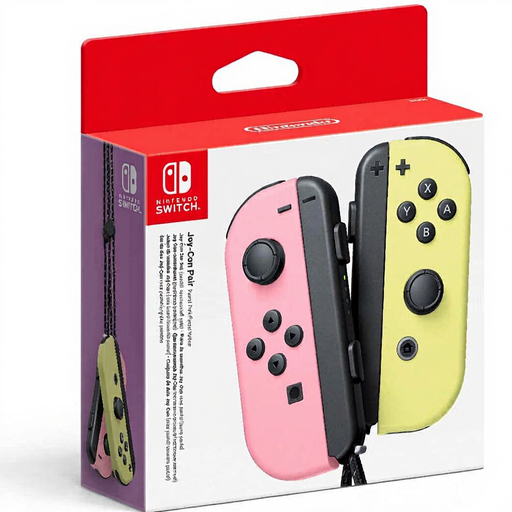
Nintendo Joy-Con controller pair, pastel pink/pastel yellow
A pair of original Joy-Con controllers for supported Nintendo Switch Sports setups; compatibility depends on your chosen sport.
The product information lists two wireless controllers, wrist straps and 14 buttons per controller.
View at Joybuy
 No image available
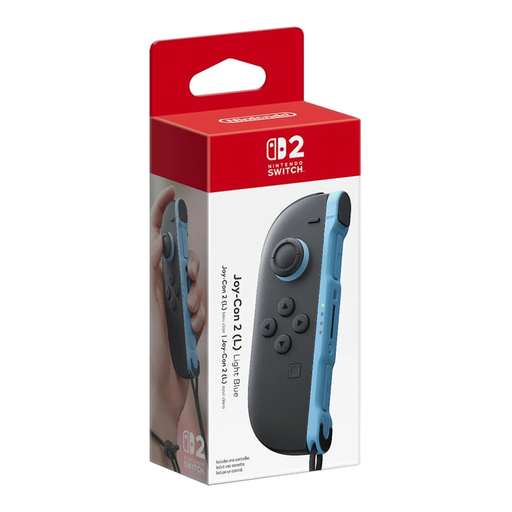
Nintendo Switch 2 Joy-Con 2 (L), light blue
A single left Joy-Con 2 for expanding or replacing your setup on Switch 2, and for supported Sports Resort sports.
This is one controller with one wrist strap. Joy-Con 2 doesn’t work with the Nintendo Switch Sports leg strap.
View at Joybuy
 No image available
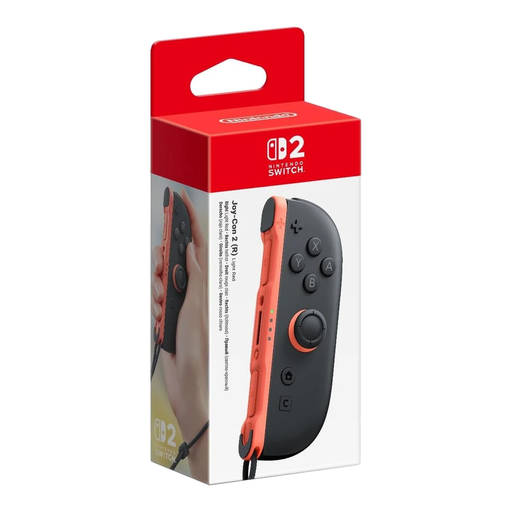
Nintendo Switch 2 Joy-Con 2 (R), light red
A single right Joy-Con 2 for expanding or replacing your setup on Switch 2, and for supported Sports Resort sports.
This is one controller. The product information lists wireless use and a rechargeable battery. Joy-Con 2 doesn’t work with the Nintendo Switch Sports leg strap.
View at Joybuy
 No image available
Nintendo Switch 2 Joy-Con 2 pair, light blue/light red
A pair of Joy-Con 2 controllers for supported motion-controlled sports on Switch 2. Nintendo also lists Joy-Con 2 for skateboard controls in Sports Resort.
The product information lists two controllers, two wrist straps, wireless use, mouse controls in compatible games and HD Rumble 2. Joy-Con 2 doesn’t work with the Nintendo Switch Sports leg strap.
View at Joybuy
Frequently asked questions
Does a Switch Pro Controller work with Nintendo Switch Sports or Sports Resort?
No. Nintendo rules out both the original Switch Pro Controller and the Switch 2 Pro Controller for these two games. For other sports games, check the controller information for that game.
Can I play these Sports games in handheld mode to save space?
No. Nintendo says that Nintendo Switch Sports and Sports Resort can’t be played in handheld mode. A smaller controller doesn’t remove the need for clear space when using motion controls.
Do I need an extra pair of Joy-Con 2 straight away for Sports Resort?
Not necessarily. A Switch 2 already comes with a left and right Joy-Con 2 and two wrist straps. First check how many controllers your chosen sport requires for the number of players.
Is a compact controller with motion controls suitable for Nintendo Switch Sports?
The presence of motion controls alone doesn’t mean it is. Nintendo lists specific Joy-Con or Joy-Con 2 configurations; check support for the exact game, console and sport before choosing another compact gamepad.
What should I bear in mind when playing with Joy-Con motion controls?
When playing wirelessly, attach the supplied wrist straps and check that you have enough space around you. If a Joy-Con responds unexpectedly, check the button settings and connection issues too before considering a replacement.


