Choose a compact desktop based on your most demanding editing task and the space your complete setup will take up. You don’t need to use heavy video editing as your benchmark if you’re working with text and voice recordings; for larger video projects, the requirements of your editing software, memory and storage matter more. Also check the exact model, its connections and which components are included.
Who is this choice for?
Lesson creator with limited desk space
You want to leave room for lesson notes, a microphone and a keyboard. Consider whether a separate small computer with a screen of your choice, or a desktop with an integrated screen, would work better in your space.
Video lesson creator
You record video and edit footage. The requirements of your video software and the size of your files can help you decide which configuration is right for you.
Voice lesson editor
You mainly edit spoken explanations and want your project files to run smoothly. Check that the desktop has the connections you need for your microphone or audio equipment.
What should you look for when buying?
Mini PC with a separate monitor
Suited to anyone who already has a suitable monitor or wants to choose its position. Apple lists the Mac mini’s casing as measuring 12,7 × 12,7 cm; this doesn’t represent the total space needed for your workspace.
Keep in mind that you’ll need a separate monitor and possibly separate input devices. Check the connections and what’s included with the exact configuration.
All-in-one desktop
Suited to anyone who doesn’t already have a monitor and wants to buy the computer and screen as one setup. HP lists the OmniStudio 24cu0612nd as having a built-in 23,8-inch FHD screen, plus a wireless keyboard and mouse.
Keep in mind the fixed screen size and the configuration of the specific model. HP lists this OmniStudio configuration as having 12 GB RAM; compare this with your software’s requirements if you edit video.
| Consideration |
What to check before buying |
Who is this important to? |
| Space for the complete setup |
Measure the space for both the computer and monitor; check the dimensions, connections and included input devices. |
If I have limited desk space, I want to know how much room the complete setup will take up, not just the computer. Around 36% of consumers prioritise space for their entire workspace. |
| Video editing |
Compare your editing software’s requirements and the size of your projects with the memory and storage of the exact configuration. |
When editing video lessons, I want a configuration that suits my software and project files. This is the top priority for around 29% of consumers. |
| Editing voice recordings |
Check the operating system, storage and connections for your microphone, audio interface and headphones. |
If I mainly edit spoken lessons, I want to open my recordings smoothly and connect my audio equipment. Around 21% of consumers give audio editing top priority. |
| Software and complete setup |
Check that your teaching software works with the operating system and whether a monitor, keyboard and mouse are included. |
If I haven’t settled on my teaching software or peripherals yet, I want to know in advance what will work and what else I’ll need. Compatibility and a complete setup matter most to around 14% of consumers. |
Common buying mistakes
-
Comparing only the dimensions of the mini PC
A small computer case doesn’t tell you how much space the monitor, cables and input devices will take up together. What’s included in a set varies by configuration.
Plan your complete setup and check which components are included with the exact model.
-
Applying the requirements for heavy video editing to every language lesson
The configuration you need depends on the task and the software. Audacity doesn’t specify particular CPU or GPU requirements; Adobe gives separate recommendations for Premiere depending on the system and how it’s used.
First decide whether you’ll mainly edit text, voice or video, then compare the configuration with the requirements of the software you use.
-
Assuming every mini PC is ready to use
For the NUC 15 Pro, ASUS distinguishes between complete mini PCs and kits without a pre-installed operating system.
Check the full model number and what’s included with the configuration you’ve chosen before ordering.
-
Confusing the manufacturer’s warranty with all your statutory rights
A manufacturer’s warranty is in addition to your statutory rights. The Dutch government states that there is no fixed general period for the statutory guarantee in the Netherlands; if a product is faulty, the seller must provide a solution.
Keep your purchase and product details, and contact the seller if there’s a fault.
Brands to consider
Apple
The Mac mini is worth considering if you want to pair a separate monitor with a compact macOS desktop.
- Apple lists the Mac mini’s casing as measuring 12,7 × 12,7 cm.
- Configurations vary in memory and storage. Check your software’s compatibility and remember that you may need to buy peripherals separately.
Lenovo
ThinkCentre Tiny desktops are an option if you’re looking for a small Windows PC to pair with a screen of your choice.
- For the Dutch ThinkCentre M75q Gen 5 configuration 12RQ004MEZ, Lenovo lists Windows 11 Pro, 16 GB RAM and a 512 GB SSD.
- Configurations vary across the range; these details don’t necessarily apply to other versions.
HP
HP offers both small standalone desktops and all-in-ones, making it a relevant choice if you’re deciding between a separate computer and an integrated screen.
- HP lists the OmniStudio 24cu0612nd as having a 23,8-inch FHD screen, 12 GB RAM, a 512 GB SSD and included wireless input devices.
- These details apply to that specific configuration, not all HP desktops. Compare the specifications with your software’s requirements.
ASUS
The NUC 15 Pro range is worth considering if you’re looking at a mini PC or a configurable kit.
- ASUS specifications distinguish between complete mini PCs and kits.
- Some kits come without a pre-installed operating system. Check the full model number and what’s included.
Desktops at Joybuy
These desktops are designed for workspaces where space matters. For each configuration, check software compatibility, connections and which components are included with the computer.
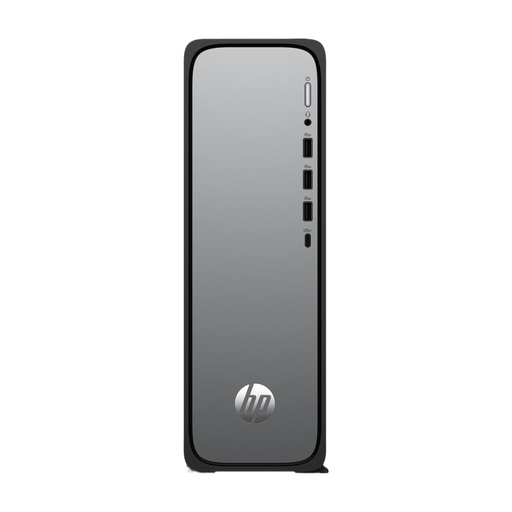 Image unavailable
HP OmniDesk Slim S03-0006nd D49HREA#ABH
Consider this desktop if you’re looking for a compact computer for a workspace with limited room; check the dimensions and connections to make sure it suits your setup.
According to the product information, the charger must be purchased separately.
View at Joybuy
 Image unavailable
SOYO Y5Pro Mini PC, Intel Core i5 8250U/8350U
This mini PC may suit a setup where you choose your own monitor; check which processor option comes with the configuration you’ve selected.
The product name lists Windows 11, 8 GB DDR4 and a 256 GB SATA SSD.
View at Joybuy
 Image unavailable
Lenovo Yoga Mini 01IPH11 Copilot+ PC
A mini desktop to consider if you’re choosing a separate monitor and want a compact computer for your workspace.
The product name lists Intel Core Ultra 5 325, 16 GB LPDDR5X, a 512 GB PCIe 4.0 SSD and Windows 11 Home. The memory is soldered in.
View at Joybuy
 Image unavailable
Lenovo IdeaCentre Mini PC
An option if you want to pair a mini PC with a monitor of your choice. Check the configuration, connections and included components of the exact model.
View at Joybuy
 Image unavailable
FIREBAT R3 Mini PC, AMD Ryzen 5 7430U
This mini PC may suit a desk where you want to keep the computer compact and choose a separate monitor.
The product name lists 16 GB RAM, a 512 GB SSD and Wi-Fi 6. Check that it has the connections you need for your teaching materials and peripherals.
View at Joybuy
Frequently asked questions
Do I need a powerful video-editing computer for lessons with only text and voice recordings?
Not for those tasks alone. Audacity doesn’t specify particular CPU or GPU requirements, but it does recommend fast, uninterrupted access to storage. Also check the requirements of any other software you use.
What should I check before connecting the computer?
Compare the connections on the exact desktop configuration with those on your monitor, microphone or audio interface, and headphones. Then check that your teaching software supports the operating system; Audacity has versions for Windows and macOS.
Where should I store audio projects while editing?
Audacity recommends a drive or SSD that offers fast, uninterrupted access. The developer warns that network storage, basic external hard drives and USB sticks can be unreliable for this use.
What are my rights when buying a desktop online in the Netherlands?
According to the Dutch government, online purchases from a business usually come with a 14-day cooling-off period, although there are exceptions and the exact terms depend on the purchase. The Netherlands also has a statutory guarantee with no fixed general time limit. If a product is faulty, the seller is your point of contact for a solution.
Does an electronic device from outside the EU need a CE mark?
The Dutch government states that electronic devices sold in the EU must have a CE mark. If you’re buying from outside the EU, also check where the seller is based; a product page in Dutch doesn’t tell you this automatically.


