Start with your source files and editing software: check how much space your originals, working files and backups will need, and what hardware your software recommends for your intended resolution and codec. A compact desktop could be right for you if your software, screen and connections are compatible and you choose enough memory and storage from the outset. A tower is worth considering if you want to be able to upgrade the internal storage or graphics hardware. Adobe describes proxies as smaller copies that can make editing large source files easier, but they don’t replace the originals.
Who is this choice relevant to?
Creator with lots of raw footage
You’re editing a cooking tutorial with large video files and want to keep your originals, working files and backups organised. Lenovo Netherlands discusses storage as part of a video-editing workflow; Adobe describes proxy files as smaller editing copies, while Microsoft lists an external drive or network location as a possible destination for File History.
Creator making effects-heavy videos
You use multiple video layers, colour correction or effects, and want to choose graphics hardware that suits your editing software. Adobe publishes system requirements for specific versions of Premiere, so check the requirements for the version and features you use.
Creator with a small workspace
You’re looking for a compact computer and want to check in advance that the memory, storage, screens and connections you choose will work with your setup. Apple Netherlands publishes configurations for the Mac mini, so check the specifications of the model you’re considering.
What should you look for when buying?
Compact desktop
Choose this option if: desk space matters to you and your editing software and peripherals work with macOS.
Keep in mind: your chosen memory and SSD configuration, as well as the connections. With a compact setup, it’s important to check these in advance.
Upgradable tower
Choose this option if: you want to tailor the internal storage or graphics configuration to the way you edit and take future upgrades into account.
Keep in mind: configurations can vary within the same product range, so check the specifications of the exact model.
| Buying concern |
What to look for |
Who might this matter more to? |
| Space for files and backups |
Choose an SSD capacity that suits your footage and working files. Keep recoverable copies in a separate location too; Microsoft describes an external drive or network location as a destination for File History. |
I want to store my footage and project files, while keeping recoverable copies separate. Around 36% of consumers prioritise file storage and retention. |
| Smooth editing on the timeline |
Check your editing software’s requirements for the resolution and codec you use, and compare the full configuration. Adobe describes proxies as smaller copies for editing. |
If large source files slow down my editing sessions, I want to know which configuration suits my software and whether proxies could help. Around 29% of consumers prioritise a smooth timeline. |
| Graphics capabilities |
Check whether your editing tasks require a GPU and which graphics configuration the exact model has. A display output alone doesn’t indicate how well it will handle video editing. |
For effects, colour correction or multiple video layers, I want to match the graphics hardware to my editing software. Around 21% of consumers prioritise graphics capabilities. |
| A workspace that suits you |
Check the ports and display connections on the exact model, and choose a memory and SSD configuration that suits your project. |
I want a computer that fits on my desk and can connect to my screen and peripherals. Around 14% of consumers prioritise a compact workspace that suits their needs. |
Common buying mistakes
-
Assuming a 4K display output means smooth 4K editing
A stated level of display support doesn’t tell you how your codec, effects and source files will perform on the timeline.
Compare the full processor, memory, GPU and storage configuration with your editing software’s requirements. Consider using proxies if your software supports that workflow.
-
Choosing a product range without checking the exact configuration
Models within the same product range can have different components. The Lenovo ThinkStation P3 Tower Gen 2 configuration reviewed has 32 GB RAM, a 256 GB SSD and integrated graphics; the HP Z2 Tower G1i configuration reviewed has 32 GB RAM, a 1 TB SSD and a dedicated GPU.
Before buying, check the product code, memory, SSD and GPU of the configuration on offer.
-
Treating your working SSD or proxy files as a backup
Adobe describes proxies as editing copies of original media. Microsoft describes an external drive or network location as a destination for File History, so working files and a backup destination don’t automatically serve the same purpose.
Decide where your originals, projects and recoverable copies will be stored, and check that the folders you want are actually included.
Relevant brands to consider
Apple
The Mac mini is a compact option for a macOS workspace, provided its software compatibility, memory, storage and connections suit your workflow.
- For the M6 and M5 Pro models reviewed, Apple Netherlands lists media engines for formats including H.264, HEVC and ProRes.
- Configurations vary in memory and SSD capacity. Manufacturer specifications aren’t an independent editing test.
HP
The Z2 Tower G1i is a Windows tower worth comparing if the exact GPU and storage configuration matter to you.
- For configuration C69C7EA#ABH, HP lists 32 GB RAM, a 1 TB SSD and an NVIDIA RTX 2000 Ada with 16 GB of graphics memory.
- Upgrade options for the product range won’t necessarily apply to every model, so check the configuration you choose.
Lenovo
The ThinkStation P3 Tower Gen 2 is a configurable Windows tower to compare with the specific requirements of your editing work.
- Lenovo lists 32 GB RAM for the model reviewed.
- According to Lenovo, this model has a 256 GB SSD and integrated graphics. Features of other configurations don’t automatically apply to this one.
Dell
The Precision 5860 Tower is a configurable workstation range worth comparing if the chosen specifications and service options are important to you.
- Dell offers a choice of processor and service options.
- Dell notes that changing the configuration may affect other specifications, so check the full configuration.
Desktops at Joybuy
This selection includes compact Mac mini desktops and other desktop PCs. Compare the listed configurations with your editing software, source files, workspace and connections.
 Image unavailable
Apple Mac mini M6, 16 GB, 512 GB SSD
Compare this model if you’re looking for a compact desktop, and check that its configuration suits your editing software and peripherals.
M6 chip with 12-core CPU and 12-core GPU; 16 GB memory; 512 GB SSD; Thunderbolt 4, USB-C and HDMI.
View at Joybuy
Image unavailable
Apple Mac mini M6, 24 GB, 512 GB SSD
Compare this compact model if you’re considering a Mac mini and want to choose the memory to suit your software and projects.
M6 chip with 12-core CPU and 12-core GPU; 24 GB memory; 512 GB SSD; Thunderbolt 4, USB-C and HDMI.
View at Joybuy
 Image unavailable
Acer Nitro 20 N20-101, Intel Core 5 210H, RTX 5050
Compare this desktop if you want to weigh its listed graphics configuration against the requirements of your editing software and effects.
16 GB RAM; 1 TB SSD; NVIDIA GeForce RTX 5050 with 8 GB; Windows 11 Home.
View at Joybuy
 Image unavailable
SHARK Max Bite R502, AMD Ryzen 5 5500, Radeon RX 9060
Compare the listed processor, graphics card and storage with the specific requirements of your editing software and project.
16 GB DDR4; Radeon RX 9060 with 8 GB of graphics memory; 500 GB NVMe SSD; Windows 11 Home.
View at Joybuy
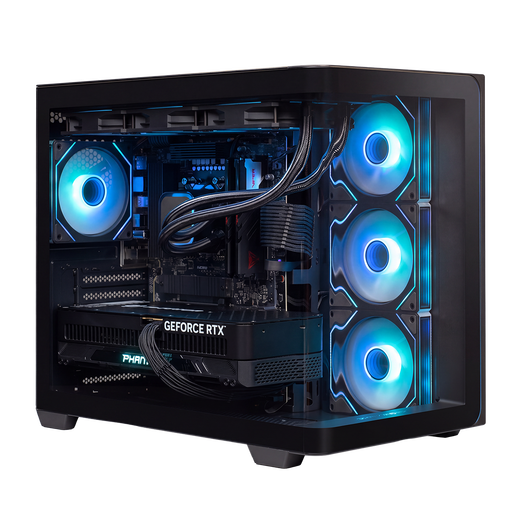 Image unavailable
Almighty Shark Gaming PC R900, Ryzen 9 9900X3D, RTX 5090
Compare this configuration if you want to weigh graphics-intensive editing and local project storage against the needs of your own workflow.
32 GB DDR5; NVIDIA RTX 5090 with 24 GB of graphics memory; 2 TB NVMe SSD; Windows 11 Home.
View at Joybuy
Frequently asked questions
Do I need to choose the most powerful desktop straight away for large source files?
Not just because of the file size. First check the resolution, codec and requirements of your editing software, then work out how much space your originals and working files will need. Adobe describes proxies as smaller copies for editing; you’ll still need the originals for the final export.
How can I avoid losing my footage if my editing computer fails?
Don’t keep your only recoverable copies on your working storage. Microsoft describes File History with an external drive or network location as its destination; check that it includes the folders containing your footage and projects.
What are my rights when buying a desktop online?
According to the Government of the Netherlands, online purchases often come with a 14-day cooling-off period, subject to exceptions; the example given doesn’t apply to a purchase from a private individual. Check who the seller is and which terms apply to your order. For a product that breaks down in its first year, the Government of the Netherlands describes rights to a free repair or replacement, depending on the cause.
Can I use other people’s music or images in my cooking tutorial?
According to the Government of the Netherlands, you need permission from the creator to use someone else’s copyright-protected music, films or photos. Making a copy for personal use doesn’t give you permission to distribute or publish the material; check the rights before you publish.


