Who is this buying guide for?

Editors of straightforward cookery videos

You want a compact workspace without an unnecessarily high-spec setup. Start by checking your editing software, resolution and recording codec. Apple describes hardware-accelerated processing for certain video formats on the Mac mini, while Adobe provides separate recommendations for Premiere.

Editors with limited desk space

You need to fit your desktop, monitor and connections into a small space. So look beyond the case itself: allow room for cables and check where the ports are positioned. Apple lists a footprint of 12,7 × 12,7 cm for the Mac mini.

Editors working on more complex projects

When you’re working with multiple layers or effects, it’s more important to compare the memory and graphics configuration of the exact model than to focus on its size alone. Adobe recommends 32 GB RAM or more for Premiere on Windows or an Intel Mac; this isn’t a general requirement for all software or systems.

What should you look for when choosing?

Mac mini with macOS

Best for: anyone who wants to use macOS or Final Cut Pro and is looking for a very small desktop case.

Keep in mind: choose the memory and SSD configuration to suit your project, and check that your monitor and peripherals will connect. Codec support doesn’t guarantee smooth performance for every project or effect.

Compact Windows desktop with integrated graphics

Best for: anyone who uses Windows software and wants a small, pre-configured PC.

Keep in mind: check the exact memory, storage and graphics configuration. The Lenovo ThinkCentre configuration reviewed has 16 GB RAM and integrated graphics; Adobe’s recommendation of 32 GB or more for Premiere applies specifically to Windows or Intel Macs.

Windows mini workstation with a dedicated GPU

Best for: anyone using editing software and working on projects where extra graphics memory is relevant.

Keep in mind: the HP configuration reviewed, C69BWEA#ABH, has 32 GB RAM and an RTX A1000 with 8 GB of memory. These specifications don’t prove how quickly it will edit your footage.

Build-it-yourself mini PC kit

Best for: anyone who wants to choose and install their own memory, SSD and operating system.

Keep in mind: the ASUS NUC 15 Pro kits reviewed are supplied without memory, storage or a pre-installed operating system. Check the exact kit version and component compatibility.

What to consider What should you check? Who is this important for?
Editing capability Note your software, codec, resolution and effects, then compare them with the exact PC configuration. Adobe recommends 32 GB RAM or more for Premiere on Windows or an Intel Mac; Apple specifies hardware-accelerated processing of H.264, HEVC and ProRes for the Mac mini M6. If I’m working with multiple layers or effects, I want to match the configuration to my software and footage. Consumers who prioritise editing capability account for around 33% of consumers in this choice breakdown.
Desk space Measure the space, allowing for cables and your monitor. Apple lists a footprint of 12,7 × 12,7 cm for the Mac mini; ASUS lists USB-A, USB-C, HDMI and Thunderbolt 4, among other connections, for the specified NUC 15 Pro kits. On a small desk, I want to leave room for my monitor and cables, not just squeeze in a compact case. Consumers who prioritise placement account for around 27% of consumers in this choice breakdown.
Connections for media Compare the connectors on your camera or card reader, external drive and monitor with the ports on the configuration you’ve chosen. Also consider your project files: the Lenovo configuration reviewed has a 512 GB SSD, while the HP configuration reviewed has a 1 TB SSD. If I need to transfer footage from a card reader or external drive while connecting a monitor, I want to know in advance which ports I’ll need. Consumers who prioritise media connections account for around 20% of consumers in this choice breakdown.
Included components and flexibility Check whether RAM, an SSD, an operating system, a monitor and input devices are included. ASUS states that the NUC kits reviewed come without memory, storage or a pre-installed operating system. If I want to choose my own components, I need to know what else I’ll have to buy and install before the desktop is ready to use. Consumers who prioritise what’s included and flexibility account for around 20% of consumers in this choice breakdown.

Common buying mistakes

  • Comparing a barebones mini PC kit as if it were complete

    The ASUS NUC 15 Pro kits reviewed don’t include memory, storage or a pre-installed operating system. This means they aren’t directly comparable with a desktop that already comes configured with those components.

    Allow for the time and cost of choosing and installing compatible RAM, an SSD and, potentially, an operating system.

    First, compare exactly what’s included and which components you’ll still need.

  • Assuming every configuration with the same model name is identical

    Processor, memory, graphics configuration and included components can vary within a model range. So the specifications of one configuration don’t automatically apply to another.

    Make a note of the full model or part number, then compare that specific configuration with your software and equipment.

  • Assuming there’s a fixed statutory two-year warranty in the Netherlands

    According to the Dutch government, the Netherlands has no fixed statutory warranty period, and the retailer is your point of contact for your statutory guarantee rights.

    Before choosing an optional service plan, check what it adds to your statutory rights.

Brands to compare

Apple

The Mac mini offers a small macOS workspace for editing with compatible apps.

  • Apple lists a footprint of 12,7 × 12,7 cm for the Mac mini and hardware-accelerated processing for formats including H.264, HEVC and ProRes.
  • Memory and SSD capacity vary by configuration. Codec support isn’t an independent test of performance with your project.

HP

The Z2 Mini G1i is a compact Windows workstation option; the configuration determines its specifications.

  • According to HP, the Dutch C69BWEA#ABH configuration has 32 GB RAM, a 1 TB SSD and an RTX A1000 with 8 GB of memory.
  • These specifications apply to that configuration and don’t prove editing performance for other Z2 models or your project.

Lenovo

The ThinkCentre M90q Gen 6 Tiny is a configurable, space-saving business desktop running Windows.

  • Lenovo lists 16 GB RAM and a 512 GB SSD for configuration 13ACCTO1WWNL5.
  • According to Lenovo, this configuration has integrated graphics and is supplied without a keyboard or mouse. Check Adobe’s recommendations when assessing more demanding Premiere projects.

ASUS

The NUC 15 Pro is a compact kit suited to Windows for anyone who wants to choose their own components.

  • ASUS specifies a range of processor options and connections for the NUC 15 Pro.
  • According to ASUS, the kits reviewed don’t include memory, an SSD or a pre-installed operating system. The exact model and memory configuration matter.

Dell

The Pro Micro is a compact Windows desktop available in a range of configurations.

  • For the Dutch base configuration QCM1250, Dell lists a Core Ultra 5 235T, 16 GB RAM and a 512 GB SSD.
  • Another QCM1250 configuration may have different specifications; compare the full configuration number and details.

Joybuy products

This selection includes compact Windows desktops and mini PCs, as well as Mac mini configurations for a small macOS workspace. Compare each model’s configuration and connections with your editing software, footage and available space.
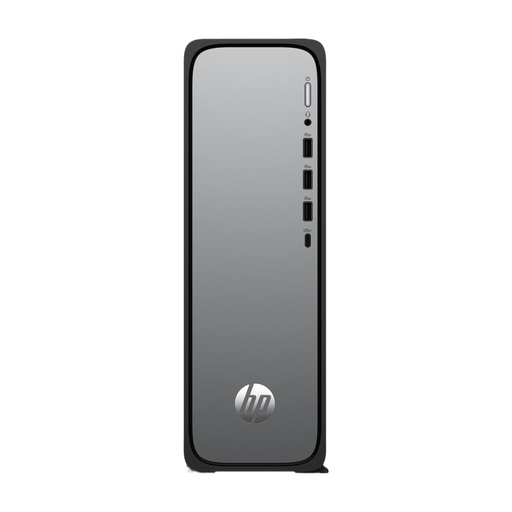
HP OmniDesk Slim S03-0006nd desktop PC

HP OmniDesk Slim S03-0006nd D49HREA#ABH

A compact Windows desktop to consider if you’re looking for a pre-configured PC. Check whether its 8 GB of memory meets the requirements of your editing software.

The listed configuration includes an Intel 300 processor, 8 GB of memory, a 512 GB SSD and integrated Intel UHD Graphics 710. It also lists Windows 11 Home, HDMI, USB-A and USB-C.

The listed dimensions are 30,35 × 30,35 × 10 cm. Remember to allow space for your monitor and cables when checking whether it will fit on your desk.

View at Joybuy

SOYO Y5Pro Mini PC

SOYO Y5Pro Mini PC, Intel Core i5 8250U/8350U

A small Windows mini PC to consider if its listed dimensions and ports suit your setup. Check which of the listed processor models applies to the configuration.

The product name lists 8 GB DDR4 memory, a 256 GB SATA SSD, Bluetooth 5.2 and Wi-Fi 5. The description mentions two HDMI outputs, Type-C and four USB ports.

The listed dimensions are 105 × 113 × 45 mm. Check that the storage and connections suit your source footage and peripherals.

View at Joybuy

Apple Mac mini M6 with 16 GB memory and 256 GB SSD

Apple Mac mini M6, 16 GB, 256 GB SSD

A compact macOS option if your editing software and peripherals are compatible with macOS. Apple lists hardware-accelerated processing for H.264, HEVC and ProRes; this doesn’t guarantee smooth performance for every project.

The product name lists an M6 chip with a 12-core CPU, 12-core GPU, 16 GB of memory and a 256 GB SSD. Apple lists a footprint of 12,7 × 12,7 cm for the Mac mini.

View at Joybuy
Apple Mac mini M6 with 16 GB memory and 512 GB SSD

Apple Mac mini M6, 16 GB, 512 GB SSD

A compact macOS option if your editing software and peripherals are compatible with macOS. Apple lists hardware-accelerated processing for H.264, HEVC and ProRes; this doesn’t guarantee smooth performance for every project.

The product name lists an M6 chip with a 12-core CPU, 12-core GPU, 16 GB of memory and a 512 GB SSD. Apple lists a footprint of 12,7 × 12,7 cm for the Mac mini.

View at Joybuy
Apple Mac mini M6 with 24 GB memory and 512 GB SSD

Apple Mac mini M6, 24 GB, 512 GB SSD

A compact macOS option if your editing software and peripherals are compatible with macOS. Compare the memory capacity with your software and projects; the configuration alone can’t predict editing performance.

The product name lists an M6 chip with a 12-core CPU, 12-core GPU, 24 GB of memory and a 512 GB SSD. Apple lists hardware-accelerated processing for H.264, HEVC and ProRes, and a footprint of 12,7 × 12,7 cm for the Mac mini.

View at Joybuy

Frequently asked questions

Is 16 GB of memory enough to edit my cookery tutorial?

It depends on your editing software and project. Adobe recommends 32 GB RAM or more for Premiere on Windows or an Intel Mac; that recommendation doesn’t automatically apply to other software or Apple silicon Macs. Compare your software’s requirements with your recording format and effects.

What do I need to install with an ASUS NUC 15 Pro kit?

For the NUC15CRK-B and NUC15CRH-B kits reviewed, ASUS lists no installed memory, storage or pre-installed operating system. Choose compatible components for the exact kit version and check in advance how to install the operating system.

Who should I contact if my desktop turns out to be faulty?

For a consumer purchase in the Netherlands, the retailer is your point of contact for your statutory guarantee rights. According to the Dutch government, there is no fixed statutory warranty period in the Netherlands; a manufacturer’s warranty or an extended warranty is in addition to your statutory rights.

Can I return a desktop I bought online?

According to the Dutch government, when you buy from a business at a distance, you generally have 14 days to change your mind. Check the relevant terms and exceptions. According to that guidance, an online purchase from a private individual doesn’t count as a distance purchase in this sense.

Where can I hand in my old computer in the Netherlands?

When you buy a new, similar device, the retailer must, according to the Dutch government, take back an old device from a private individual free of charge; this also applies to online deliveries. The take-back scheme doesn’t apply to business equipment.
