
Vandaag of morgen in huis

Kwaliteit gegarandeerd

Welkomstaanbiedingen ontgrendelen: GRATIS bezorging | Tot 80% korting | Gratis 30 dagen JoyPlus-proefperiode
Download de app
A compact desk for small spaces needs to do more than simply take up little room. Students, people working from home and gamers often run into the same problems: a desktop that barely fits a monitor, legs that get in the way or assembly that’s more complicated than expected.
So don’t just look at the colour and price. Check the dimensions, materials and how you plan to use the desk. That way, you can avoid finding that a small desk feels impractical after just a few weeks.
An 80 or 90 cm-wide desk may seem compact, but the depth determines how much usable space you really have. A 90x40 cm desk can fit a laptop, keyboard and a few accessories. However, 40 cm may not be enough for a large monitor with a deep stand or multiple screens.
So measure not just the available wall space, but also the room in front of the desk. Allow for a chair, cables and enough legroom.
A modern desk, black desk or Sonoma oak desk can look right at home in a bedroom or living room. But its appearance tells you little about how it’s built. Check the materials, frame and stated maximum load.
For example, some models list a maximum static load of 50 kg. This figure applies only when the desk is placed on a flat, stable surface and the weight is evenly distributed.
A desk may look sturdy on paper, but loose connections or an uneven floor can make it wobble. Models with adjustable feet can help compensate for small differences in floor level. Also check that all parts and assembly instructions are included.
Don’t place a desk on a sloping surface, stand on it or exceed the stated load. If you have young children at home, take extra care to reduce the risk of it tipping over.
Choosing between an 80x50 cm desk and a 90x40 cm desk depends on your equipment and room layout.
A depth of 40 cm is often suitable for using a laptop or writing. If you use a computer desk for working from home every day, you’ll usually benefit from a depth of 50 cm. Measure the width of your monitor stand before you order, too.
Many compact desks are made from engineered wood or chipboard with a metal frame. Engineered wood can provide a smooth surface that’s easy to clean with a slightly damp cloth. Don’t use abrasive cleaners, harsh solvents or too much water, as these can damage the finish.
A metal frame can provide extra support, but the joints and adjustable feet are just as important. When assembling the desk, check that the screws are secure without overtightening them.
A study desk or writing desk has different requirements from a gaming desk. For studying and writing, an uncluttered desktop and a shallow depth are often enough. For a computer setup, look for:
Black, brown, greige and Sonoma oak finishes make it easy to match the desk to your existing furniture. Choose the colour only once you’ve found the right size and layout.
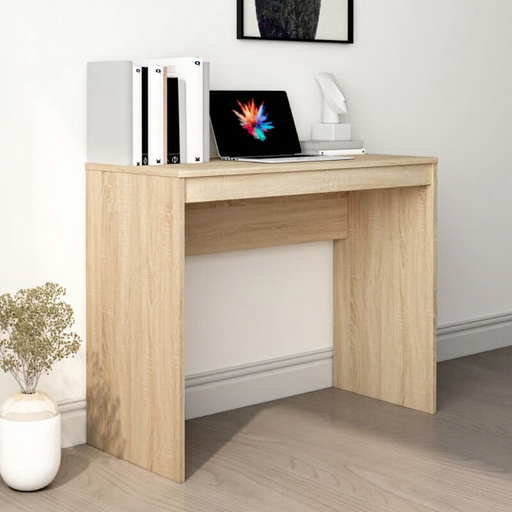
Why it suits this profile: Its 90 cm length makes efficient use of a narrow wall. It’s 72 cm high, and the Sonoma oak finish complements a warm, neutral interior.
The exact dimensions help you look beyond appearance alone. According to the product description, the smooth surface can be cleaned with a damp cloth.
90 x 40 x 72 cm; engineered wood; suitable as a work desk, study desk or writing desk.

Why it suits this profile: This black desk combines a compact size with a steel frame. According to the product information, it has adjustable feet to help on uneven floors.
The stated dimensions and maximum static load of 50 kg give you more to go on than a general claim about sturdiness.
80 x 50 x 75.5 cm; steel frame; adjustable feet; maximum static load of 50 kg.

Why it suits this profile: The 50 cm depth gives you room for everyday writing and studying, a laptop or a compact gaming setup. The brown and black finish works well in a study or bedroom.
The product information lists a steel frame, adjustable feet and a maximum static load of 50 kg. Check that this is suitable for your equipment before buying.
80 x 50 x 76 cm; chipboard and steel; adjustable feet; assembly instructions and labelled parts, according to the product description.
We’ve put together a complete, up-to-date list of products that meet these strict selection criteria and current European safety regulations.
First, place the desk in its final position before fully tightening all the screws. Then check that the desktop is level and that your chair can move freely. For a home office desk, it’s useful to group cables along one side so they don’t clutter the limited surface.
Use a monitor riser only if the desk and chair are still comfortable to use with it in place. A laptop stand can free up space for a separate keyboard, but it takes up some room itself. For a gaming setup, allow for the size of your monitor stand, mouse mat and any speakers.
Yes, as long as your equipment fits the dimensions. An 80x50 cm or 90x40 cm desk is often suitable for a laptop. For a monitor, keyboard and mouse, a depth of 50 cm will generally give you more workspace. Measure your equipment beforehand.
Place it on a flat surface, tighten the fixings evenly and use adjustable feet if it has them. After assembly, check again that the desk doesn’t wobble. Don’t exceed the stated maximum load.
Wipe the desktop with a soft, slightly damp cloth, then dry it. Avoid abrasive cleaners, chemical solvents and prolonged contact with water. This helps reduce the risk of damaging the finish.
