
For anyone who wants to photograph the whole courtyard
You want to frame the paving and the surrounding façades together while out walking, perhaps without being able to step back any further.


A fixed wide-angle lens suits you if you mainly want to frame the whole courtyard and can move to a different position if needed. A zoom is more convenient if you also want to capture details further away from the same spot. Also compare the aperture at the zoom setting you plan to use, and bear in mind the limitations of each lens: specifications alone can’t guarantee a sharp photo in the morning light.
You want to frame the paving and the surrounding façades together while out walking, perhaps without being able to step back any further.
You want to assess the shadows on the cobbles, bright areas of sky and small details on the surface, and adjust the exposure if needed.
You want to take a camera with you without carrying separate lenses, and sometimes capture a façade ornament or another detail from the same spot.
Start with the angle of view you need from the positions available to you. Then decide whether you also want to zoom in on details, and what kind of controls you’ll find comfortable to use while walking.
| What to consider | What should you check? | Who is this important for? |
|---|---|---|
| Framing the whole courtyard | Compare the wide-angle setting in full-frame equivalent terms, and try framing the scene from a realistic shooting position. | If I can’t step back any further, I want to capture the paving and façades together; around 27% of consumers prioritise wide, overall compositions. |
| Shadows and bright areas | Check the sensor size and maximum aperture at the focal length you’ll use; also check the exposure controls. | With shadows on the cobbles and a bright sky, I want to be able to adjust the exposure to suit the conditions; around 27% of consumers give morning light top priority. |
| Texture and detail | Check the optical telephoto range and minimum focusing distance at the zoom setting you’ll use for your subject. | If I want to photograph a stone or a façade detail on its own, I want to know whether I can zoom in or need to move closer; around 20% of consumers choose detailed compositions as their top priority. |
| Carrying and using the camera | Compare the dimensions and weight, and try holding, switching on and framing with the camera. | When I’m out walking, I want a camera I enjoy picking up and can use quickly; around 26% of consumers say portability matters most. |
For a wide view, the first thing to consider is how wide the lens can frame the scene. Zooming in can also change the aperture and minimum focusing distance.
Compare the wide-angle setting, optical telephoto range, sensor size and aperture at the settings you actually plan to use.
The Consumentenbond points out that more megapixels don’t automatically produce better photos; the sensor and lens matter too.
Look at the combination of sensor size and aperture, and check sample images taken in similar lighting conditions.
For the Canon PowerShot G7 X Mark III, Canon Netherlands specifies 5 cm at the wide-angle setting and 40 cm at the telephoto setting, measured from the lens.
Check the focusing distance at the framing and zoom setting you’ll use to photograph the texture of the cobbles.
If something goes wrong, it matters who the seller is and what rights you have against them; a manufacturer’s warranty doesn’t automatically replace those rights.
Check who the seller is, what’s included and what returns information applies. Keep the purchase details and any records of how faults are handled, too.
For this kind of shot, the main choice is between a fixed angle of view and a zoom lens. The features below apply to the models named, not to every product from the same brand.
The PowerShot G7 X Mark III combines a wide-angle setting with zoom, for anyone who switches between wider views and nearby details.
According to Sony Netherlands, the RX100 VII offers a range of 24–200 mm full-frame equivalent, for both wide views and distant details.
The GR IV is a fixed wide-angle option for anyone who prefers to shoot while walking with a pre-selected angle of view.
The LUMIX DC-TZ99 is a travel zoom option if you want to photograph distant details as well as the courtyard.
The X100VI is designed for anyone who deliberately frames shots using a fixed angle of view of 35 mm full-frame equivalent.
This selection includes instant, action and digital cameras with a range of stated angles of view and zoom features. Check each model to see whether its lens and controls suit your walk and the shot you want to take.
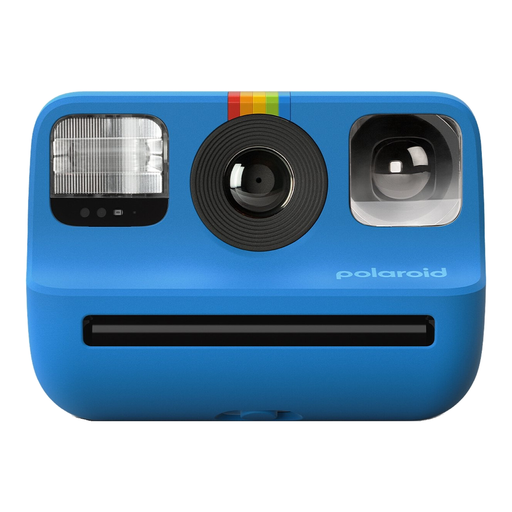 No image available
The product information describes this model as a portable instant camera for taking on the go, for anyone who also wants to keep their photos as prints straight away.
Listed features include a light sensor, manual exposure settings, a self-timer and double exposure. Polaroid Go film is required for instant prints.
 No image available
The product information describes this as a portable point-and-shoot camera; check that the stated zoom setting and angle of view suit your shooting position.
The product information lists 18× optical zoom, 80 MP photos and 5K video. These stated figures alone don’t tell you how sharp a photo will be in the morning light.
 No image available
This model is described as compact and suitable for photography and travel; check that its stated features match the photos you want to take.
The product information lists 12× optical zoom, 64 MP photos, Wi-Fi and 4K video. The zoom factor alone doesn’t tell you what angle of view you’ll get at the wide-angle setting.
 No image available
The product information describes a portable point-and-shoot design for taking on the go; compare the stated zoom with the framing you need.
Listed features include 18× zoom, 80 MP photos and 4K video. These specifications don’t guarantee a sharp image in low light.
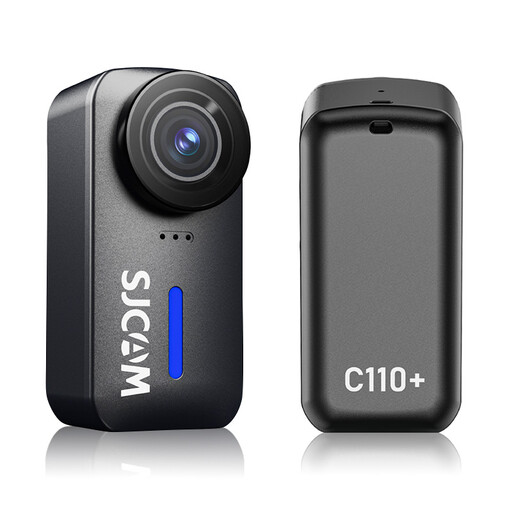 No image available
The stated ultra-wide angle may be useful if you want to capture a lot of the surroundings; check that the angle of view suits the composition you have in mind.
The product information lists a 170° angle of view, an f/1.8 aperture, photos up to 20 MP and a weight of 82 g. These figures alone can’t predict how the camera will capture the courtyard.
First check whether the wide-angle setting captures everything from where you’re standing. A tilting screen can help when shooting from a low angle; also check that the lines and foreground work with the composition you want.
Image stabilisation helps counter camera movement, but it won’t freeze people who are moving. Also pay attention to the shutter speed, and try the settings in the morning light you plan to shoot in.
Check who the seller is, what’s included and what returns information applies. According to the Rijksoverheid, when you buy online from a business, you’ll often have a 14-day cooling-off period. If a product is faulty, you may have statutory consumer rights against the seller as well as any manufacturer’s warranty.
Not necessarily. According to the Autoriteit Persoonsgegevens, sharing a photo publicly isn’t covered by the exception for personal or household use. Identifiable people may be personal data; what’s required for any further use depends on the purpose and circumstances.