
Quick snapshot taker
You want to pick up your camera, use a preset mode and capture the courtyard without changing lenses. Compare the controls, and don’t assume a start-up speed that hasn’t been demonstrated.


First, choose a field of view that captures the courtyard from where you’ll be standing, and controls you can set up easily in advance. A fixed wide-angle lens means you won’t need to choose a zoom setting on the spot, while a zoom compact gives you more scope to frame details. Specifications don’t provide a reliable comparison of how long it takes to take the first photo.
You want to pick up your camera, use a preset mode and capture the courtyard without changing lenses. Compare the controls, and don’t assume a start-up speed that hasn’t been demonstrated.
You can’t step very far back and want to frame the paving and surrounding façades together. So compare the stated field of view from the spot where you’ll actually be standing.
After capturing the whole scene, you also want to photograph architectural details further away. Optical zoom gives you a different way to frame them than a fixed wide-angle lens.
A good fit if: you mainly want to capture the whole courtyard and can choose a fixed field of view in advance. Ricoh gives the GR IV a focal length of approximately 28 mm in 35 mm-equivalent terms.
Bear in mind: there’s no optical zoom for details further away.
A good fit if: you want to frame both a wide view and closer details from one spot. Canon specifies this range for the PowerShot G7 X Mark III.
Bear in mind: you’ll need to choose a zoom setting on the spot; this range alone says nothing about how long it takes to take the first photo.
A good fit if: you also want to frame details high up on a façade without changing position. Sony specifies 24–200 mm for the RX100 VII, and Panasonic specifies 24–720 mm for the TZ99.
Bear in mind: extra telephoto reach isn’t needed for every wide shot, and doesn’t prove anything about image quality in low light.
A good fit if: you mainly want a defined composition and are happy to settle on the field of view in advance. Fujifilm gives the X100VI a 35 mm-equivalent field of view.
Bear in mind: from the same spot, this framing is narrower than the 24 mm wide-angle setting on the zoom models mentioned.
| What to consider | What should you check? | Who is this important for? |
|---|---|---|
| Minimal preparation | Practise the whole process with your settings: switch on, frame your shot and take a photo. | If I only have a short time, I want to choose a mode in advance and take a photo straight away. Around 36% of consumers mainly prioritise keeping preparation to a minimum. |
| Capturing the whole courtyard | Compare 35 mm-equivalent focal lengths and assess the framing from where you plan to stand. | If I can’t step further back, I want to capture the paving and façades together. Around 29% of consumers mainly prioritise a complete wide view. |
| Texture and details | Check the maximum aperture at the focal length you’ll use, and whether the model has image stabilisation. | If I want to capture texture in the paving or details further away, I also consider light and reach. Around 21% of consumers mainly prioritise visible texture or distant details. |
| Easy to carry | Check the dimensions and weight of the exact version; try holding the camera with its battery and memory card fitted. | If I want a camera that’s easy to carry, its dimensions and weight matter to me. Around 14% of consumers mainly prioritise portability. |
A stated field of view helps you estimate how your shot will be framed, but it doesn’t determine on its own what the photo will look like. For example, Canon specifies f/1.8–f/2.8 and lens stabilisation for the G7 X Mark III; this doesn’t guarantee a sharp photo of people in motion or a short start-up time. For the Sony RX100 VII, Sony lists 24–200 mm and f/2.8–f/4.5, with the maximum aperture changing from wide-angle to telephoto.
A high zoom ratio doesn’t tell you how wide the initial framing is. If you can’t step back, a narrower field of view may leave parts of the paving or façade out of the shot.
Compare the wide-angle setting in 35 mm-equivalent terms, and assess it from the spot where you want to take your photo.
A speed improvement described by Ricoh isn’t a like-for-like measurement of switching on, focusing and taking a photo.
Try the whole process with your settings. Only compare time measurements if they were taken using the same method.
From the same position, a fixed 35 mm-equivalent lens gives you a narrower frame than a 24 mm wide-angle setting.
Check whether you can step back. If not, choose based on the field of view you need.
A manufacturer’s warranty doesn’t replace your statutory right to a product that is fit for purpose. According to the Dutch Government, there is no fixed statutory warranty period in the Netherlands; what you could reasonably expect from the product is relevant.
Keep your proof of purchase and contact the seller if there’s a fault. A manufacturer’s warranty is in addition to your statutory rights.
Ricoh gives the GR IV a fixed field of view of approximately 28 mm in 35 mm-equivalent terms. It could suit you if you want to try capturing a wide view without choosing a zoom setting.
Canon specifies a 24–100 mm zoom in 35 mm-equivalent terms for the PowerShot G7 X Mark III, for framing both a wide view and closer details from one spot.
Sony specifies a 24–200 mm range for the RX100 VII, so you can frame details further away after capturing a wide view.
Panasonic gives the Lumix TZ99 a range of 24–720 mm in 35 mm-equivalent terms. This could be useful if you want to frame distant details as well as the wider view.
Fujifilm gives the X100VI a fixed lens with a 35 mm-equivalent field of view, for those who want to work deliberately with that framing.
The Joybuy cameras below range from instant cameras to digital cameras with zoom. Only choose a model if its controls and field of view suit where you plan to take your photos.
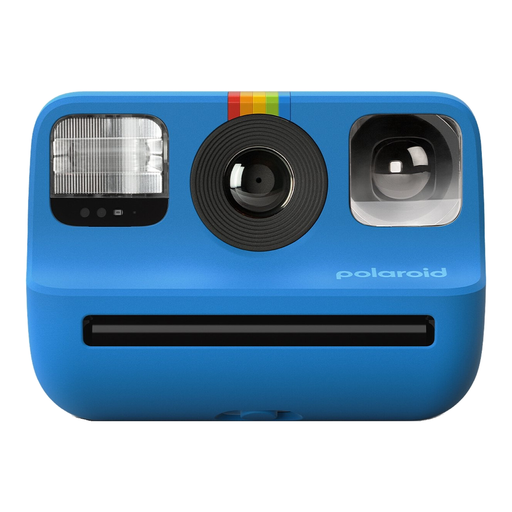 Image unavailable
This model is designed for instant physical photos; the product description mentions Polaroid Go film.
Stated print size: 66,6 × 53,9 mm. The product information warns that ejected film sheets have sharp edges and that contact with the film chemicals may be harmful.
 Image unavailable
The product description presents this as a point-and-shoot camera for photography; check that its field of view and controls suit where you plan to take your photos.
The title mentions 18X zoom; the product description lists optical zoom and automatic features.
 Image unavailable
Optical zoom can help you create a different composition from one spot; check that the wide-angle setting suits the courtyard.
The product description lists 8X optical zoom, autofocus, and zoom and focus controls on a manual lens ring.
 Image unavailable
The product description lists travel and everyday photography as possible uses; check whether the digital zoom suits the framing you need.
The product description mentions autofocus and a removable microSD card for storage. A microSD card isn’t included; the stated 16X zoom is digital.
Choose a shooting mode that suits you in advance, charge the battery and check the memory card. Then practise the whole process, from switching on to taking a photo; the stated specifications don’t give comparable total times for the models discussed.
Check which card type is compatible with the exact model, and follow the manual for cleaning and storage. For the X100VI, Fujifilm lists SD, SDHC and SDXC cards and refers users to its card information for compatibility.
Contact the seller if the product is faulty. According to the Dutch Government, there is no fixed statutory warranty period in the Netherlands; what you could reasonably expect from the product and the cause of the problem are relevant. A manufacturer’s warranty is in addition to your statutory rights.
Not automatically. The Dutch Data Protection Authority distinguishes between images you keep private or share with a very limited group, and images you publish more widely. Publishing images of recognisable people more widely may require a lawful basis under the GDPR; the exception for personal or household use doesn’t apply to business use. Access to a specific courtyard also depends on the location and any access rules.