Choose a camera based on both the smallest detail you want to show and the distance from which you can photograph the entire ceramic piece. Manufacturers quote different focusing distances for different zoom settings and macro functions, so test both types of shot. Photograph glaze in even lighting, with the white balance carefully controlled.
Who is this guide for?
Ceramics seller with small flaws to show
You want to show stamps, glaze crazing or damage in sharp detail, as well as taking an overall shot. The OM SYSTEM TG-7 manual describes a close-up mode for shots from 1 cm away; this doesn’t replace an overview photo.
Seller who wants to show glaze colours
You photograph coloured or glossy ceramics and want the shades to look true to life. Nikon recommends consistent lighting and paying attention to white balance when the lighting changes.
Regular seller with a photo table
You photograph several pieces in a row and want consistent framing and quick transfers. Canon says a tripod can help you achieve consistent product compositions; Panasonic describes smartphone transfer for the LUMIX DC-TZ99.
What should you look for when buying?
Compact camera with close-up features
Choose this option: if you often want to photograph small maker’s marks, crazing or damage separately. OM Digital Solutions describes close-ups from 1 cm away on the TG-7; Ricoh lists a digital microscope function from 1 cm away on the PENTAX WG-90.
Bear in mind: a short focusing distance doesn’t guarantee that the whole object will fit in the frame or that the lighting won’t create shadows or reflections.
Camera for overall shots and the occasional detail
Choose this option: if you mainly want to show a vase, bowl or piece of tableware in full, with the occasional close-up. Canon lists focusing from 5 cm away in wide-angle mode for the PowerShot G7 X Mark III; Panasonic lists macro from 3 cm away in wide-angle mode for the DC-TZ99.
Bear in mind: the minimum focusing distance changes with the zoom setting. Canon lists 40 cm in telephoto mode and Panasonic 200 cm, so test the detail you want to capture at the zoom setting you plan to use.
Camera for listings and more distant subjects
Choose this option: if you also want to use the same camera away from your photo table for subjects further away. Sony lists an equivalent range of 24–200 mm for the RX100 VII.
Bear in mind: Sony lists a minimum focusing distance of around 8 cm in wide-angle mode and around 100 cm in telephoto mode, measured from the front of the lens. Try it out to see whether the ceramic detail you want to capture appears large enough in the frame from your working distance.
| What to consider |
What should you look for? |
Who is it important for? |
| Small features and flaws |
Check the focusing distance for each zoom setting and shooting mode; try capturing a detail from the distance you’ll actually be working at. |
If I want to show maker’s marks, crazing or damage separately, the close-up needs to be sharp and framed well enough to use; around 33% of consumers prioritise these details. |
| Glaze colour and reflections |
Check whether you can adjust the white balance and assess a test shot in the lighting you plan to use. |
With coloured or glossy glaze, I want to be able to compare the shade in the photo with the real object; around 27% of consumers prioritise glaze colours that look true to life. |
| Showing the whole object |
Measure the object and the available distance; try an overall shot against a simple background. |
When I’m selling a bowl or vase, I want one clear overall shot to show its shape and size; around 20% of consumers prioritise this kind of full-frame shot. |
| A repeatable workflow |
Check for a tripod socket, transfer options to your phone and which accessories are included with the specific listing. |
If I’m creating several listings, I want consistent framing and an easy way to transfer photos; around 20% of consumers prioritise a smooth, repeatable workflow. |
Common mistakes
-
Assuming the highest zoom makes it the best camera for details
The minimum focusing distance can vary depending on the zoom setting. Canon and Panasonic list clearly different distances for their models in wide-angle and telephoto modes.
Compare the focusing distance for each setting, and try photographing both the whole ceramic piece and the smallest detail you want to show.
-
Assuming a colour will look right automatically
White balance that doesn’t suit the lighting can affect how colours appear. Nikon recommends consistent lighting and adjusting the white balance to suit the conditions.
Take a test shot in the lighting you intend to use, then compare the colour in the photo with the real object.
-
Using close-ups only
Individual detail shots don’t always make the shape or size of the whole object clear.
Combine close-ups with a clear overall shot and, if needed, include a familiar object to show scale.
Brands to compare
OM SYSTEM
The TG-7 is worth looking into if you want to photograph small features separately.
- The OM Digital Solutions manual describes a close-up mode for shots from 1 cm away, as well as focus bracketing, which combines shots taken at different focus points.
- These features don’t guarantee suitable exposure or a good overall shot of the entire ceramic piece from very close up.
Ricoh Imaging / PENTAX
The PENTAX WG-90 is an option to compare if close-ups of small details are your priority.
- Ricoh lists a digital microscope function from 1 cm away and six macro LEDs.
- Take a test shot to see whether the LEDs create unwanted reflections on glossy glaze.
Canon
The PowerShot G7 X Mark III offers options for both overall shots and close-ups.
- Canon lists an equivalent range of 24–100 mm and focusing from 5 cm away in wide-angle mode.
- The stated minimum distance is 40 cm in telephoto mode. Canon’s advice to use a tripod applies to product photography in general and isn’t evidence of an advantage over other cameras.
Panasonic
The LUMIX DC-TZ99 offers a wide-angle setting and macro function, as well as smartphone transfer described by Panasonic.
- Panasonic lists macro from 3 cm away in wide-angle mode and describes focus stacking and smartphone transfer.
- The stated minimum focusing distance is 200 cm in telephoto mode; 30× zoom alone doesn’t tell you how useful close-ups will be on a small table.
Sony
The RX100 VII is worth including in your comparison if you also want to use the camera for subjects further away.
- Sony lists an equivalent range of 24–200 mm.
- Sony lists a minimum focusing distance of around 8 cm in wide-angle mode and around 100 cm in telephoto mode, measured from the front of the lens. Test whether that suits your ceramic details.
Cameras at Joybuy
This Joybuy selection includes compact cameras for photos and videos. For each model, check that the focusing distance suits small ceramic details and that you can photograph the whole object from the working distance available to you.
 No image available
KINSI Mini Vlog Camera 4K, 64 MP
The listed Wi-Fi and smartphone transfer may suit a workflow where you create listings on your phone; check separately whether the camera can focus at the close distance you need.
The product name lists a 330° rotating lens and a 1.72-inch touchscreen. The product description mentions a mini tripod and transfer to a smartphone.
View at Joybuy
 No image available
KOMERY G7-A digital camera, 4K, 80 MP, pink
Include this camera in your comparison if 18× zoom is one of your criteria; test the focusing distance for small ceramic details separately.
The product name lists 4K video, 80 MP and 18× zoom.
View at Joybuy
 No image available
DJI Osmo Pocket 3, 1-inch CMOS, 4K/120fps
The product description mentions fast focusing for still images; try it out to see whether it can focus on the small details you want from your working distance.
The product name lists a 1-inch CMOS sensor, 4K/120fps video and a 2-inch rotating touchscreen.
View at Joybuy
 No image available
Songdian Pocket Camera, 4K, 44 MP, 16× zoom, pink
The listed autofocus may be useful for ceramic photos; take a test shot of a small detail before relying on the camera for close-ups.
The product name lists 4K, 44 MP and 16× zoom. According to the product description, a microSD card is not included.
View at Joybuy
 No image available
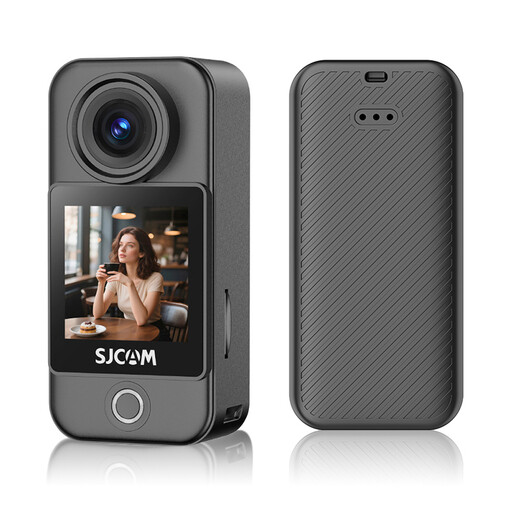
SJCAM C400 Pocket Action Camera, 4K, 16 MP
The listed white balance settings may be useful when photographing glaze; compare a test shot with the real object and check the close-up distance.
The product name lists 16 MP photos and Wi-Fi transfer to a phone. The product description mentions white balance settings.
View at Joybuy
Frequently asked questions
How can you take photos that help a buyer assess the condition of the ceramics?
Start with a sharp overall shot against a simple background, then photograph relevant details separately. Including a familiar object for scale can help show the dimensions.
What should you do if there’s no daylight or the colour looks different in the photo?
Use lighting that’s as even as possible and adjust the white balance to suit it. Nikon recommends consistent lighting; take a test shot and compare it with the real object.
Which accessories should you check before buying a camera?
Check the specific listing to see whether it includes a suitable memory card, battery, charger and, if needed, a tripod. Also consider which other accessories you’ll need for your workflow.
What rights do you have if you buy a second-hand camera online from a business?
For eligible online consumer purchases from a business, you generally have a 14-day cooling-off period after delivery; ACM ConsuWijzer also says this applies to second-hand products. You may also be entitled to a legal guarantee if the camera doesn’t perform as you could reasonably expect when used normally. Check who the seller is and whether you’re buying as a consumer: these consumer rules don’t necessarily apply to purchases from a private individual or for business purposes.


