If you mainly photograph book covers, spines and small signs of damage, start by checking the focusing distance at the zoom setting you’ll actually use. Also check whether you can adjust the white balance, and whether there’s enough room around the book to position the lights without reflections on glossy covers. Manufacturer specifications tell you about distances and features, but they won’t automatically show how a camera performs under your lights.
Who is this buying guide for?
Book seller who wants to show the details
You want to take clear photos of spine text, editions and signs of wear. The focusing distance needs to suit the distance at which you can hold the camera at your worktable. Canon, Sony and Panasonic publish different focusing distances for each model and zoom setting.
Seller who uses different types of artificial light
You photograph white pages or colourful, glossy covers and want to minimise colour casts and reflections. Nikon explains how automatic white balance can vary under certain fluorescent lighting, while the Smithsonian Institution Archives describes diffused light as a way to reduce glare on reflective surfaces.
Seller with a small workspace
You want to position the camera and lights around a book without having to make major changes to the setup for every shot. The stated focusing distance and the space you need for the lights will help determine whether this is practical.
What should you look for when buying?
Start with the focusing distance for the close-up shots you need most. Then check the colour settings and how much room you’ll need for a practical lighting setup.
| What to consider |
What should you check? |
Who is this important for? |
| Sharp detail |
Compare the minimum focusing distance at your preferred zoom setting and measure how much space you have around the book. Canon, Sony and Panasonic list different distances for wide-angle and telephoto settings. |
If I want to capture spine text, edition details or small signs of damage clearly, the camera needs to focus from my working distance. Around 36% of consumers put clear detail first. |
| Colour and reflections |
Check the white balance settings for the exact model and take a test shot under the lighting you use. Move the lights or soften them if a glossy cover reflects them. |
When photographing white pages or glossy, colourful covers, I want to assess the colour without reflections obscuring details. Around 29% of consumers give colour and reflections top priority. |
| Workspace and speed |
Measure the book and the space for the camera and lights; check the angle of view and focusing distance at the same zoom setting. |
If I photograph several books in a row, I want a setup that fits on my table and doesn’t need much repositioning. Around 21% of consumers prioritise workspace and a setup that’s quick to repeat. |
| Cost and other uses |
Compare the features you actually need, such as zoom for distant subjects, with the focusing distance for book details. Check the price and what’s included with the camera at the retailer. |
If I also want to use the camera for things other than photographing books, I weigh up that extra use against what I need for my book setup. Around 14% of consumers give this trade-off top priority. |
Common buying mistakes
-
Looking only at the maximum zoom or shortest macro distance
The minimum focusing distance can vary between zoom settings. A short distance at wide angle doesn’t automatically mean you can focus up close at telephoto.
Check the distance for the setting you want to use, and make sure you can frame both the whole book and the key details.
If the camera won’t focus from your workspace, you may need to change your setup or take an extra shot.
-
Expecting a larger sensor to get rid of reflections
Glare is also affected by the position and spread of the light. A reflection can overexpose details on a cover, even if your camera has a larger sensor.
Take a test shot of a glossy cover and adjust the position of the lights or diffuse the light.
-
Confusing an extended warranty with your statutory rights
The Dutch government distinguishes between statutory warranty rights and additional warranties. If a product is faulty, the retailer is your point of contact for a solution.
Check what an additional warranty actually covers before you choose one.
Brands to consider
Canon
The PowerShot G7 X Mark III is a compact zoom option for switching between full-book shots and close-up details.
- Canon lists a 1.0-type sensor and a 24–100 mm full-frame equivalent range.
- Canon gives a minimum focusing distance of 5 cm at wide angle, measured from the front of the lens.
- At telephoto, the stated minimum distance is 40 cm. These are specifications, not test results for book photography.
Sony
The RX100 VII is a pocket zoom for anyone who also wants to use the same camera for subjects further away.
- Sony lists a 1.0-type sensor, a 24–200 mm full-frame equivalent range and 8× optical zoom.
- Sony gives a minimum focusing distance of around 8 cm at wide angle and around 100 cm at telephoto, measured from the front of the lens.
Panasonic
The LUMIX TZ99 offers a travel-zoom option for anyone who wants to photograph books and other subjects.
- Panasonic lists 30× optical zoom and a macro distance from 3 cm at wide angle.
- At telephoto, the stated macro distance is 200 cm. The specifications also list a 1/2,3-inch sensor; this alone doesn’t tell you how the camera will take photos under your artificial lighting.
Ricoh
The GR IV is a fixed wide-angle option for anyone who mainly photographs whole books and doesn’t need zoom.
- Ricoh lists an APS-C sensor and a fixed lens with an equivalent focal length of around 28 mm.
- With a fixed angle of view, you can’t zoom in on a detail from the same camera position. Check that the angle of view suits your workspace and book size.
Cameras at Joybuy
The selection below ranges from pocket cameras to a camera with a 16–50mm kit lens. The product names and descriptions mention photography or video; for book photography, check the focusing distance, white balance and lighting controls separately.
 No image available
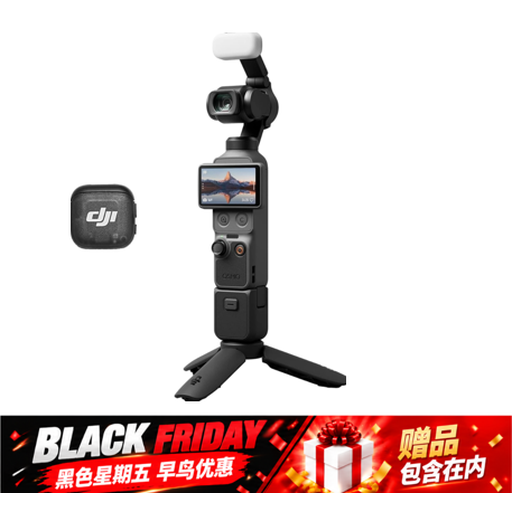
DJI Osmo Pocket 4 Standard Combo
The product name mentions photography and video; check whether the focusing distance and white balance suit your books and lighting.
The title lists 2× lossless zoom, 107 GB of built-in storage and a 2-inch rotating screen.
View at Joybuy
 No image available
Osmo Pocket 4 Creator Combo
The product name describes a pocket gimbal camera; for close-ups of books, check the focusing distance at the setting you plan to use.
The title lists 2× lossless zoom, 107 GB of built-in storage, a 2-inch rotating screen and a handle with a 1/4-inch thread.
View at Joybuy
 No image available
DJI Osmo Pocket 3
The product description mentions photography and a rotating touchscreen; check the focusing distance and white balance for your book setup.
The description lists a 1-inch CMOS sensor, fast focusing and a 2-inch rotating touchscreen. The title mentions 4K/120fps video recording.
View at Joybuy
 No image available
Songdian Pocket Camera 4K 44MP, pink
The product name mentions photography and video; check whether the camera can focus at the distance you’ll be from the details in your books.
The description lists autofocus and 16× digital zoom.
View at Joybuy
 No image available
Sony ZV-E10 with 16–50mm zoom lens, black
The kit includes a zoom lens; check the focusing distance and how much room the camera and lens will take up in your book setup.
The description lists an APS-C sensor, 24.2 MP, a tilting screen and a Product Showcase setting that shifts focus from your face to an object. An SD memory card and adapter/charger are not included, according to the description.
View at Joybuy
Frequently asked questions
Does a longer zoom help you photograph small signs of damage up close?
Not necessarily. The minimum focusing distance can vary between zoom settings, so compare the distance for the setting you actually plan to use.
What can you do about a colour cast or reflection on a cover?
Take a test shot under the lights you use and check the white balance. Nikon explains that automatic white balance can vary under certain light sources. If there are reflections, change your lighting setup or diffuse the light too: white balance won’t remove an overexposed reflection.
Who should you contact if a newly purchased camera is faulty?
For a consumer purchase in the Netherlands, contact the retailer if the product is faulty. The Dutch government distinguishes between statutory warranty rights and additional warranties; a manufacturer’s or separately purchased warranty does not replace your statutory rights.
Can you sell a second-hand book and publish its entire contents online?
The right to resell a legally acquired copy that has been put into circulation in the EU does not automatically give you permission to copy and distribute its contents. Consider separately which photos or text you publish; Auteursrecht.nl explains the distinction.
Do you need to be careful if someone is recognisable in your product photo?
Yes. The Dutch Data Protection Authority explains that identifiable people in photos count as personal data, and that the GDPR is relevant when you publish them. Keep people out of the product shot, or check that you have a valid legal basis before publishing.


