What should you look for?
Start with the available working distance and the photos you want to take. Then check the focusing, colour settings and how you plan to transfer your images.
| What to consider |
What should you check? |
Who is this most important for? |
| Framing complete covers |
Try the largest and smallest books to see whether the entire cover fits in focus at your available working distance. |
If I want to photograph every book with a similar crop, I need to know whether the full cover will fit from where I’m standing with the camera. Around 36% of consumers prioritise complete book overviews when making this choice. |
| Focusing on small details |
Check the focusing distance for each zoom setting and where the distance is measured from. Canon lists 1 cm for macro at the wide-angle setting on the SX740 HS Lite Edition; Panasonic lists 3 cm at wide-angle and 200 cm at telephoto for the DC-TZ99. |
If I want to show wear or small lettering, the camera needs to focus on these details without cropping out the rest of the cover. Around 29% of consumers give small details the highest priority. |
| Colour and exposure |
Check whether you can adjust the white balance, and take a test shot under your planned lighting. Canon explains how to adjust the white balance to suit the lighting conditions. |
In changing light, I want to assess cover colours without every shot looking different. Around 21% of consumers give consistent colour and exposure the highest priority. |
| Transferring images and charging |
Check the box contents, charging method and required memory card for the exact variant. Canon says the SX740 HS Lite Edition comes with a battery and battery charger, but does not support USB charging. |
If I’m photographing lots of books in a row, I want to know in advance how to charge the battery and transfer the files. Around 14% of consumers give a practical workflow and manageable extra requirements the highest priority. |
Products for book photography
This selection of Joybuy products includes compact cameras and action cameras with features for framing, photo settings or file transfer. Check each model to make sure its lens and focusing distance suit your book sizes and the details you want to capture.
 No image available
DJI Osmo Pocket 3
The rotatable screen can help you check the framing on the camera. The product name lists a 1-inch CMOS sensor and 4K/120fps video. Check that the lens suits the full cover and the details you want to photograph.
View at Joybuy
 No image available
Songdian Pocket Camera 4K 44MP, Pink
The product description mentions autofocus and photography. Test it with a book to see whether the camera can focus on the smallest detail you want to show. The title lists 16X zoom, and the product description mentions transferring files via a removable drive.
View at Joybuy
 No image available
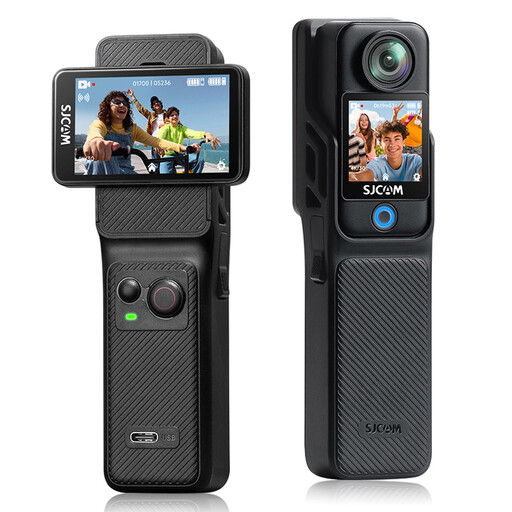
SJCAM C400 4K Action Camera
White balance settings and exposure compensation may be useful if you want to adjust the camera settings to suit your exhibition lighting. The product details list photos up to 16 MP. Take test shots to check whether the camera can capture your covers and details.
View at Joybuy
 No image available
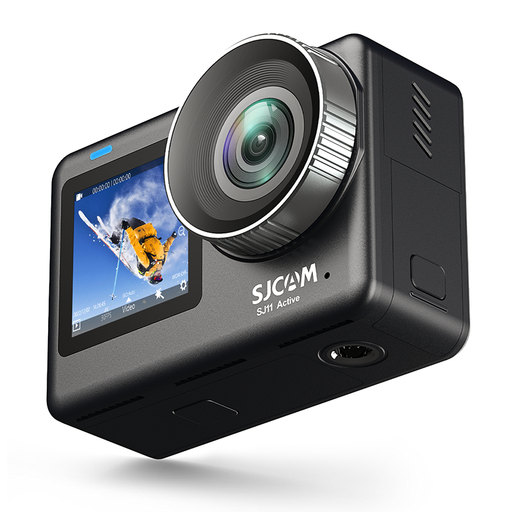
SJCAM SJ11 Active Dual Screen Action Camera
The two screens can help you check the framing. The product details list white balance presets, exposure compensation and photos up to 20 MP. Test whether the focus and framing suit your books.
View at Joybuy
 No image available
Sony ZV-1 Compact Camera
The optical zoom and tilting screen can help you frame different book sizes. The product details list a 1-inch sensor, a 24–70 mm focal range and JPEG and RAW support. Check the focusing distance for your close-ups.
View at Joybuy
Frequently asked questions
How can I photograph a fragile second-hand book without forcing it open?
Where possible, photograph the cover with the book closed, and don’t force the binding to open further than it allows. The Library of Congress highlights loose bindings and books that open to less than 90 degrees as considerations when digitising them.
Is the quoted macro distance enough to take a sharp photo of an entire cover?
Not necessarily: the minimum focusing distance doesn’t tell you how much of the book will fit in the frame from that distance. Check the distance at each zoom setting and take test shots of both a detail and the complete cover.
What should I check for the cost and practical use on the day of the shoot?
Check the box contents, charging method and required memory card for the exact variant. Canon says the PowerShot SX740 HS Lite Edition comes with a battery and battery charger, but does not support USB charging.
What cancellation period and warranty apply when buying a camera online in the Netherlands?
According to ACM ConsuWijzer, online purchases generally come with a statutory cancellation period of up to 14 days after delivery; check before buying whether an exception applies. The statutory warranty is separate: if a product is faulty, the seller is your point of contact for a solution, and the warranty period is not automatically a fixed two years.
Can I make photos of pages or illustrations from second-hand books available to the public?
Owning a second-hand book doesn’t automatically give you permission to make copyright-protected text or illustrations available to the public. The Dutch government distinguishes between a private copy for personal use and distributing or making material available to the public. For each planned photo, check whether you need permission or whether an exception applies.


