Choose a compact camera based on the shot you want: the whole card, fine print details or both. Check the focusing distance at the zoom setting you’ll use, and whether you can adjust the white balance. Extra zoom or more megapixels won’t, on their own, solve changing window light or reflections.
Who is this guide for?
Creator looking to capture card colours
You photograph printed cards for a portfolio or product presentation and want to assess colours in changing window light. Canon Europe explains how RAW files give you scope to adjust the white balance afterwards.
Seller needing both full-card and detail shots
You want to photograph the whole card as well as small details. The focusing distance at the framing you’re using may matter more than the maximum zoom ratio.
Creator with a small photography space
You work by a window with limited space and need a manageable camera and a setup you can repeat. A camera won’t remove reflections by itself.
What should you look for?
Start with the shot you want: zoom can help you change the framing from the same spot, while a fixed lens means finding a suitable shooting distance. Also decide how you’ll assess colour and reflections.
Compact camera with a short zoom
Choose this if: you want to switch between a full-card shot and a detail crop from a fixed position.
Keep in mind: the minimum focusing distance can change when you zoom in; Canon lists 5 cm at wide angle and 40 cm at telephoto for the PowerShot G7 X Mark III.
Compact camera with a long zoom
Choose this if: you also want to use the same camera for subjects beyond your card setup.
Keep in mind: extra telephoto reach isn’t automatically useful for a card on a table; Panasonic lists a focusing distance of 3 cm at wide angle and 200 cm at telephoto for the LUMIX TZ99.
Compact camera with a fixed lens
Choose this if: you’re happy to work with a fixed angle of view and can adjust the distance to the card yourself.
Keep in mind: the Ricoh GR IV has no optical zoom, so you can’t change the framing by zooming in from the same spot.
| Point to consider |
What to check |
Who it’s for |
| Colour in window light |
Check whether you can set the white balance and, if you want to edit your images afterwards, whether the exact model saves RAW files. |
If I’m photographing cards for a portfolio, I want to assess colours in changing window light. Consumers who prioritise colour consistency make up around 28%. |
| Framing the whole card |
Compare the available shooting distance with the model’s angle of view. |
If your main aim is to get the whole card straight in the frame, consider how you can frame it within the space available. Consumers who prioritise this make up around 22%. |
| Reflections and uneven light |
View the card from the shooting angle and, if needed, adjust the position of the card, camera or light. |
With a glossy card, I first want to see where the window light is reflected. Consumers who want to tackle reflections or uneven light first make up around 22%. |
| Fine print details |
Compare the focusing distance at the zoom setting you want and check where that distance is measured from. |
If small lettering or print texture matters, I want to know whether the camera will focus at my working distance. Consumers who prioritise detail shots make up around 17%. |
| Working in a compact space |
Check the dimensions, screen position and support needed for your workspace. |
If you have limited space and regularly put your camera away, you’ll want a practical setup you can repeat. Consumers who prioritise compact use make up around 11%. |
Common pitfalls
-
Assuming the minimum focusing distance applies at every zoom setting
The stated minimum distance may differ at wide angle and telephoto. Canon lists 5 cm at wide angle and 40 cm at telephoto for the PowerShot G7 X Mark III; Sony lists approximately 8 cm and approximately 100 cm respectively for the RX100 VII.
Check the focusing distance and the framing you want at the same zoom setting. Also check whether the distance is measured from the front of the lens.
-
Assuming more zoom or megapixels means a better photo of your card
A zoom ratio or megapixel count alone doesn’t determine how a camera reproduces printed colours and details. The Consumentenbond points out that sensor size matters more to photo quality than the number of megapixels.
First choose a suitable working distance and angle of view, then consider the colour settings and controls you need.
-
Expecting the camera to eliminate reflections
The direction of the light and a glossy card surface affect what you can see in the photo. Buying a camera doesn’t replace checking your setup.
View the card from the camera’s angle and move the card, camera or light source if you see a reflection.
Camera brands to compare
Canon
The PowerShot G7 X Mark III has a zoom lens for different framing options; the focusing distance depends on the zoom setting.
- Canon lists a 24–100 mm equivalent focal length and focusing from 5 cm at wide angle and 40 cm at telephoto, measured from the front of the lens.
- The wide-angle distance doesn’t automatically apply when you zoom in.
Sony
The RX100 VII offers a wider zoom range for anyone who also wants to use their camera beyond their card setup.
- Sony lists a 24–200 mm equivalent focal length and a minimum focusing distance of around 8 cm at wide angle.
- Sony lists around 100 cm at telephoto; the wider zoom range doesn’t prove better reproduction of flat printed material.
Panasonic
The LUMIX TZ99 is a travel zoom compact camera, so it’s worth checking the working distance for each zoom setting.
- Panasonic lists 30× optical zoom and the ability to save JPEG and RAW photos.
- The stated focusing distance in macro mode ranges from 3 cm at wide angle to 200 cm at telephoto; Panasonic lists a 1/2.3-inch sensor.
Ricoh
The GR IV has a fixed angle of view, making it a good fit if you can adjust the shooting distance and setup yourself.
- Ricoh lists an APS-C sensor, approximately 25.74 effective megapixels and an angle of view equivalent to approximately 28 mm.
- The camera has no optical zoom; sensor size and megapixel count alone don’t prove more accurate colour reproduction of art cards.
Cameras on Joybuy
Below are cameras on Joybuy that you can compare for photographing printed cards. Check whether the features listed for each model suit the framing and setup you have in mind.
 No image available
KOMERY G7-A 4K, 80MP, 18× zoom
Worth comparing if you’re looking for a digital camera with zoom for different framing options.
4K; 80MP; 18× zoom.
View on Joybuy
 No image available
Komery W6 4K, 64MP, 12× optical zoom
Worth comparing if you’re looking for a camera with optical zoom to adjust the framing.
4K; 64MP; 12× optical zoom.
View on Joybuy
 No image available
Songdian 5K, 56MP, 10× optical zoom
Worth comparing if you want to switch between a full-card shot and different crops.
5K; 56MP; 10× optical zoom.
View on Joybuy
 No image available
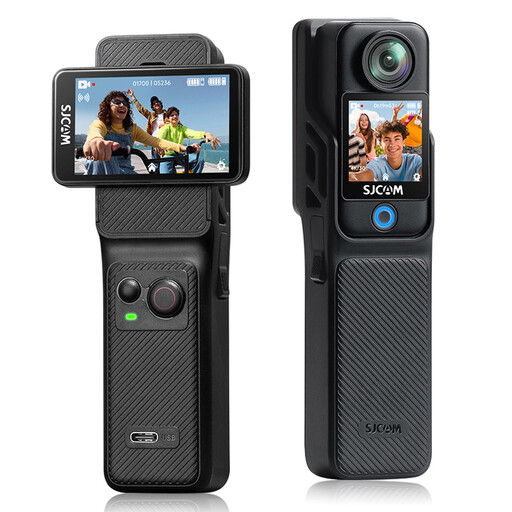
SJCAM C400 4K action camera
Worth comparing if you’re considering an action camera as well as taking card photos; check whether the angle of view suits a flat card setup.
Two touchscreens; 16MP photos; 154° angle of view.
View on Joybuy
 No image available
Sony ZV-1 compact camera
Worth comparing if you’re looking for a compact camera; before buying, check which shooting features suit your card setup.
View on Joybuy
Frequently asked questions
Does RAW help when the light by the window changes?
RAW gives you scope to adjust the white balance afterwards. Keep the exposure as consistent as possible between successive cards, and check whether the exact model saves RAW photos; Panasonic lists RAW storage for the LUMIX TZ99.
How can you prevent reflections on a card?
Check for reflections from the camera’s angle and, if needed, move the card, camera or light source. The Canadian Conservation Institute describes lighting from either side at a 45-degree angle as an example of how to light objects evenly; this isn’t a guarantee for every glossy card beside a single window.
Do you always need to zoom in as far as possible for a detail shot?
No, because the minimum focusing distance can vary between zoom settings. Canon lists 5 cm at wide angle and 40 cm at telephoto for the PowerShot G7 X Mark III; Sony lists approximately 8 cm and approximately 100 cm respectively for the RX100 VII. So compare the framing you want with the shooting distance you can actually use.
What are your rights when buying online in the Netherlands?
For a qualifying distance sale from a business, you’ll generally have a 14-day cooling-off period, according to the Dutch Government; conditions and exceptions may apply. If there’s a problem with a product, contact the seller about your statutory guarantee. Check the terms of the specific purchase.


