What should you look for?
First, check how the full card-and-object setup fits in the frame at your working distance. Then assess individual close-ups, colour control and how easy it is to repeat your results.
| What to consider |
What should you check? |
Who should pay particular attention? |
| Fitting the card and object in the frame together |
Try your largest card with the object in the intended camera position. Check that there’s also room for a light source or reflector. |
If you want to show both subjects in one photo, you’ll want the entire card in the frame and the object to be clearly recognisable. Around 40% of consumers prioritise capturing them together. |
| Colour and even lighting |
Check whether you can adjust the white balance and, if you edit your photos, whether RAW capture is available. Take a test shot using the lighting you’ll actually use. |
If you mainly photograph printed cards for a portfolio or catalogue, you’ll want to control colour casts and changing light. Around 30% of consumers prioritise recognisable card colours. |
| Individual close-ups |
Compare the focusing distance at each zoom setting and check the framing at your preferred distance. Leave room for lighting around the subject. |
Magnification and working distance are important for a separate photo of print texture, embossing or a small object. Around 20% of consumers prioritise this kind of detailed shot. |
| A setup you can repeat |
Check whether you can keep your camera position, lighting and background consistent in your space. |
If you’re photographing a series of cards, you’ll want consistent framing and results from one shot to the next. Around 10% of consumers prioritise repeatability. |
Joybuy camera options
According to their product titles, these camera options have a photography or camera function. Before buying, check that the focusing distance, angle of view and controls suit your card-and-object setup.
 No image available
DJI Osmo Pocket 4 Standard Combo
The product title lists photography as a use. Check whether the camera can frame the full card and small object at your working distance.
The title lists a 1-inch CMOS sensor, 2× lossless zoom, 107 GB of built-in storage and a 2-inch rotating screen.
Also listed: 4K/240fps and 3-axis stabilisation. Check how individual close-ups look at the distance you plan to work from.
View at Joybuy
 No image available
DJI Osmo Pocket 3
The product title lists photography as a use. Check the framing and focusing distance for both your complete card setup and individual details.
The title lists a 1-inch CMOS sensor, 4K/120fps, fast focusing, 3-axis stabilisation and a 2-inch rotating touchscreen.
The title also mentions face and object tracking. Check whether these features suit the way you plan to use the camera for still photos of cards.
View at Joybuy
 No image available
Songdian Pocket Camera 4K 44MP, pink
The product title lists photography and video. Check whether the camera can frame the card and object as you want at your working distance.
The title lists 4K, 44 MP and 16× zoom. The zoom ratio alone doesn’t determine how close you can focus.
View at Joybuy
 No image available
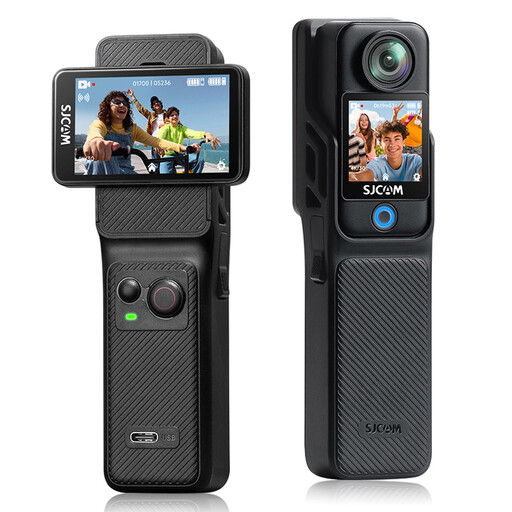
SJCAM C400 4K Action Camera
The title lists 16 MP photos. Before choosing this action camera for photos of cards and objects, check the angle of view and focusing distance at your photography table.
The product title lists a 154° lens, dual touchscreens and a waterproof casing rated to 30 m with the case.
The product title also lists 6-axis electronic image stabilisation and a battery life of 437 minutes.
View at Joybuy
 No image available
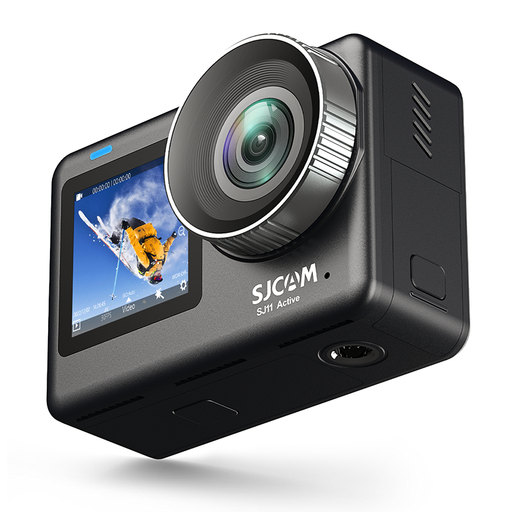
SJCAM SJ11 Active Dual Screen
The product title describes an action camera with two screens and 4K video at 30 fps. Check whether it also offers the photo settings and focusing distance your card-and-object setup requires.
The title lists a 2.33-inch touchscreen and a 1.3-inch selfie screen.
View at Joybuy
Frequently asked questions
How can you stop the card looking a different colour from the original?
Use lighting you can control, avoid mixing light sources where possible and set the white balance accordingly. A neutral background can help. Take a test shot under the same lighting you’ll use for your cards. For colour-critical work, you could also consider using a reference card or shooting in RAW.
Should you try to get the card and display object equally sharp in one photo?
First decide how you want to frame them together. If a small detail needs greater magnification or different lighting, take a separate close-up as well. National Museums Scotland describes using raking light to show texture and a reflector to soften the shadow on the opposite side of an object.
What should you check about costs and after-sales service in the Netherlands?
Check which battery, memory card and lighting your setup needs. For a consumer purchase, the seller is responsible for providing an appropriate remedy free of charge if, under normal use, a product doesn’t do what you could reasonably expect, according to ACM ConsuWijzer. Online purchases generally come with a 14-day cooling-off period after delivery, subject to legal exceptions.
Can you publish photos of someone else’s printed art cards online?
Not automatically. The Dutch government distinguishes between making a copy for personal use and distributing or making copyright-protected work available to the public. Ask permission before publishing a card online; the protection and the rights holder depend on the specific card.


