Start with the distance between the speaker and the microphone: placing a microphone at the other end of an echoing hall won’t automatically make voices clear. For dialogue recorded from a fixed position, a handheld microphone on a stand, kept close to the speaker, may work well. For actors who move around, consider a microphone that moves with them, while a studio microphone needs a quiet, fixed setup. Then check that the connection and any accessories are compatible with your recording equipment. This advice is based on placement and product specifications, not an independent comparison of sound quality.
Which setup is right for you?
Voice actor speaking from a fixed position
If you record dialogue one person at a time and can stay close to a microphone on a stand, placement and a suitable connection are important considerations. Shure, Audio-Technica and Samson describe models for this kind of fixed-position setup.
Actors who move around during scenes
If actors walk while speaking or record a scene together, a microphone that moves with them may be more practical than one in a fixed position. RØDE describes the Wireless PRO as a system with two transmitters and two lavalier microphones.
Voice actor with a quiet recording space
If you can set up in a quiet, fixed position, you could also consider a studio microphone. RØDE marks the front of the NT1 5th Generation; the direction you point it and the room itself still matter.
What should you look for when choosing?
Shure explains that a microphone cannot effectively separate direct speech from reflected sound in a room. So first consider the distance to the speaker, then make a test recording from the position you plan to use.
Close-up dynamic handheld microphone
Suitable when: one actor speaks at a time and can stay close to the microphone.
Bear in mind: you’ll need a fixed speaking position; the actor must keep the distance and direction consistent.
Wireless lavalier microphone
Suitable when: actors move around, or two actors need to wear microphones at the same time.
Bear in mind: attachment, clothing rustle, power and the receiver output; test the complete setup in the hall.
Studio condenser microphone in a fixed position
Suitable when: the actor can stay still and the recording space is quiet enough.
Bear in mind: a studio microphone won’t fix poor room acoustics. If you’re using XLR, check the power supply and interface requirements too.
| What to consider |
What should you check? |
Who is this important for? |
| Clarity in an echoing room |
Check how close the microphone can be to the speaker and make a test recording from the intended position. |
If I’m recording dialogue in an echoing hall, I want to keep the microphone close to the speaker. Around 39% of consumers put clarity despite echo at the top of their list. |
| Freedom of movement |
Work out how many actors will speak at the same time, and check the microphones, transmitters and receiver output. |
If actors move around during a scene, I want the microphone to move with them. Around 23% of consumers give freedom of movement their highest priority. |
| Compatibility with your recording setup |
Check the exact USB or XLR connection, the input required and whether a power supply is needed. |
If I want to use my existing computer, recorder or mixer, I want to know in advance which input and cables I’ll need. Around 23% of consumers choose compatibility as their first consideration. |
| Vocal detail in a fixed position |
Check the speaking direction, attachment and accessories for the exact model, then listen to a test recording. |
If the actor can stay in a quiet spot, I want to see whether a fixed studio microphone is right for the recording. Around 15% of consumers give vocal detail in a fixed position their highest priority. |
Common pitfalls
-
Expecting a directional microphone to filter out room echo from a distance
With poor placement, a microphone cannot effectively separate direct speech from reflected sound. A failed recording may mean you have to record again or adjust your setup.
First, consider the distance to the actor and make a test recording in the hall.
-
Assuming an XLR microphone records directly to a computer via USB
USB and XLR are different types of connection. An XLR condenser microphone may also need power from your recording setup.
Compare the connections on the exact model variant with your equipment, and check whether you need an interface, cable or recorder.
-
Choosing a wireless system based only on its stated range
A stated wireless range doesn’t tell you whether the connection, attachment and recording will work in your hall.
Test the complete setup with the clothing, movements and recording equipment you intend to use.
Brands to compare
Audio-Technica
The ATR2100x-USB is a dynamic handheld microphone for uses including voice-over, with USB and XLR outputs.
- Audio-Technica lists a headphone output for direct monitoring.
- That connection won’t automatically make a recording in an echoing hall free of echo.
Shure
The SM58 is a dynamic handheld microphone for close-up speech via XLR. The MV7+ is a separate model with USB-C and XLR.
- Shure lists a cardioid pickup pattern and built-in pop filter for the SM58.
- The SM58’s XLR connection is not the same as the MV7+’s dual connection; neither model corrects room echo from a distance.
RØDE
The NT1 5th Generation is designed for a fixed speaking position; the Wireless PRO is a separate wireless system for wearable microphones.
- According to RØDE, the NT1 5th Generation has USB-C and XLR. The Wireless PRO comes with two transmitters and two lavalier microphones.
- Position the NT1 carefully, and check the attachment and complete recording setup for the Wireless PRO.
Samson
The Q2U is a dynamic microphone with USB and XLR connections.
- According to Samson, it comes with a microphone clip, desktop tripod stand, windscreen and cables.
- Check that the desktop tripod stand gives you the height and position you want in the hall.
Sennheiser
The e 835 is a dynamic cardioid handheld microphone designed for vocals and stage use; it may be worth considering if the actor speaks close to a fixed microphone.
- Sennheiser describes a limited change in sound when speaking off-axis.
- This product specification is not independent evidence of better recordings of character voices.
Joybuy products for actors on the move
These Joybuy products are wireless microphone options to consider when actors move around or you need multiple transmitters. Check that the receiver for each model is compatible with your recording equipment.
 No image available
DJI Mic Mini 2S (2 TX + 1 RX + Charging Case)
With two transmitters and one receiver, this is an option to consider for scenes with two actors.
The product name mentions a charging case. Check that the receiver connects to your recording equipment.
Joybuy
 No image available
SYNCO P2XT USB-C Wireless Microphone
A wireless lavalier setup to consider if the microphone needs to move with an actor.
Check that the USB-C receiver is compatible with your device. For Android phones with USB-C, OTG must be enabled.
Joybuy
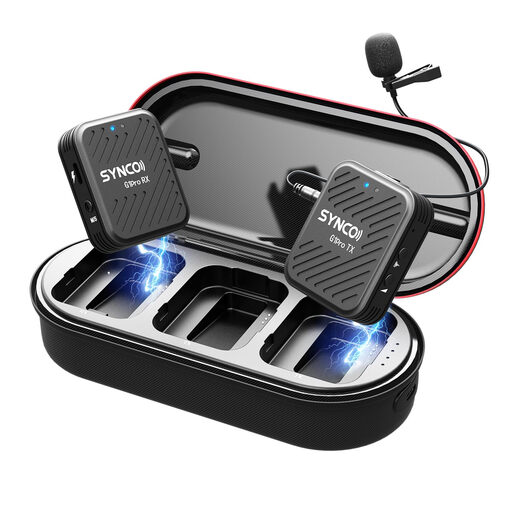 No image available
SYNCO G1(A1) Pro Lavalier 2.4GHz Wireless Microphone System for SLR Camera
A wireless lavalier setup to consider when an actor won’t stay by a fixed microphone.
Check that the receiver and connection are compatible with your camera or other recording equipment.
Joybuy
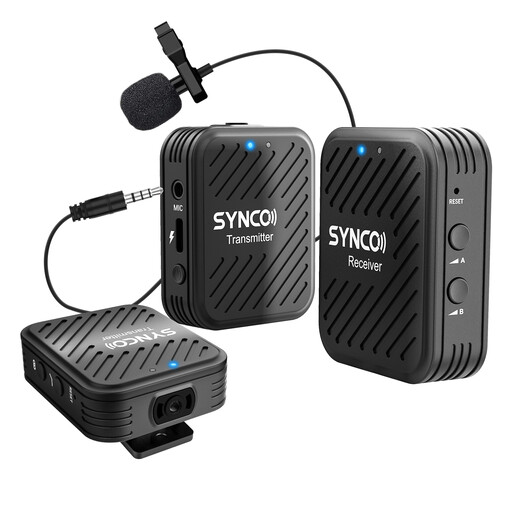 No image available
SYNCO Wireless Lavalier Microphones, G1(A2) 2.4G Dual Transmitter
The product name mentions two transmitters, making this an option to consider for scenes with two speakers.
Check that the receiver connects to your camera, smartphone or tablet.
Joybuy
 No image available
DJI Mic 3 (2 TX + 1 RX + Charging Case)
With two transmitters and one receiver, this is an option to consider for a setup with two actors.
Check that the receiver is compatible with the camera, smartphone or computer you’re recording with.
Joybuy
Frequently asked questions
Can you put the microphone at the back of the hall to record all the characters?
Don’t rely on this if you want clear, distinct voices: reflected sound can become more prominent over greater distances. Try placing the microphone close to each speaker; a microphone can’t fix the room’s acoustics after the fact.
What do you need to connect an XLR microphone to a computer?
You’ll need a suitable XLR audio interface or recorder to connect the microphone to your computer. If you’re using a condenser microphone, also check whether the interface supplies the power the exact model needs via XLR. A microphone with its own USB output also gives you the option of a direct USB connection.
How do you check your setup before the first scene?
Make a short test recording from the intended speaking position, listen for echo and plosive sounds, then adjust the distance and direction if needed. According to RØDE, a gold dot marks the front of the NT1 5th Generation; the included pop filter and shock mount are designed to reduce plosives and bumps.
Who can help if a microphone bought in the Netherlands is faulty?
For a consumer purchase, contact the seller if the product is faulty. According to the Dutch Government, a manufacturer’s warranty is additional, and the Netherlands has no fixed statutory warranty period that applies to all products.
Can I record and share recognisable voices of actors or people present?
A recognisable voice recording may be personal data. If the GDPR applies to your intended use, you need a valid legal basis; consent is one possible basis, but it is not automatically the only one. Whether the exemption for personal or household use applies depends on the specific use. So make sure you take recognisable bystanders into account when planning your recording.


