
Volunteers printing forms in batches
You print large batches of the same form for meetings and don’t want to keep topping up the paper. Brother lists a 250-sheet paper tray for the HL-L2400DWE and HL-L5210DN.


If you mainly print text forms, even with long gaps between print jobs, a mono laser printer is a sensible option. For larger batches, paper capacity and automatic double-sided printing matter even more. Choose a multifunction printer if the group also needs to scan or copy completed forms, and opt for a colour printer only if colour is genuinely needed. If you use an inkjet printer infrequently, bear in mind that the ink may dry out.
You print large batches of the same form for meetings and don’t want to keep topping up the paper. Brother lists a 250-sheet paper tray for the HL-L2400DWE and HL-L5210DN.
You may go weeks without needing to print and want to consider the potential ink issues that can arise when printing text forms infrequently. The Consumers’ Association describes how ink can dry out and clog print heads.
You also want to scan or copy completed forms. If the group processes personal data, it must put appropriate security measures in place. The Dutch Data Protection Authority provides information on this.
Choose this if: you mainly print blank text forms and don’t need colour or scanning.
Bear in mind: this type of printer doesn’t replace a scanner. Compare toner options and consider your expected print volume.
Choose this if: the group regularly prints a lot of forms and a wired network connection suits your needs.
Bear in mind: you may need an extra unit to increase paper capacity. The Brother HL-L5210DN has a standard 250-sheet tray and can be expanded, according to Brother.
Choose this if: you want to scan or copy completed forms as well as print, but don’t need colour.
Bear in mind: check separately whether the model has an automatic document feeder. Automatic double-sided printing doesn’t necessarily mean it can scan both sides automatically.
Choose this if: colour is essential and the group also wants to scan or copy.
Bear in mind: ink can dry out if the printer is used infrequently. According to Canon, the PIXMA G4570 prints double-sided manually.
| What to consider | What should you check? | Who is this important for? |
|---|---|---|
| Larger print runs | Compare the amount of paper needed for each meeting with the tray capacity, and check duplex printing and the connection you need. Brother lists a 250-sheet tray for the HL-L5210DN, with the option to expand it. | When I print batches of forms for a meeting, I want to minimise interruptions to refill the paper. Around 36% of consumers say batch printing is their main consideration. |
| Occasional printing | Decide whether mono printing is enough, and compare toner options with your expected usage. The Consumers’ Association explains that ink can dry out and clog print heads if the printer is used infrequently. | When I only print text forms occasionally, I want to allow for long gaps between print jobs. Around 29% of consumers prioritise reliable occasional mono printing. |
| Completed forms | Check whether you need to print, scan or copy, and consider the ADF and double-sided scanning as separate features. Also assess how the group will protect personal data. | When I need to process completed forms, I want to know whether the printer can scan or copy them. Around 21% of consumers give this task top priority. |
| Colour and running costs | Check whether colour is genuinely needed, how often you print and whether double-sided printing is automatic. Look at the consumables for the exact model. | When colour carries meaning on my form, I don’t want to choose mono printing and lose that information. Around 14% of consumers prioritise colour for practical reasons. |
Your toner or ink needs depend on how much you print. With infrequent inkjet use, you may also need to clean the print head.
Estimate your print volume per month and per meeting, then compare the printer and its consumables based on the same usage.
If you use an inkjet printer, allow for ink that may be needed to clean the print head.
Duplex printing and an automatic document feeder are different features. An ADF also doesn’t necessarily scan double-sided originals automatically.
For the exact model, check print duplex, ADF and double-sided scanning separately.
Without a suitable feeder, processing batches of completed forms may involve extra manual work.
HP says that, for the LaserJet Pro MFP 3102fdw, dynamic security may block cartridges without a suitable HP chip.
Before buying, check which cartridges are compatible with the exact model and whether they are available.
An incompatible cartridge may not work with the printer you choose.
The Brother models mentioned include basic and higher-capacity mono laser printers, as well as a multifunction mono laser printer.
The EcoTank ET-2871 is an example of a multifunction A4 colour ink tank printer.
According to Canon, the PIXMA G4570 combines a refillable colour ink tank with scanning functions and an automatic document feeder.
The LaserJet Pro MFP 3102fdw is a mono multifunction option for groups that also need to scan or copy.
This selection includes printers for mono text forms, larger batches and situations where colour or scanning functions are needed. Check that each model’s features suit your forms and the way your group works.
 Image unavailable
For groups that need colour and features for processing forms.
Multifunction inkjet printer; A3, 1,200 x 4,800 DPI, 31 ppm and Wi-Fi according to the product name. The description lists printing, scanning, copying and a document feeder. If used infrequently, dried ink may clog an inkjet print head.
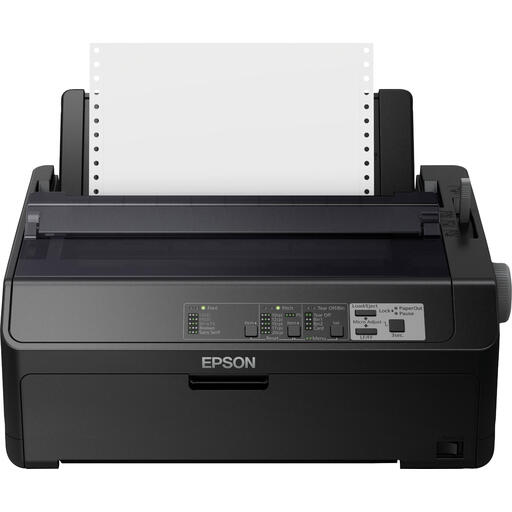 Image unavailable
A dot matrix printer to consider if your group needs to print large volumes of forms or multipart forms.
The product information lists Ethernet and serial connections. The product name specifies 240 x 144 DPI and 612 Cps.
 Image unavailable
For A4 forms that need colour, where the group wants to print double-sided automatically.
The product name specifies a colour inkjet printer, A4, Wi-Fi and 4,800 x 1,200 DPI. If used infrequently, dried ink may clog an inkjet print head.
 Image unavailable
A mono laser printer to consider for A4 text forms and shared use in a working group.
The product name specifies a wireless A4 mono laser printer. The product information lists automatic double-sided printing and Ethernet.
 Image unavailable
For larger batches of text forms when a wired network connection suits your needs.
Brother lists automatic double-sided printing, Gigabit Ethernet and a 250-sheet tray, expandable to 1,290 sheets. This model prints in mono and is not a scanner.
Only if you want to print forms on both sides without turning the sheets over yourself. Brother lists automatic duplex printing for the HL-L2400DWE, while Canon specifies manual duplex printing for the PIXMA G4570.
Not necessarily: print duplex and an automatic document feeder are separate features. Canon specifies an ADF for up to 35 single-sided sheets for the PIXMA G4570, but double-sided printing is manual on this model.
According to the Consumers’ Association, inkjet ink can dry out and clog a print head if the printer is used infrequently. If you only need text and expect long gaps between print jobs, you could consider a mono laser printer.
If the group collects or processes personal data, it must put appropriate security measures in place, according to the Dutch Data Protection Authority. Personal data must not be kept for longer than necessary; the GDPR does not set a general fixed retention period.