Choose a projector that suits the room lighting, the screen width you want and the available projection distance. Then work out how to connect your documentary and audio. A darkened room, a space with ambient light and a cramped setup all call for different considerations, and the stated lumen rating alone cannot guarantee a good picture. Also check separately what permission you need to screen your chosen documentary.
Who is this buying guide for?
Organisers of a partially lit venue
You can’t fully darken the room and want the picture and subtitles to remain easy to read at the back. Factor in the room lighting and screen size when comparing stated brightness; Epson Netherlands and BenQ Netherlands both stress that the viewing environment matters.
Organisers with limited space for positioning
You have a fixed screen position, but little room to place the projector or a tricky seating layout. Measure the available distance before choosing a standard model or a short-throw model, as BenQ Netherlands advises.
Organisers using different venues
You take the equipment with you and need to connect a playback source and audio at each venue. Check the connections and audio setup for the exact model; Epson Netherlands and Optoma Europe provide model-specific details that can help.
What should you look for when buying?
| What to consider |
What to check before buying |
Especially important if |
| Picture that’s clear with the room lights on |
Consider which lights will stay on and the screen size; only compare lumen ratings measured on the same basis. |
I need some lights to stay on, but want everyone to follow the picture and subtitles. Around 33% of consumers say visibility with the room lights on is their top priority. |
| Picture size and positioning |
Measure the screen width and the distance from the lens to the screen; check the projection specifications for the exact model. |
I have limited space and need a picture that suits the room and seating layout. Around 27% of consumers prioritise the available projection distance. |
| Source and clear audio |
Check that the source’s video outputs are compatible with the projector and how the audio will reach a sound system or external speaker. |
I’m playing a documentary for a group and need to connect the source and make the dialogue easy to hear. Around 20% of consumers put playback and clear audio at the top of their list. |
| Portability and running costs |
Compare the weight, setup options and stated light-source lifespan for the specified operating mode. |
I use different venues and want equipment that’s easy to carry and set up again. Around 20% of consumers prioritise portability and ongoing running costs. |
Things to consider when choosing
-
Assuming a high lumen rating guarantees a good picture
Ambient light and screen size affect visibility. BenQ Netherlands warns that a higher lumen rating alone doesn’t guarantee excellent picture quality.
Compare brightness ratings measured on the same basis, and consider the room lighting, screen size and picture quality in the space where you’ll be screening.
-
Choosing based only on the ‘short throw’ label
The picture size you can achieve depends on the projection distance of the exact model and the space available.
First measure your desired screen width and the distance between the lens and screen. Then check whether the projection specifications work with the venue and seating layout.
You may need to change the projector’s position or use a suitable screen if your chosen setup doesn’t fit.
-
Treating a group screening like watching at home
Auteursrecht.nl gives a private club screening as an example of an event that requires permission from the rights holders; the exception for private, domestic use doesn’t automatically apply.
For the specific documentary, check who can grant permission and what conditions apply to the screening and any announcement.
Allow for any licence fees and, depending on the arrangement, costs for a playback disc or stream.
Relevant brands to consider
Epson
The models mentioned range from a Full HD projector for a room with ambient light to a home cinema model and a portable WXGA projector.
- Epson says the EB-FH54 has Full HD resolution, 4,100 lumens and a built-in 16 W speaker. The EH-TW7000 has lens shift and two HDMI inputs.
- According to Epson, the EB-1780W has WXGA rather than Full HD resolution; bear this in mind if small subtitles are important. The stated specifications are not an independent performance test.
BenQ
BenQ describes the TH585P as a Full HD home cinema model. Check whether its stated features suit the room lighting and distance to the screen.
- BenQ gives the TH585P a rating of 3,500 lumens, 1.1× zoom and automatic vertical keystone correction.
- These manufacturer specifications don’t automatically tell you whether the picture will be clear in your venue. Measure the screen size and projection distance, and consider the available light.
Optoma
Optoma Europe describes the HD30LV as a Full HD lamp projector with an audio output. Check that the version and connections suit your setup.
- Optoma Europe lists 4,500 lumens, a throw ratio of 1.5–1.66:1 and a 3.5 mm audio output for the HD30LV.
- The stated lamp life depends on the operating mode. Check the version and terms with the retailer.
Projector options at Joybuy
These Joybuy products include portable models, short-throw options and projectors with HDMI. Check whether the brightness, picture size, connections and audio of each model suit your venue.
 No image available
XGIMI Vibe One Match Night EU Edition, with projection screen and stand
A portable option for a club that takes its projector between venues.
Full HD 1080p, 250 ISO lumens, Google TV, JBL audio and a built-in battery; this version is listed with a projection screen and stand.
View at Joybuy
 No image available
XGIMI MoGo 4 Match Night EU Edition with EA SPORTS FC 26 game code
A portable option if carrying and setting up the projector at different venues is important.
Full HD 1080p, 450 ISO lumens, Harman Kardon audio and a built-in battery; the stated battery life is 2.5 hours.
View at Joybuy
 No image available
2026 Video Projector with built-in apps
An option to consider if you’re connecting your documentary source via HDMI.
The product details list HDMI compatibility, Wi-Fi 6, Bluetooth, automatic screen correction, 50%–100% digital zoom and 180° rotation. The stated screen size is 50–200 inches.
View at Joybuy
 No image available
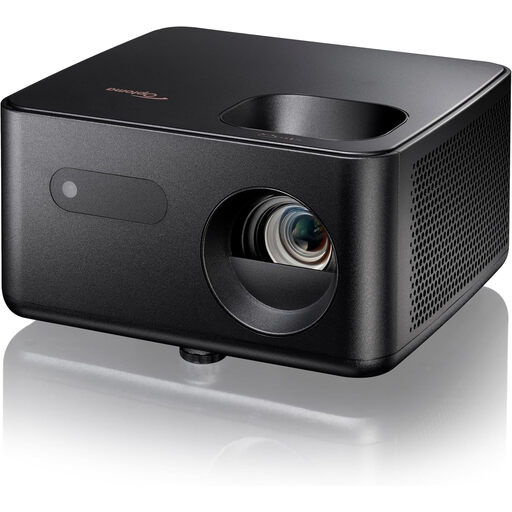
Optoma Photon Life PH31
A Full HD option to compare when working out the picture size and projection distance for your venue.
The product details list 1,500 lumens, 1.1× zoom, automatic vertical keystone correction, HDMI and a built-in speaker. The stated projection distance is 1.99–5.47 m.
View at Joybuy
 No image available
Optoma Photon Go
An option to compare if there’s limited space between the projector and screen; check that the desired picture size will work at that distance.
The product details list Full HD, 650 lumens, a throw ratio of 0.18:1, HDMI and two built-in speakers. Projection is specified from 26 cm; the weight is 1.72 kg.
View at Joybuy
Frequently asked questions
Does the community club need permission to screen a copyrighted documentary?
Yes. Permission from the rights holders is needed for a screening outside a strictly domestic setting. Auteursrecht.nl also gives a private club screening as an example. Check who can grant permission for your chosen title; buying a projector or owning a private copy of the film doesn’t give you that permission.
Can the club announce the documentary title as soon as it applies for a screening licence?
Not on the basis of an application alone: according to FilmService, a Standard Licence doesn’t allow the title to be announced publicly, while the Plus Licence is intended for this purpose. Check which arrangement and rights holder apply to the specific documentary.
How can you tell if a projector will fit in the available space?
Measure the picture width you want and the available distance from the lens to the screen, then compare these with the projection specifications for the exact model. If a standard model won’t fit, look into a short-throw model.
Is the built-in speaker powerful enough for a community hall?
You can’t tell from the stated power alone; test whether the dialogue is clear in your own venue. Epson lists a built-in 16 W speaker for the EB-FH54. If you’re using an external audio setup, also check that the projector and playback source have the audio connections you need.
What other costs might you need to consider besides the projector?
Depending on your setup, you may also need to budget for a screen, cables, external audio equipment and screening rights. FilmService’s 2026 price list states that fees for the Plus Licence are charged per screening. These terms don’t automatically apply to every documentary or licensing body.


