Use a USB stick for transferring files or as an extra copy, not as the only place for long-term storage. The Digital Heritage Network considers USB sticks unsuitable for long-term preservation, and the Digital Trust Center advises against relying on a single location or format for backups. Then choose a stick based on its connectors, file sizes and any access security you need. A stated read speed does not tell you how quickly files will be written to the stick.
Who is this guide for?
Volunteer handing over notes
If you transfer notes between different computers, check that the connector is suitable and that the transferred files can be read on the receiving device. The Digital Heritage Network advises archive managers to record details such as files, formats and the storage media used.
Manager of confidential notes
If your notes contain personal data, consider the risks of loss and unauthorised access, and decide how unlocking and recovery will be managed. The Dutch Data Protection Authority says organisations must determine appropriate security measures for themselves.
Manager of archive copies
If you want to find and restore notes later, treat a USB stick as one part of a wider preservation and backup approach. The Digital Heritage Network and the Digital Trust Center highlight the importance of using multiple storage formats or locations.
What should you look for when choosing?
First decide whether the stick is for transferring files, additional storage or access to confidential files. The table will help you identify the main purchasing priority for your archive.
| What to consider |
What should you look for? |
Who should pay extra attention? |
| Recoverable storage |
Record where the managed archive copy is stored and check that files can be restored from a separate backup. The Digital Heritage Network considers USB sticks unsuitable for long-term preservation. |
I want to be able to restore notes later, even if a transfer stick is lost. Around 36% of consumers put recoverability at the top of their purchasing priorities. |
| Confidentiality |
First establish whether the files contain personal data, then compare the unlocking and recovery process with your management plan. The Dutch Data Protection Authority cites the loss of a stick containing unencrypted personal data as a possible data breach. |
If notes contain personal data, I want to prevent loss from leading to unauthorised access. Around 29% of consumers prioritise confidentiality. |
| Connectors |
Check which USB-A and USB-C ports are available on the devices involved, and confirm that they support external storage. |
I want to transfer files between devices without first having to find a suitable connector. Around 21% of consumers give connectivity and file transfer their highest priority. |
| Capacity and transfer time |
Check your file sizes and expected growth. For the Samsung BAR Plus MUF-128BE3/APC, the stated 400 MB/s is a read speed, not a write speed. |
For scans or a growing collection, I want to know that the copy will fit and how long regular transfers will take. Around 14% of consumers put capacity and transfer time first. |
Common pitfalls
-
Treating a transfer stick as the permanent archive
The Digital Heritage Network considers USB sticks unsuitable for long-term preservation. If the stick contains your only copy, there is no separate copy to fall back on if it is lost or the device fails.
Decide which storage holds the managed archive copy, and use the USB stick only for transfers or as an additional copy.
Also set aside time to check periodically that files can be restored from the separate copy.
-
Comparing only the stated MB/s
The 400 MB/s stated by Samsung for the 128 GB BAR Plus MUF-128BE3/APC is a maximum read speed under the specified test conditions. This figure does not automatically tell you how quickly you can write files to the stick.
Check the write speed for the exact model if you regularly save files to it, and test your process with your own files.
-
Choosing a secure stick without a recovery process
Repeatedly entering the wrong unlock details can affect access to files on the Kingston and Verbatim models mentioned here. Verbatim also states that the Keypad Secure USB-C Drive must be reformatted after 20 failed PIN attempts.
Record who manages access and how files will remain available if a PIN or device is lost.
Allow time to manage passwords and security updates, as well as keeping a separate recoverable copy.
Relevant brands to consider
The features below apply to the specific product ranges and models mentioned. A brand’s inclusion here is not a recommendation of its entire range.
SanDisk
The Ultra Dual Drive Luxe is worth considering if you want to transfer files between devices with USB-A and USB-C ports. The Ultra Flair is a separate USB-A range.
- SanDisk describes the Dual Drive Luxe as having both connector types.
- The stated maximum speed for the Ultra Flair is not the write speed for a specific archive copy, nor does it mean the stick is suitable for long-term preservation.
Samsung
The BAR Plus is a USB-A option for transferring files on devices with that connector.
- Samsung states that the 128 GB BAR Plus MUF-128BE3/APC has a read speed of up to 400 MB/s under the specified test conditions.
- Read speed is not write speed. The usable capacity may be lower than the stated capacity after formatting.
Kingston
The IronKey Locker+ 50 G2 is designed for USB-A storage with hardware-based security for confidential files.
- Kingston specifies XTS-AES-256 encryption and separate administrator and user passwords.
- Kingston explains that repeatedly entering the wrong administrator password can result in the device being locked and cryptographically erased, so you should also set up a recovery process.
Transcend
According to Transcend, the JetFlash 930C combines USB-A and USB-C connectors for use with multiple devices.
- Transcend lists 128, 256 and 512 GB models, with maximum read and write speeds of 420 and 400 MB/s respectively.
- Transcend says that mobile devices need to support USB OTG. The stated maximum speeds are not measured performance for your archive copy.
Verbatim
According to Verbatim, the 128 GB Keypad Secure USB-C Drive has a keypad and hardware-based encryption.
- Entering a PIN on the device itself may suit a process where access is managed through a keypad.
- Verbatim states that 20 failed PIN attempts will lock the stick and require it to be reformatted. The manufacturer also reports that a security update is available; check the model and update instructions before use.
USB sticks for transferring files and keeping extra copies
This Joybuy selection includes USB sticks for transferring files and keeping defined additional copies of research notes. Choose a stick based on the connectors and capacity your devices and files require. Don’t use a USB stick as the only place for long-term storage.
 Image unavailable
Kingston DataTraveler Exodia, 128 GB
For a defined transfer from a device with USB-A. The product name specifies 128 GB, USB 3.2 Gen 1 Type-A and 2.0.
Don’t use this stick as your only long-term archive copy.
View at Joybuy
 Image unavailable
SanDisk Ultra Flair, 64 GB, USB 3.0
An option for transferring files on computers with USB-A. The product name specifies 64 GB and USB 3.0.
Don’t use this stick as your only long-term archive copy.
View at Joybuy
 Image unavailable
Kingston DataTraveler SE9 G3, 64 GB, USB 3.2 Gen 1
For a defined copy on a device with USB-A. The product name specifies 64 GB and 220 MB/s, but does not say whether this is a read or write speed.
Don’t use this stick as your only long-term archive copy.
View at Joybuy
 Image unavailable
Kingston DataTraveler SE9 G3, 512 GB, USB 3.2 Gen 1
The larger stated capacity may suit a bigger defined copy. The product name specifies 512 GB and 220 MB/s, but does not say whether this is a read or write speed.
Don’t use this stick as your only long-term archive copy.
View at Joybuy
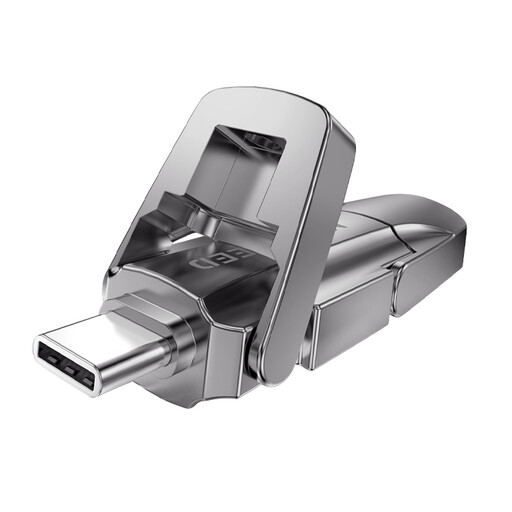 Image unavailable
MOVESPEED YSUYVP10-256GSR, 256 GB, USB 3.2 Gen 1 and Type-C
The dual connector is designed for transfers between devices with different port types. The product name specifies 256 GB and a read speed of 1090 MB/s.
Check that the receiving device supports external USB storage, and don’t use the stick as your only long-term archive copy.
View at Joybuy
Frequently asked questions
Is a USB stick enough as the only archive for your research notes?
No, not if you want to preserve them long term. The Digital Heritage Network considers USB sticks unsuitable for long-term preservation. Record your files and formats, and arrange storage and checks beyond the stick.
How can you check that notes can be retrieved after copying?
Open the files on the receiving device and periodically test that you can restore a backup. The Digital Trust Center advises testing backups in practice; this is guidance, not a specific legal requirement for USB sticks.
Should notes containing names be stored on an encrypted stick?
If an organisation processes personal data, it must determine appropriate security measures based on the risks. The Dutch Data Protection Authority cites the loss of a stick containing unencrypted personal data as a possible data breach, but the page mentioned does not require a specific type of encrypted USB stick.
Does the Archives Act automatically apply to a community archive?
The name ‘community archive’ alone does not mean that it does. The Dutch Data Protection Authority’s guidance on the Archives Act concerns the archiving of government information; you cannot conclude from this that the Act automatically applies to notes held by an unspecified community archive.


