What should you look for when buying?
Start with the room and the material you’ll be showing. That way, a lumen figure or maximum image size won’t make the decision for you.
| What to consider |
What to look for |
Who is this important for? |
| Daytime visibility |
Assess the light falling on the screen, the image size and the stated light output in the relevant mode. If possible, test it with your own material. |
If you sometimes project in a bright room, you’ll want to know whether visitors can follow the image from their seats. Around 36% of consumers give daylight visibility top priority. |
| Detail and text readability |
Compare the native resolution with your photos and captions; check small text from the back row. |
If names, dates and details in photos need to remain legible, you’ll want to match the projector to your archive material and viewing distance. Around 29% of consumers put these details first. |
| Setup and playback |
Measure the distance from the lens to the screen and decide on the image width. Check the zoom, connections and playback methods supported by the exact model. |
If you set up the display at different venues, you’ll want to know whether the projector will fit and connect to your archive source. Around 21% of consumers prioritise this practical setup. |
| Maintenance over time |
Compare the stated light-source life for each mode and, for lamp models, check whether the lamp can be replaced. Also review the warranty terms and purchase cost of the specific offer. |
If you want to know what maintenance to expect, weigh up how often you’ll use it against the terms for the specific model. Around 14% of consumers put maintenance first. |
Projectors at Joybuy
These Joybuy projectors are options to compare for archive images and presentations. Consider the resolution, setup and light on the screen.
 No image available
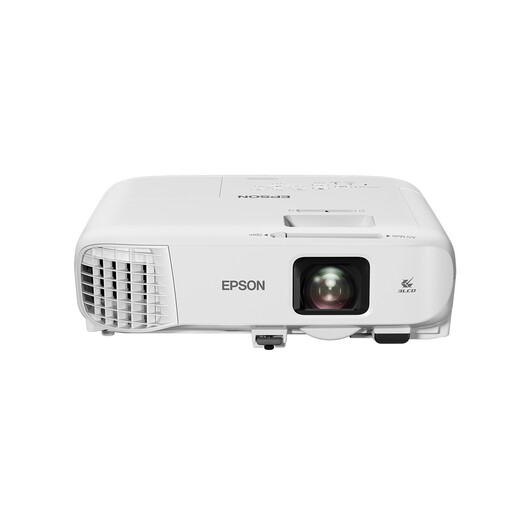
Epson EB-992F
An option to compare if Full HD and flexible positioning suit your archive presentations.
The Joybuy product listing specifies Full HD 1920 × 1080, 4.000 ANSI lumens, 3LCD, 1,6× optical zoom and HDMI connections. The stated lamp life of up to 17.000 hours applies in ECO mode.
View at Joybuy
 No image available
Yaber K2s
An option to compare if you’re looking for native 1080p and automatic setup adjustments.
Joybuy lists native 1080p, autofocus, automatic keystone correction, and HDMI and USB for external devices. The product name also mentions 4K support; this is not the same as native 4K resolution.
View at Joybuy
 No image available
Optoma UZ38X 4K UHD Dual-Laser
A laser option to compare if you’re considering a setup that will be used for longer periods or more frequently.
The Joybuy product listing specifies native 4K, 3.800 lumens, 1,3× optical zoom and two HDMI inputs. Assess the room’s lighting conditions separately; these specifications alone don’t predict daytime visibility.
View at Joybuy
 No image available
JMGO N1S Ultra 4K Triple Laser
An option to compare if 4K resolution and flexible positioning are important for your setup.
Joybuy lists 4K UHD, 3.000 ANSI lumens and an adjustable gimbal. Compare the stated light output with the conditions where the screen will be positioned; the lumen figure alone can’t confirm daytime visibility.
View at Joybuy
 No image available
Epson EB-W53 WXGA
An option to compare if you mainly show large archive photos and simple slides, and small text is less important.
Joybuy lists 4.000 ANSI lumens, two HDMI ports and a weight of 2,5 kg. Check the exact native resolution with Epson before choosing this model for fine captions.
View at Joybuy
Frequently asked questions
Can you project a community archive onto a screen during the day?
Yes, but visibility depends on the light falling on the screen, screen size and setup. Where possible, control the light on the screen, and don’t expect a lumen figure alone to compensate for direct sunlight.
How can you check whether the projector will work in the room?
Measure the distance from the lens to the screen and decide on the image width you want. Compare these measurements with the throw ratio and zoom of the exact model; also check that the image source will work with an available connection or supported playback feature.
Do you need a laser projector for occasional screenings?
Not necessarily. It depends on how often and how long you’ll be projecting, as well as the terms for the specific model. Optoma states a laser light-source life of 30.000 hours for the ZH450; compare this manufacturer specification with the mode-dependent lamp life of lamp models and the specific purchase and maintenance terms.
Who can help if a product develops a fault after purchase in the Netherlands?
Contact the retailer if the product is faulty. According to the Government of the Netherlands, there is no fixed statutory warranty period for all products in the Netherlands; any manufacturer’s warranty is in addition to your statutory rights.
Can you show archive photos and films at a public community event without checking first?
No. For each protected work, check whether you have permission or an applicable licence. The Government of the Netherlands explains that copyrighted photos and films cannot be made available to the public without permission. Auteursrecht.nl distinguishes between screenings in a strictly domestic setting and those elsewhere; the fact that an archive item is old or available online does not, by itself, mean it is free of copyright restrictions.


