Start with the furthest seat, the smallest text or finest photographic detail, and the available screen height. AVIXA highlights that viewing distance and image height together determine visibility. Then check separately whether the throw distance and room lighting suit your chosen setup. A standard projector may be suitable if you have enough space to position it away from the screen. Ultra-short-throw projection can be a solution when space in front of the screen is limited, but it won’t automatically make small captions readable.
Who is this guide for?
Archive presenter with an audience seated at the back
You show captions, maps or document details to visitors seated a long way from the screen. The screen height and the smallest information that needs to be visible help determine what to look for. AVIXA explains the relationship between the furthest viewing position and image height.
Organiser of a well-lit community hall
You can’t switch off all the room lights, so you need to consider image size and lighting conditions together. Epson Netherlands, BenQ and ViewSonic Europe publish model specifications, but visibility also depends on the room and the screen.
Fitting out a compact exhibition space
You have limited space between the projector and the screen. In that case, a short-throw or ultra-short-throw projector may be important; check the lens range for your specific setup. BenQ Netherlands explains how throw distance and screen size need to work together.
What should you consider when choosing?
Standard projection
Suitable when: you can position the projector at a measured distance from the screen and the desired image size falls within the lens range.
Bear in mind: extra space for positioning won’t solve the problem if the lens range, image size and room lighting aren’t right for one another.
Ultra-short-throw projection
Suitable when: the projector needs to be close to the screen or positioning it further into the room would be impractical.
Bear in mind: check the screen size and visibility from the rearmost seat separately. Epson lists a maximum of 150 inches for the EB-775F, but that doesn’t guarantee that small text will be readable.
Measure the viewing distance from the audience to the screen and the distance from the projector lens to the screen separately. Use the table to match the main checks to your situation.
| What to consider |
What should you check? |
Who is this important for? |
| Readability at the back |
Measure the distance to the furthest viewing position and test the smallest relevant text or details at the intended image height using actual archive files. |
If I want visitors at the back to be able to read captions or details on maps, I need to look beyond the screen diagonal alone. Around 36% of consumers name readability at the back as their top priority. |
| Visibility with the room lights on |
Assess the image with the lights that will remain on during the presentation, and compare the brightness specifications of the exact models. |
When the room lights can’t be switched off, I want to know how the image will look at the planned screen size. Around 29% of consumers prioritise visibility with the room lights on. |
| Throw distance and positioning |
Measure the distance from the lens to the screen and the image width; check the range of the exact projector in the manufacturer’s documentation. |
If I have limited space for positioning, the projector needs to produce the desired image size from that spot. Around 21% of consumers give the available throw distance and positioning top priority. |
| Playback and maintenance |
Check the connections or file playback, the maintenance instructions and the terms for the exact model. |
For regular presentations, I want to be able to play my archive files conveniently and know what maintenance the projector requires. Around 14% of consumers put playback, connections and maintenance at the top of their list. |
Common buying mistakes
-
Confusing viewing distance with throw distance
The distance between the rearmost visitor and the screen partly determines how large details need to appear. The distance from the lens to the screen determines whether the projector can produce the desired image size from its position.
Measure both distances separately before comparing models. You may otherwise find that you need a different position, mount or screen size.
-
Assuming the maximum screen diagonal guarantees readable text
A large image doesn’t automatically make a small caption easy to read. Visibility also depends on image height, viewing distance and the content of the archive material.
Test the smallest relevant caption at the planned image height from the furthest viewing position. If necessary, adjust the captions, presentation layout or screen setup.
-
Assuming the light source’s rated lifespan means maintenance-free use
A stated lifespan for a laser or LED light source applies to that light source; it doesn’t guarantee the lifespan of the entire device.
Read the maintenance instructions and warranty terms for the exact model alongside the light source’s rated lifespan.
-
Assuming archive material can be shown without checking the rights
Just because material is held in an archive doesn’t automatically mean you can show it freely to the public. Copyrighted material may be subject to usage rights.
Check the rights holder, licence and any applicable exception for each work. If identifiable people appear, also assess which privacy rules apply to showing it.
Brands to consider
Epson
Epson describes the EB-L260F as a standard Full HD laser projector and the EB-775F as an ultra-short-throw projector suitable for displaying exhibition information, among other uses.
- Epson lists 4600 lumens and dual HDMI for the EB-L260F. For the EB-775F, Epson specifies 4100 lumens, Full HD and direct USB playback.
- These are model specifications, not measurements taken in your room. Check the throw distance, image size and file compatibility for your chosen setup.
BenQ
BenQ describes the LH730 as a Full HD LED projector for meeting room presentations.
- BenQ lists 4000 ANSI lumens and two HDMI inputs for the LH730.
- Check that the lens range and source file are suitable for your screen and room. BenQ’s claims about colour reproduction are manufacturer claims, not an independent assessment of archive photographs.
ViewSonic
ViewSonic Europe describes the LS740HD as a Full HD laser installation projector for public spaces, among other uses.
- For the European LS740HD version, ViewSonic Europe lists 5000 ANSI lumens and 1.3× optical zoom.
- When buying, check the specifications of the actual European version on offer and whether the zoom and throw distance suit your room.
Optoma
Optoma describes the ZH450 as a compact Full HD laser projector for standard installation.
- Optoma lists 4500 lumens and 1.6× zoom for the ZH450.
- Check the throw distance, the version you’re considering and the service terms. A manufacturer’s stated light source lifespan doesn’t, on its own, tell you about maintenance for the entire device.
Projectors at Joybuy
These Joybuy products are projectors you can consider for an archive presentation. Before deciding whether a model suits your setup, check its screen size, viewing distance, throw distance and the conditions in your room.
 No image available
Optoma UZ38X 4K UHD Dual-Laser Projector
Consider this projector if you’re planning a standard setup; first check that the throw distance suits your screen.
The product name lists 4K UHD, 3800 lumens, 1.3× zoom and a 15 W speaker.
Joybuy
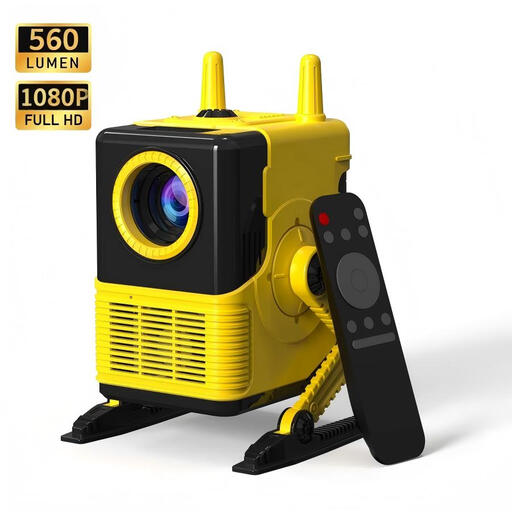 No image available
XBJ H8 Portable LCD Home Projector
If you want to show presentations from a connected source, check that the listed connections and source file suit the way you plan to use it.
The product name lists 1080P support, HDMI and USB, Wi-Fi and Bluetooth 5.0, 560 lumens and a 1500:1 contrast ratio.
Joybuy
 No image available
Video projector with built-in apps and Wi-Fi 6
Before use, check that the projector supports the files and source devices you plan to use for your archive presentation.
The product name lists a screen size of 50–200 inches, 50%–100% digital zoom, Bluetooth and connection options including HDMI and USB.
Joybuy
 No image available
XBJ TYYK8QBS Portable Projector
If you want to position the projector in different directions, check that the rotating mount suits your chosen setup.
The product name lists a 360° rotating mount, native 1080P, 4K decoding, Wi-Fi 6 and Bluetooth 5.4.
Joybuy
 No image available
JMGO N1S Ultra 4K Triple Laser UHD Projector
Check the throw distance, screen size and room lighting before deciding whether this projector is right for your archive presentation.
Joybuy
Frequently asked questions
Will the largest possible screen automatically be readable for visitors at the back?
No. A larger screen doesn’t guarantee that small text will be readable. Match the active image height to the furthest viewing position and the smallest detail visitors need to make out, then test it with actual archive files. The throw distance from the lens to the screen is a separate check.
How do I check the setup before mounting the projector?
Measure the available distance from the lens to the screen and the desired image width, then check the range of the exact model. Next, assess the image with the room lighting and the archive files you actually plan to use.
Do I need to play archive photographs from a laptop?
Not always; it depends on the projector and the files. Epson lists HDMI connections for the EB-L260F and direct USB playback for the EB-775F, among other features. Check which connections and file formats the model you choose supports for your presentation.
What does a laser or LED projector’s stated lifespan mean for maintenance?
That figure applies to the light source of the specific model; it doesn’t guarantee the lifespan of the entire device. Also consult the maintenance instructions and the separate warranty terms.
Can I simply show visitors photographs or videos from a community archive?
Not just because the material is held in an archive. The Dutch Government says permission from the creator is needed to use copyright-protected photographs and films. Check the rights holder, licence and any applicable exception for each work. If identifiable people appear, also consider which privacy rules apply.


