For looking at reproductions alongside text, a colour tablet is a sensible place to start. Choose a more compact screen if you often hold your device, or a larger one if you mainly view full pages at a table. If you mostly read text, a colour e-paper device could be suitable, but check beforehand that your chosen illustrated books are available on it. If you want to take notes, also check that the stylus and reading app support the features you need.
Who is this guide for?
Reader of art plates
You look at images alongside explanatory text and weigh up a portable colour screen against the extra space needed to view full pages. The Consumers' Association also recommends considering screen reflections and how comfortable the device feels to use.
Reader who takes notes
You read source material and want to highlight or write at the same time. The file format and your reading app's features matter as well as the stylus; Samsung describes stylus use on the Galaxy Tab S10 range.
Reader of long texts
You read for long periods, so you’re considering either a handy device or a paper-like screen. The Online Library warns that books with lots of images may only be readable in the app or online.
What should you look for when choosing?
First decide whether images, note-taking or long reading sessions matter most to you. Then check that the screen size and available reading method suit your books.
| What to consider |
What should you check? |
Who is this important for? |
| Colour and detail |
View a representative reproduction under similar lighting and look out for reflections. Don’t judge colour reproduction by resolution alone. |
If you look at art plates alongside text, you’ll want to see how much detail remains legible to you. Around 36% of consumers give colour and detail the highest priority. |
| Note-taking |
Check which stylus is compatible with the exact model and whether it’s included. Try highlighting and saving notes in the app or PDF file you plan to use. |
If you want to highlight passages in source material or make notes, both the stylus and reading app matter. Around 29% of consumers prioritise making notes on reading material. |
| Portability |
Think about whether you’ll mostly read at a table or hold the tablet. Compare the screen size, weight and reflections with the reading material you use. |
If you read for long periods or take your tablet with you, portability may matter more than seeing a whole page at once. Around 21% of consumers prioritise a device that’s comfortable to hold and carry. |
| Book access and additional costs |
Check the permitted reading method for each title, and which app or accessories you’ll need. Don’t assume that every book can be accessed in the same way. |
If you want to make sure your chosen books work without unexpected extra steps or purchases, check each title and its reading method before you choose. Around 14% of consumers make access and additional costs their main priority. |
Things to watch out for when buying
-
Choosing a screen based on resolution alone
The stated pixel resolution doesn’t tell you how accurately a reproduction’s colours will appear or how reflective the screen is. The Consumers' Association also recommends considering reflections and how comfortable the screen and device feel to use.
View a representative image and page of text on the screen under lighting similar to where you’ll be reading.
-
Assuming you can annotate every borrowed book
A tablet’s stylus support doesn’t automatically mean you can write in every borrowed book or export your notes.
Check what’s included with the model you’ve chosen, then try the features you need in your reading app or with your file. Some models may require you to buy a stylus separately.
-
Choosing colour e-paper without checking your books
The Online Library says that books with lots of images may only be readable in the app or online. So a screen chosen mainly for reading text won’t necessarily suit the reading method available for every title.
Look up the books you want and check where you can read each one.
Brands to consider
Apple
The Dutch 11-inch iPad (A16) is a compact colour tablet for viewing text and images.
- Apple lists a weight of 477 grams for the Wi-Fi model, which comes with 128 GB of storage.
- Apple lists support for Apple Pencil (USB-C) and Apple Pencil (1st generation). Check which stylus suits your needs and whether you’ll need to buy it separately.
Samsung
The Galaxy Tab S10 Lite and Galaxy Tab S10 FE are separate 10.9-inch ranges for those considering using a stylus too.
- Samsung says the Galaxy Tab S10 Lite comes with an S Pen and describes stylus use on the Galaxy Tab S10 FE.
- Stylus support doesn’t prove that you can annotate every borrowed book. Also check that your reading app offers the features you need.
Lenovo
The Idea Tab Pro Gen 2 is designed for those who want more screen space for art plates and full pages when reading at a table.
- For the Dutch 128GB version, Lenovo specifies a 13-inch screen with a resolution of 3504 × 2190 pixels.
- Check the exact version and what’s included in the bundle. The Consumers' Association points out that larger tablets may be less practical to hold for long periods.
BOOX
The Note Air4 C is a colour e-paper device for those who mainly want to read and write.
- BOOX describes a 10.3-inch Kaleido 3 colour e-paper screen and Android 13.
- Check that the books and reproductions you want to view are suited to this screen and available through your preferred reading method.
Joybuy tablets for reading and note-taking
These tablets are designed for reading on a portable screen, viewing pages and taking notes. Check which of the features and accessories mentioned suit your needs for each model.
 No image available
Lenovo IdeaTab, MediaTek Dimensity 6300, 8 GB/128 GB
An 11-inch screen is one option for reading text and viewing images on a portable-sized device.
The product name lists an IPS screen, 90 Hz, 500 nits and Android 15. According to the product information, a charger isn’t included as standard, so check what comes in the bundle.
Joybuy
 No image available
TECLAST P50, 11 inch, 128 GB, 4G LTE
The 11-inch size offers a compact screen for reading text and viewing images.
The product name lists Android 16, a 90 Hz IPS screen, 32 GB RAM (6 GB + 26 GB virtual) and 128 GB of storage.
Joybuy
 No image available
iFLYTEK AINOTE 2, 10.65 inch E-Ink
An E-Ink screen could suit you if you’re mainly looking for a device to read text and take notes.
The product name lists a thickness of 4.2 mm and speech-to-text features. Check that the screen and reading method are suitable for the illustrated titles you want to use.
Joybuy
 No image available
TECLAST ArtPad Pro, 12.7 inch, 2K, 256 GB
The 12.7-inch screen gives you more room for pages and reproductions than a more compact size.
The product name lists 20 GB RAM (8 GB + 12 GB virtual), 256 GB of storage and an included stylus. A larger size may be less practical to hold for long periods.
Joybuy
 No image available
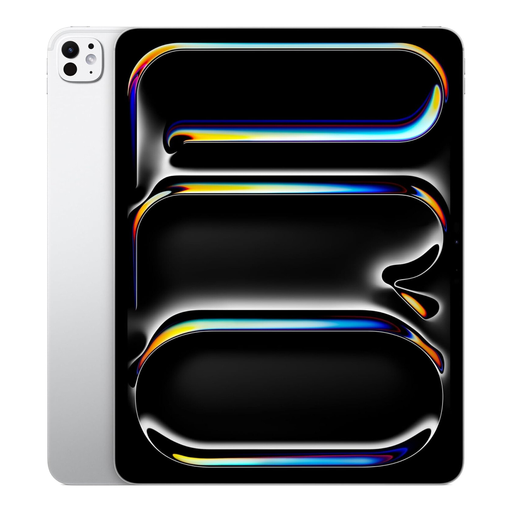
Apple 13-inch iPad Pro (M5), Wi-Fi, 2 TB, silver
A 13-inch model could suit you if you usually read at a table and want room for larger pages.
The product name lists Wi-Fi and 2 TB of storage. Its large size may make it less practical to hold for long periods.
Joybuy
Frequently asked questions
Can I read every art book from the Online Library on an e-reader or e-paper device?
No. Check the information page for each title. The Online Library says that books with lots of images may only be readable in the app or online; this isn’t a general statement about all art books or e-paper devices.
How do I get started with digital library books on a tablet?
First check whether your chosen title is available through the reading method you want to use. According to the Online Library, you can search for, download and read books through its app. To borrow books, you’ll need to be a member of the Online Library or your local library.
What about the guarantee when buying in the Netherlands?
According to the Dutch Government, you’re entitled to a product that works properly, and if there’s a fault you should generally contact the seller. The Netherlands doesn’t have a fixed statutory guarantee period of exactly two years; what you can expect depends on factors including the product, its price and the information provided.
Can I share scans or images from an art book with others?
According to the Dutch Government, you’re allowed to make a copy for personal use at home, but you can’t share it or make it public. Also check the terms of the relevant library or digital source; this doesn’t give you permission to publish the material.


