What should you look for when choosing?
With collage photography, straight edges, even lighting and visible details depend not only on the camera body, but also on your setup and choice of lens.
Your existing smartphone
Choose this if: you're mainly creating a digital portfolio and want to see what your current device can do first.
The trade-off: you won't need to buy a separate camera, but a different phone won't automatically fix an unsuitable lighting setup.
Compact camera with a fixed lens
Choose this if: you want to use a separate camera without changing lenses.
The trade-off: the lens offers less scope to expand your setup; check that it can frame both the whole panel and the details you want to capture.
Mirrorless camera with a suitable lens
Choose this if: you photograph panels regularly, want to edit RAW files or need to choose a lens for close-up details.
The trade-off: you'll need to check the lens mount and what's included in the kit; additional lenses may mean extra equipment and cost.
| What to consider |
What should you check? |
Who is this most important for? |
| Straight, evenly lit full-panel shot |
Check that the camera and panel can be positioned parallel to each other, the whole piece fits in the frame and the lighting doesn't create any obvious hotspots. |
Is your main priority to capture the whole panel straight and clearly? Around 36% of consumers say a straight, evenly lit full-panel shot is their top priority. |
| Colour and reflections |
Take a test shot using a single type of light. If you're buying a new camera, check that the exact model supports RAW and that you can process the files. |
If you need to show colours and shiny areas clearly across several pieces, colour reproduction and reflections are the main concern for many consumers: around 29%. |
| Layers and small details |
Try the framing you want and check the angle of view and focusing distance of the exact lens, not just the camera body's specifications. |
Do you also want to show small collage elements individually? Around 21% of consumers put the visibility of layers and details first. |
| Portability and complete kit |
Compare what's included in the exact kit with the lens you need and where you'll be taking your photos; test your current device first. |
If you want an easy-to-handle setup without unnecessary extras, prioritise simplicity and a complete kit; this applies to around 14% of consumers. |
Joybuy product picks
Below are Joybuy product picks for cameras and photography. Check whether the features listed for each model suit your collage panel and portfolio.
 No image available
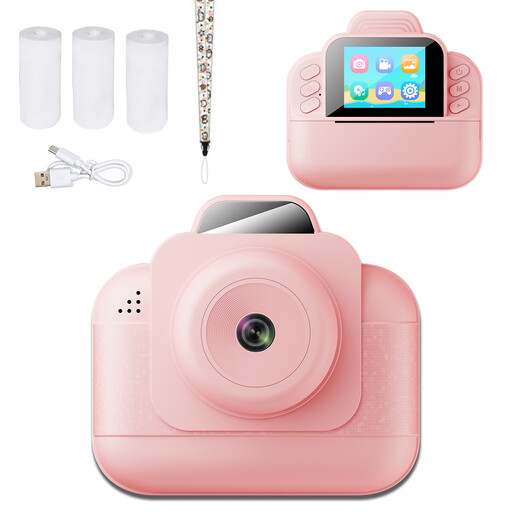
Instant Print Kids Camera
The listed features include saving digital photos and instant black-and-white thermal printing; check whether the digital files meet your portfolio requirements.
The product title mentions a 2.4-inch HD screen and 1080P video. The product information states that photos can be saved to a TF card.
View at Joybuy
 No image available
DJI Pocket 3 Camera with Ulanzi Storage Bag
The product information describes a compact handheld camera with a storage bag, for anyone who wants to take a camera along when they're out and about.
View at Joybuy
 No image available
NAXSIR Digital Camera, 64 MP, 18x Digital Zoom
The product title mentions digital photos and 18x digital zoom; take a test shot to see whether the framing and image quality suit your work.
The title also mentions 4K Ultra HD, autofocus and an included 32 GB memory card.
View at Joybuy
 No image available
DJI Osmo Pocket 3 Creator Combo + Ulanzi VL49 RGB LED Video Light
This bundle combines a DJI camera with a Ulanzi RGB LED light; take test shots to see how the light falls on shiny collage elements.
The product information lists a handheld camera with a 1-inch CMOS sensor and a Ulanzi VL49 RGB LED light.
View at Joybuy
 No image available
DJI Osmo Pocket 3 Creator Combo
The product title presents this combo as suitable for photography and video; check whether the features listed meet your portfolio needs.
The title mentions 4K/120fps video and 3-axis stabilisation. The product information lists a 1-inch CMOS sensor and fast focusing.
View at Joybuy
Frequently asked questions
Do you need to buy a camera straight away for a digital collage portfolio?
No. First, take a test shot with your existing device, keeping it straight and using even lighting. Check the colour, edges and details at the size your portfolio will be viewed; Printbeat explains how lighting and the angle of the shot affect the result.
How should you set up a collage panel for a full-panel shot?
Position the camera directly opposite the panel and aim for even lighting across the surface. Avoid shooting from below, mixing different types of light or using flash directly on the work; adjust the lighting if you want to show shadows that bring out the texture.
Do you need RAW, and how should you store your photos?
RAW is useful if you want to edit the colour and exposure yourself, but it requires more storage space and suitable software. Keep the original file alongside a version exported for your portfolio, and check that the exact camera model supports RAW.
Should you buy extra cover for a camera in the Netherlands?
Not necessarily. According to the Dutch government, there is no fixed statutory guarantee period for all products in the Netherlands, and the retailer is your point of contact if a product is faulty. Compare the terms of any paid extra cover with the protection you already have.
Can you publish photos of your collage in an online portfolio?
According to Dutch government information, copyright automatically applies to your own original work. If the collage includes photographs or other copyright-protected work belonging to someone else, check before publishing it publicly whether you need permission or whether an applicable exception applies; photographing the collage doesn't remove the rights attached to the material used.


