Who should consider this choice?

Creator with a colour-critical portfolio

You want to assess the colours of different collages consistently and are happy to check the exposure and white balance. Canon Netherlands describes RAW as a format that lets you adjust the white balance afterwards.

Creator capturing fine details

You want to show paper layers, small text or edges sharply, and have room to position the camera straight and steadily in front of the whole panel. Kunstwerkt highlights the importance of careful set-up when photographing art.

Creator taking quick overview shots

You occasionally document a piece and want to see whether a carefully taken photo with your existing camera captures enough detail. Kunstwerkt recommends, among other things, indirect daylight and avoiding distracting shadows.

What should you look for when choosing?

Your existing smartphone camera

When: if you only need an occasional overview shot for personal use. First try indirect daylight, focusing on the panel and setting up your camera straight and steadily.

Trade-off: avoid digital zoom and check the file at the size you intend to use it; a smartphone is not automatically suitable for colour-critical reproduction.

A mirrorless camera

When: if you regularly photograph collages and value RAW files, lens choice and control over white balance.

Trade-off: check which lens is included in the kit and whether it suits your panel and available shooting distance. The camera body alone does not determine whether the shot is straight, evenly lit or colour-accurate.

Key consideration What should you check? Who should pay extra attention?
Even lighting and reflections Check the whole panel for glare and shadows. Kunstwerkt recommends indirect daylight, switching off distracting artificial lights and avoiding direct flash. If I want to photograph the panel without distracting glare, I start with the lighting set-up. Consumers whose main priority is controlling light and reflections would account for around 36% here.
Checking colours Check whether the exact model saves RAW photos, and photograph in as consistent lighting as possible. Compare the shot with the panel itself, not just with the camera screen. For my portfolio, I want to compare colours and adjust them if needed; consumers who prioritise colour control would account for around 29% here.
Sharpness and straight edges Check that the whole panel fits straight in the frame and that the relevant small details are sharp in the final file. Compare the lens and kit, not just the camera body. If I want to assess small text or paper layers, sharpness and straight panel edges are my priority; consumers who prioritise detail and geometry would account for around 21% here.
A straightforward process Decide what you need the file for and test your existing camera first. For a mirrorless camera, check which lens and other necessary components are actually included in the kit. I only take an overview shot now and again and don't want to buy extra equipment unnecessarily; consumers who prioritise simplicity and keeping additional purchases to a minimum would account for around 14% here.

Common buying mistakes

  • Thinking more megapixels will solve window reflections

    A reflection or harsh shadow will still show up if you only replace the camera. The lighting set-up also affects how evenly the panel can be seen.

    First, try indirect light and adjust the position of the panel. Then check whether your current camera captures enough detail.

  • Confusing a creative colour setting with accurate documentation

    A colour preset is not a measurement of the original. The colours in the photo can also change because of the lighting and white balance.

    Keep the lighting as consistent as possible and consider RAW if you want to check or adjust the white balance afterwards.

    Post-processing can take extra time as you check and correct files.

  • Comparing camera bodies only

    With a mirrorless camera, the lens and shooting distance also help determine whether the whole panel will fit in the frame.

    Check exactly what's included in the kit and how much space you have before choosing a model.

    A suitable lens may need to be bought separately.

Camera brands to consider

Canon

The EOS R50 is a compact APS-C mirrorless camera worth considering if you want to choose lenses to suit your available shooting distance.

  • Canon Netherlands lists 24.2 effective megapixels and an RF mount for the EOS R50.
  • Canon does not list in-body image stabilisation for this model. Check the lens and kit contents separately; these specifications are not an assessment of art reproduction.

FUJIFILM

The X-S20 is worth considering if you're looking for a mirrorless camera that captures RAW photos and offers a choice of X-mount lenses.

  • FUJIFILM specifies a 26.1-effective-megapixel APS-C sensor and 14-bit RAW in RAF format for the X-S20.
  • These specifications do not show that colours will match the collage panel without controlled lighting.

Sony

The ZV-E10 II is an alternative with interchangeable E-mount lenses and RAW photos; for this purpose, assess the model based on its still photography features.

  • Sony Netherlands lists around 26.0 effective megapixels for photos, with RAW capture in ARW format.
  • The stated video capabilities say nothing by themselves about the quality of a reproduction photo of a stationary panel.

Nikon

The Z50II is a mirrorless camera option to compare if you also want to consider Nikon lenses and handling.

  • Nikon describes features for this model including adjustable Picture Controls and an electronic viewfinder.
  • A creative colour preset is no guarantee of accurate reproduction. Compare the lens and photo files that suit your way of working.

Cameras at Joybuy

These cameras are options to compare when photographing a collage panel; check the listed features, kit contents and suitability for your shooting set-up.

KOMERY G7-A digital camera, pink

KOMERY G7-A digital camera, 80MP, 18X zoom, pink

If you want to frame the panel from a particular distance, the stated zoom may be worth comparing; check that the whole panel fits in the frame sharply and straight.

The product title lists 80MP, 18X zoom and 4K video. These claims do not show how the camera captures collage colours or fine details.

View at Joybuy
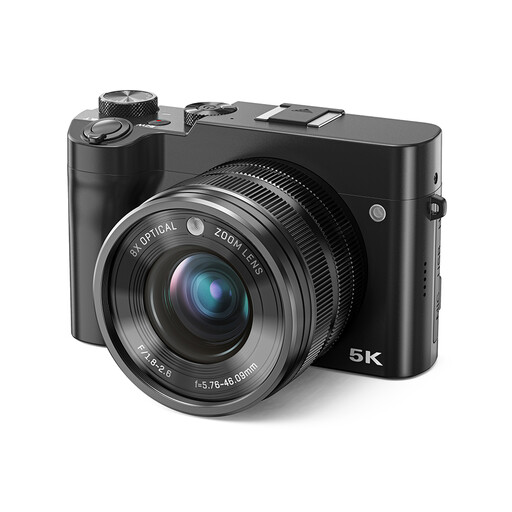
Songdian digital camera, 5K, 64MP, black

Songdian digital camera, 5K, 64MP, black

When comparing cameras for a panel photo, check that the lens and shooting distance suit the size of your collage.

The product title lists 8X optical zoom, 5K, 64MP and a dual lens. The details in the title are not a measure of colour reproduction or sharpness on a collage panel.

View at Joybuy
Songdian 5K digital camera, 56MP, black

Songdian 5K digital camera, 56MP, black

When comparing cameras for a collage panel, it's worth checking whether you can frame the whole piece straight and capture the relevant details sharply.

The product title lists 56MP, 10X optical zoom and a front and rear camera. These claims do not prove the camera's reproduction quality for collage colours or fine details.

View at Joybuy

Frequently asked questions

How should I position the collage panel and camera by a window?

Ideally, use indirect daylight and position the camera straight and steadily in front of the panel. Kunstwerkt recommends avoiding distracting reflections and harsh shadows; angled light can be suitable if you specifically want to show texture in detail.

Should I use RAW for this shot?

Not for every overview shot. RAW can be useful if you want to adjust the white balance afterwards, but it won't correct a badly positioned camera, uneven lighting or reflections.

What should I check about the cost and warranty of a camera kit?

Check what's actually included in the kit, especially which lens comes with it. According to the Government of the Netherlands, if a product is faulty, the seller must provide a solution; in the Netherlands, there is no fixed legal two-year warranty period for every product.

Can I publish a photo of my collage online?

According to the Government of the Netherlands, as the creator you automatically hold the copyright to your own artwork in the Netherlands. If your collage contains protected photos, text or other work by someone else, owning the collage does not automatically give you permission to make that material public; check the rights or ask for permission.

Do I have a cooling-off period if I buy a camera online?

According to the Government of the Netherlands, when you buy from a business at a distance, you generally have a 14-day cooling-off period in the Netherlands. This does not automatically apply to purchases from a private seller.
