
Programmers who use keyboard shortcuts
You write code with a debugger open and want to access symbols and editor commands using your own keyboard layout. Microsoft Visual Studio Code explains how to adapt keyboard shortcuts to the layout you use.


Start with a layout that gives you easy access to the symbols and debugging commands you use in your operating system and editor. A compact keyboard frees up desk space, programmable keys let you customise your setup, and a split model lets you adjust the position of each half. Each option involves different trade-offs in terms of keys, settings and getting used to the layout.
You write code with a debugger open and want to access symbols and editor commands using your own keyboard layout. Microsoft Visual Studio Code explains how to adapt keyboard shortcuts to the layout you use.
You want to make room beside your keyboard for a mouse or other work essentials, and may be able to do without a dedicated number pad. CHERRY states that the STREAM KEYBOARD TKL does not have a separate number pad.
You want to vary the distance or position of your hands during long periods of screen work. Arboportaal explains that this work can involve repetitive movements and static strain; a different keyboard does not replace a suitable workstation or the need to vary your activities.
First, check that the physical layout suits the symbols and shortcuts you use every day. Then decide how much space you need and whether customisable keys, a split design or quiet typing would make a difference to you.
| What to consider | What should you check? | Who should give this more weight? |
|---|---|---|
| Code symbols and keyboard shortcuts | Check the key legends, system layout and combinations in your own editor and debugger. | If I switch frequently between code symbols and debugger commands while programming, I want to access those combinations easily on my own computer. Around 33% of consumers put accessibility at the top of their list. |
| Desk space | Measure the space available and decide whether you regularly need a separate number pad. | If I want to keep space free for my mouse and other work essentials, I can consider whether I can do without a dedicated number pad. Around 27% of consumers give desk space top priority. |
| Hand position | Check that both halves will fit and that the distance and angle suit your workspace. | If I want to adjust the position of my hands, I look at how the two halves are arranged and how much space is available. Around 20% of consumers prioritise adjustability. |
| Noise and connection | Check how noisy the exact model is and whether its connection is compatible with your computer. | If I work in a shared space, I want keys that suit my surroundings and a connection that my computer supports. Around 20% of consumers prioritise a quiet typing experience and a suitable connection. |
How easily you can use keyboard shortcuts may depend on the layout used by your system and editor.
Test your most important code symbols and commands using the layout you’ll actually work with.
According to CHERRY, the STREAM KEYBOARD TKL does not have a separate number pad. This may matter if you regularly enter numbers.
Before you buy, consider how often you use a number pad and whether a separate one would fit in your workspace.
Changing the position of the keyboard halves does not automatically change the rest of your workstation or how often you take breaks from screen work.
Assess your entire workstation, vary your activities and seek appropriate professional advice if discomfort persists.
Layouts and included accessories can vary between versions. A product specification for another country does not necessarily tell you which version you’re looking at.
Before buying, check the exact layout, what’s included and whether the keys match your system layout.
The STREAM KEYBOARD TKL is a compact wired option without a separate number pad.
The V1 Max is a compact mechanical option with programmable keys.
The Freestyle2 International is a split model whose two halves can be positioned separately.
The MX Keys S has a conventional keyboard design with programmable keys.
The ErgoDox EZ is a split mechanical model with configurable layers of keys.
The Joybuy products below are compact keyboards, including TKL and 75% layouts. Some models list programmable keys or macros.
 No image available
Suitable if you want to save desk space and customise key functions.
The product description lists a US QWERTY layout, a wired membrane connection, quiet keys and key remapping through iCUE. Check that the layout suits your editor and system.
 No image available
Suitable if you’re looking for a compact layout with adjustable macros, arrow keys and function keys.
The product description lists a US QWERTY layout, a 75% layout, tri-mode connectivity and adjustable macros. Check that the key layout suits your system and editor.
 No image available
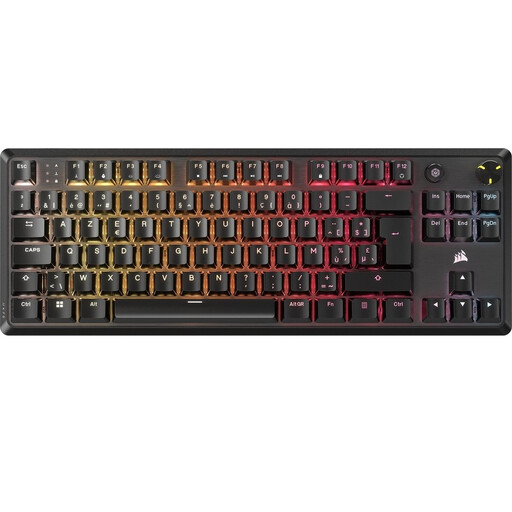
Suitable if you’re looking for a compact layout with customisable keys and profiles.
The product description lists a BE ISO AZERTY layout, linear mechanical switches, sound-dampening layers and programmable profiles through iCUE. Check that the layout matches your system and editor.
 No image available
Suitable if you want a compact design with programmable keys and macros.
The product description lists a US layout, Bluetooth and USB-C, optical switches and key customisation with Razer Synapse. Check that the connection and layout suit your computer.
 No image available
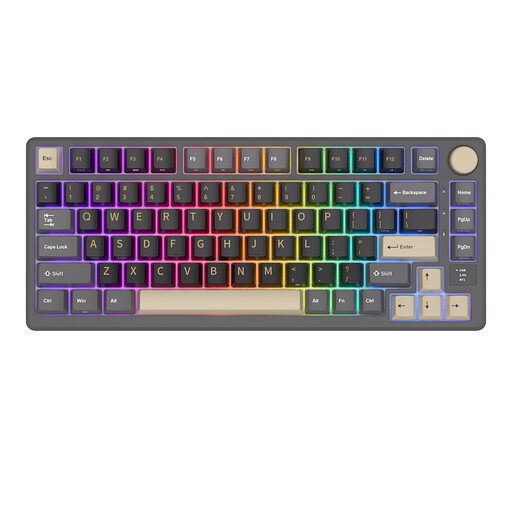
Suitable if you’re looking for a compact layout with arrow and function keys, plus a dedicated dial.
The product description lists 81 keys, tri-mode connectivity, a smart display and a volume knob. Check which connection and layout suit your workspace.
No, not necessarily. Check your editor’s keyboard shortcuts on your own operating system and keyboard layout. Microsoft Visual Studio Code explains how to adapt keyboard shortcuts to the layout you use.
Position them at a distance and angle that suit your workspace, taking into account the space available and the cable length of the version you’ve chosen. Remember to vary your screen-based work too; a split keyboard does not replace a suitable workstation.
No. Dutch government information does not specify a mechanical or split keyboard as a requirement for programmers. Arboportaal states that for employees who work at a screen for more than two hours a day, the screen and keyboard must not be attached to each other. This is not a general product requirement for private buyers.