First, check whether your camera can play back saved photos through a compatible output; an HDMI input on the screen alone isn’t enough. A compact camera field monitor may be ideal for quick reviews while you’re out and about, while a larger screen gives you more room to assess details in a sheltered spot. Bear in mind the power requirements, reflections and the limitations of judging colour in changing outdoor light.
Who is this for?
Photographers who want to review images straight from the camera
If you want to view saved bird photos without a laptop, check whether your camera outputs a compatible video signal during playback. Nikon describes HDMI photo playback for the Z 30, but this feature isn’t automatically available on other camera models.
Photographers who want to view images in bright coastal light
A compact field monitor can be a good choice for use alongside your camera. Atomos, FEELWORLD and Portkeys publish brightness specifications for their models, but these figures don’t guarantee that the screen will be easy to read in every angle of sunlight or weather condition.
Photographers who want to take their time assessing details
If you prefer to view images on a larger screen, weigh up screen size, resolution and colour information against power requirements and portability. ASUS lists these specifications for the ZenScreen Go MB16AHP and ProArt PA169CDV; for colour-critical images, make sure you view them in suitable conditions too.
What should you look for?
Compact camera field monitor
Choose this if: you want to review images quickly on a trip without a laptop, using a compatible HDMI camera. The models mentioned have screens of around 5 to 5.5 inches.
Trade-off: a smaller screen gives you less room to review lots of photos. Also check which battery or external power supply the exact model needs.
Larger portable screen with a battery
Choose this if: you want a larger screen with a built-in battery. ASUS lists a 15.6-inch screen and micro-HDMI for the ZenScreen Go MB16AHP.
Trade-off: ASUS says the screen weighs 0.86 kg. The stated battery life of up to four hours applies under a specified test condition and isn’t guaranteed for your setup. Nor does it confirm that the screen will be easy to read in direct coastal sunlight.
Larger screen for detail and colour
Choose this if: you mainly want to view plenty of detail and colour information in a sheltered spot. ASUS specifies a 15.6-inch screen, 4K resolution and 100% sRGB for the ProArt PA169CDV.
Trade-off: these specifications don’t guarantee reliable colour assessment in changing outdoor light. Also check what power supply your setup requires.
| Buying concern |
What to look for |
Relevant shoppers |
| Camera and playback compatibility |
Check your camera model’s manual to see whether it outputs saved photos for viewing on an external screen. Compare the camera output, signal format, monitor input and required cable. |
If I want to view photos from my own camera without a laptop, I want to know before buying whether it outputs the right signal; around 36% of shoppers put compatibility at the top of their list of buying concerns. |
| Readability in bright light |
Check the stated brightness and screen size of the exact model. Bear reflections in mind and, if necessary, find a sheltered spot to review your images. |
If you want to check the screen quickly on a coastal trip, it helps to have a setup that works in the available light; around 29% of shoppers give readability top priority. |
| Power and portability |
Check whether the monitor has a built-in battery or needs a separate battery or external power supply. Also check the weight and what’s included with the exact model. |
If I want to take the screen with me on a trip, I want to know in advance which power supply and accessories I’ll need; around 21% of shoppers prioritise power and portability. |
| Detail and colour |
Compare the resolution and any colour claims for the exact model. Review colour-critical images in more suitable conditions than changing outdoor light. |
If you want to assess detail and colour at home or in a sheltered spot, you can take resolution and colour information into account; around 14% of shoppers say this is their main buying concern. |
Common buying mistakes
-
Assuming an HDMI input can play back photos
A monitor receives a video signal, but whether you can view saved photos also depends on your camera’s playback output.
Check whether your exact camera model outputs photos to an external screen during playback. Then compare the camera output, signal format and monitor input.
-
Forgetting the monitor’s power requirements
Power requirements vary by model. Atomos says the Shinobi II doesn’t have a built-in battery, while ASUS says the ZenScreen Go MB16AHP does.
Check which battery or external power supply your chosen model needs and what’s actually included.
-
Treating specifications as a real-world test
Brightness, resolution and colour coverage describe different features. Taken together, the stated figures don’t amount to a test of image viewing on the coast.
Choose based on your main task, and review important colour decisions again in suitable viewing conditions.
Brands to compare
Atomos
The Shinobi II is a compact camera field monitor for use alongside a camera with compatible HDMI output.
- Atomos specifies an HDMI input and a brightness of 1500 cd/m².
- According to Atomos, the Shinobi II doesn’t have a built-in battery. For your setup, arrange a compatible NP-F/L series battery or USB-C PD power supply.
FEELWORLD
The F6 PLUSX is a compact HDMI field monitor for anyone looking for a small screen to use alongside their camera.
- FEELWORLD lists a 5.5-inch screen and a brightness of 1600 cd/m².
- These specifications don’t confirm that the monitor can display photo files on its own or that it will be easy to read in all coastal conditions.
Portkeys
The LH5P II is a 5.5-inch HDMI field monitor for a compact camera setup.
- Portkeys lists a maximum brightness of 2000 cd/m² and a weight of 285 grams without a battery.
- The stated brightness is a manufacturer specification, not the result of a coastal comparison test. Check which battery and power supply your setup requires.
ASUS
The ZenScreen Go MB16AHP and ProArt PA169CDV are larger portable screens with different stated features.
- ASUS lists a 15.6-inch screen, micro-HDMI and a built-in battery for the MB16AHP. For the PA169CDV, ASUS specifies 4K and 100% sRGB.
- The MB16AHP’s battery life of up to four hours applies under a specified test condition. The stated specifications don’t prove that colour assessment will be reliable in changing outdoor light.
Portable screens at Joybuy
This selection includes portable screens with HDMI, including a portable monitor and a portable TV. For each camera, check whether saved photos can be played back on the chosen screen through the output you plan to use.
 No image available
UPERFECT 16-inch 2K 144Hz QLED portable monitor
Could suit anyone looking for a larger portable screen with Mini HDMI. First check that your camera outputs a compatible video signal during photo playback.
The product listing specifies a resolution of 2560 × 1600, a QLED screen and 450 nits of brightness. The title also mentions anti-glare and Mini HDMI; check how easy the screen is to read in your own lighting conditions.
View at Joybuy
 No image available
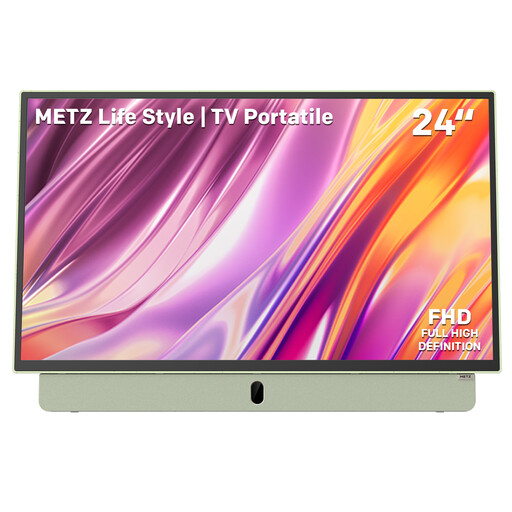
Metz MPE7200Z 24-inch portable TV
Could suit anyone looking for a larger, portable screen with a built-in battery. Check that the connection and playback function are compatible with your camera.
The product listing specifies a 24-inch FHD screen, HDMI and a matte anti-glare screen. The stated battery life is up to three hours; actual usage time may vary depending on your setup.
View at Joybuy
Frequently asked questions
Can you view photos straight from your camera without a laptop?
Only if your camera outputs a video signal during photo playback that’s compatible with the monitor. Nikon describes this feature over HDMI for the Z 30, but that doesn’t confirm it’s available on other camera models. Check your camera’s manual, output and required cable.
Is a USB-C connection enough to transmit a picture?
No, not without supported video output from the source device. ASUS says the ZenScreen Go MB16AHP requires DisplayPort Alternate Mode for USB-C video. So check both your camera’s output and the monitor’s connection.
What power supply should you take with you?
It depends on the model. ASUS lists a built-in battery for the ZenScreen Go MB16AHP, with a stated usage time of up to four hours under a specified condition. Atomos says the Shinobi II doesn’t have a built-in battery and lists a compatible NP-F/L series battery or USB-C PD power supply. Also check what’s included with the exact model.
Can you expose a portable monitor to moisture or salt on a coastal trip?
Don’t assume that your chosen model is water- or salt-resistant. Protect the screen and connections during transport, and check the manual for the exact model before exposing it to moisture.


