Start with your console or PC, then check the specific game to see whether each player needs a full controller or whether individual Joy-Con halves will do. Wireless play keeps cables out of the way, but requires batteries or charging; wired play needs a suitable connection and enough cable length. First, count the controllers you already have and check the local multiplayer mode before buying extras, as Nintendo Support and EA advise in their game information.
Who is this choice relevant to?
Two Switch players, one console
If you already have Joy-Con, first check whether your chosen game supports two players using separate controller halves. Nintendo Support advises checking each game to see how many players it supports and which controllers are needed.
Couch co-op players on PC or console
If each player needs a full controller, check that both your platform and the game support it. Xbox and PlayStation set out the platform and game requirements for their controllers.
Players short on floor space
If you want to keep cables out of the way, weigh up wireless play against the need for batteries or charging. Also look for a controller that feels comfortable in your hands. Xbox and Trust describe different connection options for their models.
What should you consider when choosing?
First, check the platform and controller layout required by the game. Then count the controllers you already have and consider the connection, power supply and controls for your living room.
| What to consider |
What should you check? |
Who is this important for? |
| Platform and game |
Check the exact platform and the game’s local multiplayer mode. |
I want to make sure my controller works with my console or PC and in this game’s co-op mode; for around 33% of consumers, compatibility with their platform and game is the main reason for buying. |
| Number of players |
Check whether the game accepts individual controller halves or requires a full controller for each player. |
I want to know whether the controllers we already have are enough for two players; around 27% of consumers prioritise having the required number of separate controls. |
| Connection and power |
Check the connection options for your platform and whether the model needs batteries or charging. |
I want to keep the floor clear and know in advance how to power the controller; around 20% of consumers focus mainly on cables and power use. |
| Grip and buttons |
Check the controller layout and which buttons or features the game uses. |
I want a layout that feels comfortable to hold and use, without paying for features the game won’t use; around 20% of consumers choose mainly for grip and ease of use. |
Common buying mistakes
-
Buying a pair of Joy-Con 2 for an original Switch
Nintendo says that Joy-Con 2 only work with Switch 2. The right controller version therefore depends on which generation of console you use.
Check the exact Switch generation before choosing a controller.
-
Buying extra controllers without checking the game’s layout
The number of controllers you need varies by game. For the Switch version of It Takes Two, EA says you can play with a pair of Joy-Con; this doesn’t automatically apply to other games.
Check the local multiplayer mode and try the controllers you already have first.
-
Assuming the 8BitDo Ultimate 2C Bluetooth and Wireless are the same version
8BitDo lists different platforms and connections for the two versions. The Bluetooth version is designed for Switch, while the Wireless version lists Windows and Android.
Compare the full model name and, for Switch 2, check the specified system version and firmware requirements.
-
Forgetting about power when using a wireless controller
Power requirements vary by model. The Xbox Wireless Controller Robot White is described as using AA batteries or connecting via USB-C.
Check the battery type, what’s included and how you can charge the controller.
If the model uses AA batteries, you’ll need to replace them; other models may need a separate charging solution.
Brands to compare
Nintendo
Joy-Con for Switch and Joy-Con 2 for Switch 2 are worth considering when a game supports local co-op using separate controller halves.
- Nintendo says a pair of Joy-Con 2 can be used for local multiplayer in supported games.
- Joy-Con 2 don’t work with the original Switch. According to Nintendo Netherlands, original Joy-Con can be used wirelessly with Switch 2, but can’t be attached to the console or charged with it.
Xbox
The Xbox Wireless Controller is a full gamepad for supported Xbox consoles and Windows PCs.
- Xbox lists Bluetooth and button mapping for the controller.
- Remember to consider the power supply when playing wirelessly. The listed platform support doesn’t confirm compatibility with Switch or PS5.
PlayStation
DualSense is primarily a controller for PS5, but can also be used with supported PC games.
- Sony lists USB and Bluetooth for connecting to a PC.
- Sony says features vary by game and platform; some PC features may require a USB connection.
Trust
The Trust GXT 542 Muta is a full controller with several connection options, including for PC.
- Trust lists a USB-A receiver, Bluetooth and a cable for this model.
- The claim about stick precision comes from Trust, not an independent test. Check the exact model number.
8BitDo
The Ultimate 2C Bluetooth is designed for Switch, while the Ultimate 2C Wireless supports Windows and Android, according to 8BitDo.
- For the Bluetooth version, 8BitDo lists Switch 2 support with a specified system version and after a firmware update.
- For Windows, the Wireless version lists a 2.4GHz receiver or cable; don’t assume that this also makes it compatible with Switch.
Joybuy products
These gamepads are suited to a range of Xbox, PS5, PC and Switch setups. For each model and game, check that the platform support and controller layout you need are compatible.
 No image available
Xbox Wireless Controller Robot White
An option for players using an Xbox console or compatible Windows PC who want a full controller.
Xbox lists Bluetooth; the product description says it uses AA batteries or connects via USB-C.
View at Joybuy
 No image available
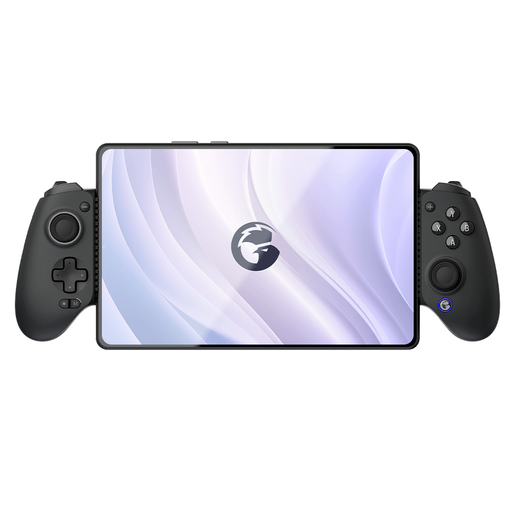
GameSir G8 Galileo Plus Bluetooth Wireless Mobile Game Controller
An option for anyone looking to compare the listed support for mobile devices, Switch or PC with the requirements of their game.
The product title lists Switch, iOS, Android, tablet and PC; the description mentions an adjustable holder for mobile devices. Check compatibility with your game and device.
View at Joybuy
 No image available
BEITONG PanGu Custom Modular Controller Wireless/Bluetooth
An option for anyone looking for a full gamepad and wanting to match its listed platform support and connections to their setup.
The product title lists PC, NS, NS2, iOS and Android. The description mentions interchangeable modules and wired, wireless and Bluetooth connections.
View at Joybuy
 No image available
BEITONG KP70 Haptic Feedback Elite Wireless Controller
An option for players who want to check the listed PC or Nintendo platform support and wireless connection for their specific game.
The product title lists PC, NS and NS2. The description mentions haptic feedback, programmable buttons and wired, wireless and Bluetooth connections; check which features your game supports.
View at Joybuy
 No image available
Sony PlayStation 5 DualSense Wireless Controller - White
An option for PS5 players who need a full DualSense controller for each player, or for a supported PC game.
Sony says PC features vary by game and some may require USB. The product description lists Bluetooth, USB-C and a built-in battery.
View at Joybuy
Frequently asked questions
Are two Joy-Con 2 halves automatically enough for two players?
No, it depends on the game. Nintendo says the halves can be synchronised separately, but check how many players and which controller layout each game supports before buying anything extra.
Will my original Joy-Con work with Switch 2?
According to Nintendo Netherlands, original Joy-Con can be synchronised wirelessly with Switch 2. They can’t be attached to the console; to charge them, you’ll need an original Switch or a suitable licensed charging accessory.
Will I automatically get all DualSense features on PC?
No. Sony says available features vary by game and platform, and some PC features may require a wired USB connection.
What should I do in the Netherlands if a controller I’ve bought turns out to be faulty?
Contact the seller to discuss a solution to the fault. According to the Dutch government, there is no fixed statutory guarantee period for all products in the Netherlands; what’s appropriate depends on the product, the fault and the circumstances.
Can I return a controller I bought online if I don’t like it?
A statutory cooling-off period may apply to an eligible online consumer purchase. ACM ConsuWijzer advises checking the terms and exceptions for your specific purchase; a cooling-off period is different from a remedy for a faulty product.


