First, choose a console that supports local two-player play for the puzzle game you want, then check how many controllers are included with the version you’ve chosen. Nintendo also lists tabletop mode for Switch 2; PlayStation describes It Takes Two as playable on a split screen, and Xbox lists local co-op for Escape Academy. A different console is not a proven solution to screen glare, so focus on your television and living room set-up instead.
Who is this guide for?
Sofa puzzlers
You mainly want to play together on one television. Check the game page to see whether it supports local co-op, and find out how many controllers are included in the bundle you’ve chosen. Nintendo, PlayStation and Xbox all list games with local play options.
Daylight players
You want to be able to read clues clearly during the day. Check for reflections and viewing angles on the television you’ll actually use; Samsung describes anti-reflection as a feature of certain televisions.
Players who switch between TV and tabletop
You sometimes want to carry on playing without a television. Nintendo describes both TV and tabletop modes for Switch 2; also check that the console supports the game you want to play.
What should you consider when choosing?
Nintendo Switch 2
Choose this if: you want to play at a table as well as on the television, and Snipperclips appeals to you. Nintendo lists Snipperclips as supported on Switch 2.
Bear in mind: in tabletop mode, you’ll be looking at the built-in screen. How easy it is to read in your bright living room will depend on where you play.
PlayStation 5
Choose this if: It Takes Two and playing together on the sofa are your priorities. Sony describes the game as playable on a split screen.
Bear in mind: the digital edition doesn’t play discs; check how many controllers are included with each bundle.
Xbox Series S
Choose this if: you want to play Escape Academy locally on a split screen and are happy with a digital game library. The UK Xbox game page lists local co-op.
Bear in mind: the Series S doesn’t play discs; also check that you have a second controller.
| Concern |
What should you check? |
Who is this important for? |
| Puzzling together on one screen |
Check that the game supports local co-op and find out how many controllers are included with the exact bundle. |
If I want to puzzle together with someone on the sofa, I’m looking for a game that supports local play on one console. Around 36% of consumers prioritise local co-op. |
| Reading clues in daylight |
View the television from both seats and check for light falling on the playing area. |
If I play during the day, I want to see clues clearly on my screen. Around 29% of consumers prioritise readability in daylight. |
| Choosing games and a console edition |
Check whether the console plays discs and whether the bundle includes enough controllers. |
If I want to use existing discs or avoid extra purchases, I pay close attention to the console edition and bundle contents. Around 21% of consumers prioritise these access costs. |
| Switching between TV and tabletop |
Check whether TV and tabletop modes are available, and whether two players can see the built-in screen clearly. |
If the television isn’t always available, I want to be able to play together at a table too. Around 14% of consumers want to switch where they play. |
Common buying mistakes
-
Assuming ‘two players’ means playing together on one console
A multiplayer listing doesn’t, on its own, mean that two players can play locally on the same system.
Check the game page specifically for local co-op or play on one system. Then check the contents of the controller bundle you’ve chosen.
-
Buying a new console to fix reflections on your television
Reflections depend on the screen and where you play; a different console is not a proven solution to glare on your television.
First, check your existing television from your usual seats and in the lighting conditions you normally play in.
-
Choosing a digital edition when you want to use discs
The PS5 Digital Edition and Xbox Series S reviewed here don’t play disc games.
Before you buy, check the full model name and whether the edition has a disc drive.
Relevant brands
Nintendo
A good fit if you want to combine TV mode with tabletop play and play Snipperclips.
- Nintendo lists Snipperclips as supported on Switch 2.
- Nintendo warns that some older Switch games may not be supported or may not be fully compatible.
Sony PlayStation
A good fit if It Takes Two and playing together on the sofa are your main priorities.
- Sony describes It Takes Two as playable on a split screen.
- The digital edition doesn’t play discs. Also check what’s included in the specific controller bundle.
Microsoft Xbox
A good fit if you want to play Escape Academy locally and are happy with a digital game library.
- The UK Xbox game page lists local co-op for Escape Academy.
- The Xbox Series S doesn’t play disc games; check that you have a second controller.
Joybuy product picks
These Joybuy picks are aimed at puzzling together locally on the television, with Switch 2 as an option for tabletop play. The PS5 editions differ in features such as digital access and disc playback.
 No image available
Nintendo Switch 2 - Console (EU)
A good fit if you want to play Snipperclips together and also play at a table without a television.
Supports TV and tabletop modes; Nintendo warns that some older Switch games may not be supported or may not be fully compatible.
View at Joybuy
 No image available
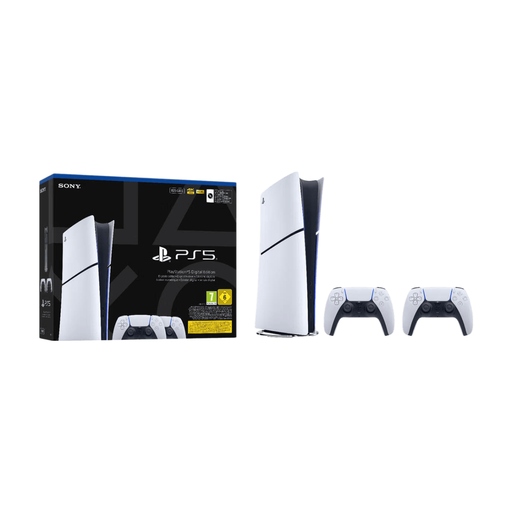
Sony PlayStation 5 Slim Digital 825GB Wi-Fi + 2 Controllers
A good fit if you want to play It Takes Two locally on a split screen and get started with two controllers.
Digital edition without a disc drive; it can’t play physical game discs.
View at Joybuy
 No image available
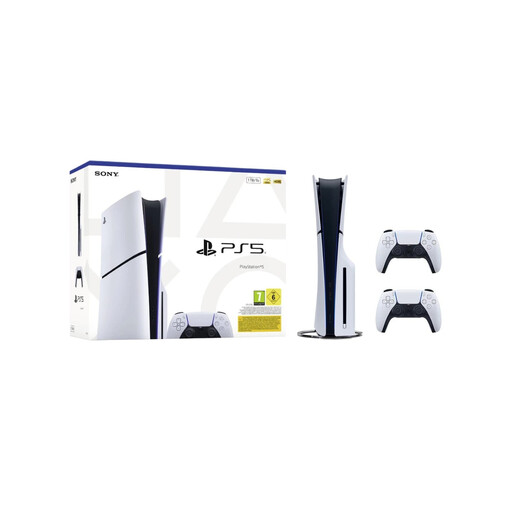
Sony PlayStation 5 Slim Disc Edition 1TB with 2 DualSense controllers - EU Version
A good fit if you want to play It Takes Two locally and having a disc drive is important to you.
Disc Edition, 1TB and two DualSense Wireless Controllers, as stated in the product name.
View at Joybuy
Frequently asked questions
Do you need an online subscription to puzzle together on the sofa?
You don’t need to play online for the local play options described for Snipperclips, It Takes Two and Escape Academy. PlayStation and Xbox pages list separate subscription requirements for online multiplayer; check these if you want to play from different locations.
How do you play Switch 2 on a television?
Nintendo describes TV mode using the Switch 2 dock. The older Switch dock won’t work for this; to use Joy-Con 2 controllers in TV mode, detach them from the console.
What can you do if your television screen reflects light during the day?
First, check how the ambient light falls on your television from the seats you plan to use. Samsung describes anti-reflection as a feature of certain televisions; how your screen performs depends on the television and your set-up. Switching consoles has not been shown to fix reflections.
Who should you contact in the Netherlands about a faulty console?
Report the problem to the seller. According to the Dutch government, statutory guarantee rights are separate from any manufacturer’s or additional warranty, and the seller must provide a solution if there’s a problem with a product.
What should you check about safety and regulations when buying a console?
Check the product’s identity and whether the conformity information applies to the specific edition. The European Commission describes requirements including safety and electromagnetic compatibility under the rules for radio equipment. This doesn’t mean that an individual listing has already been checked; assess whether CE marking is required according to the rules for the relevant product group.


