
Switch players who share controllers
You want to know whether two players can each use one Joy-Con held horizontally, or whether your game requires full controllers. Nintendo says the available play styles vary from game to game.


First, check that your console or PC and your platform game’s local multiplayer mode support the controller layout you want. In some Switch games, two players can use one Joy-Con each; games that require a full gamepad need a suitable controller for each player. Wireless controllers keep cables out of your seating area, while a wired controller needs a safe cable route.
You want to know whether two players can each use one Joy-Con held horizontally, or whether your game requires full controllers. Nintendo says the available play styles vary from game to game.
You’re looking for a way for each player to play without a cable running through your small seating area. As well as the connection type, check that the controller works with your system and game.
First, check which controllers you already own and whether you have the batteries or charging equipment you need. For example, Nintendo specifies separate charging requirements for older Joy-Cons on Switch 2.
Choose these when: your game on Switch or Switch 2 supports two players using the controllers horizontally.
Bear in mind: a pair of Joy-Cons won’t work as two separate player controllers in every game.
Choose these when: each player needs a full controller and you can find a model that works with your system.
Bear in mind: wireless controllers aren’t automatically compatible with other consoles or PCs.
Choose this when: you can run the cable safely past the seats and don’t want to use a wireless connection.
Bear in mind: according to the manufacturer, the PowerA Advantage Wired Controller for Nintendo Switch 2 only works when the Switch 2 is docked.
Nintendo says the available Joy-Con play style varies from game to game. Microsoft and PowerA describe connections that depend on the model and the system you’re using.
| What to consider | What to look for | Who is this for? |
|---|---|---|
| System and game | Check console or PC compatibility and which controller layouts the game supports in local multiplayer. | If I want to make sure both players can join in on my system, compatibility comes first; around 36% of consumers give system and game compatibility top priority. |
| Cables and space | Check where your system is set up and whether you can keep a cable out of the way. | I want to play without a cable running between the seats; around 29% of consumers prioritise a cable-free seating area. |
| Controls for each player | Check whether the game supports separate Joy-Cons or requires a full gamepad. | If I want each player to have the right button layout, I check the game’s requirements; around 21% of consumers give player controls top priority. |
| Complete set-up | Count how many controllers you need, check how they’re powered or charged, and see what’s included in the box. | I want to need as few extra items as possible to play together; around 14% of consumers prioritise the total equipment needed. |
Nintendo says the supported ways to hold the controllers vary from game to game. A game may therefore require a different controller layout from two separate Joy-Cons.
Before buying, check the controller and local multiplayer information for the specific platform game.
Joy-Con 2 is designed for Switch 2 and won’t work with the original Switch. Older Joy-Cons can be used wirelessly with Switch 2, but they won’t attach to the console or charge directly from it, according to Nintendo.
Check which console version you have and how you can charge your existing controllers before choosing a set.
To charge older Joy-Cons on Switch 2, you’ll need a Switch system or a suitable charging accessory.
A cable can still run through a walkway. According to the manufacturer, the PowerA Advantage Wired Controller for Nintendo Switch 2 can only be used when the console is docked. What’s included in a controller pack can also vary by version.
Check what’s in the box, which controllers you already have, and whether you can run a cable safely past the seats.
Joy-Con and Joy-Con 2 are options for Switch players who want to share controllers in games that support horizontal play.
The Xbox Wireless Controller is a full-size gamepad for supported Xbox systems and Windows PCs.
DualSense is a full-size gamepad for a PS5 set-up.
The Advantage Wired Controller for Nintendo Switch 2 is a wired option for use with a docked Switch 2.
The Ultimate 2C Bluetooth is a full-size gamepad designed for Switch; the Ultimate 2C Wireless has different platform and connection specifications.
These options include full-size gamepads for Xbox and PC, PS5 and Nintendo Switch, as well as Joy-Con sets for Switch and Switch 2. Before buying, check that your specific game and system support the layout you want.
 No image available
A full-size wireless controller for one player on a supported Xbox system or Windows PC.
The product information lists Xbox Wireless, Bluetooth and USB-C. This version comes with two AA batteries.
 No image available
A full-size gamepad for one player with a PS5 set-up who wants a wireless controller.
The product information lists Bluetooth, directional buttons and sticks.
 No image available
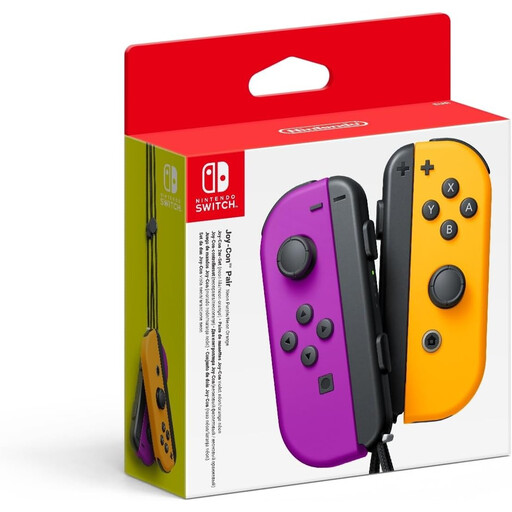
A set for Switch players who want to use separate Joy-Cons when their game supports that controller layout.
The set includes a left and a right Joy-Con. Whether they can be used horizontally by two players depends on the game.
 No image available
A full-size wireless gamepad for one player on Nintendo Switch who doesn’t want a separate Joy-Con layout.
The product information lists Nintendo Switch compatibility and a built-in rechargeable battery.
 No image available
A Joy-Con 2 set for Switch 2 players whose game supports separate controllers.
The set includes two controllers; the available play style varies from game to game.
No. Nintendo says the available play style can vary by game and game mode. Check the controller information for your platform game before buying an extra set.
On Switch 2, you can select ‘CONTROLLERS’ in the HOME menu, then ‘CHANGE GRIP/ORDER’. For each Joy-Con 2 you’re using horizontally, press SL and SR. Nintendo recommends attaching the wrist straps when using the controllers separately.
No. According to Nintendo, older Joy-Cons can sync wirelessly with Switch 2, but they can’t be attached to the console. You’ll need a Switch system or a suitable licensed charging accessory to charge them.
Online consumer purchases generally come with a 14-day cooling-off period from delivery, subject to legal exceptions. ACM ConsuWijzer also explains your statutory guarantee: when used normally, a product must do what you could reasonably expect of it, and there is no fixed statutory guarantee period.