
Co-op players on one PC
You want to play with two input devices without cables taking over your desk. Check whether the game supports gamepad input and which USB or Bluetooth connections are available.


First, check whether your game supports local co-op and the intended controller setup for both players; compatibility matters more than wireless connectivity or extra buttons. Then choose between a full-size wireless gamepad, a wired controller or a single Joy-Con, if the game allows that setup. Remember to factor in the available ports and space for cables on your desk.
You want to play with two input devices without cables taking over your desk. Check whether the game supports gamepad input and which USB or Bluetooth connections are available.
You want to know whether your existing Joy-Con controllers will work as separate controllers, or whether the game requires a full controller for each player. Nintendo lists single Joy-Con controls for games including Mario Kart 8 Deluxe; check the requirements for the game you’re playing.
You’d prefer a connection that suits your setup and want to weigh up whether a wired controller and its cable route will work at a small desk.
Start with the game and platform; then choose the connection method and type of control that suits your desk.
| What to consider | What should you look for? | Who is this important for? |
|---|---|---|
| Compatibility | Check the platform, local co-op support and the input options supported for each player in the specific game. | I want to know in advance whether both players can play together on my system; around 36% of consumers focus mainly on compatibility between the game, platform and second player. |
| Space and cables | Compare wireless use with the USB ports available and the route a cable would need to take across your desk. | I want enough room for two players without cables running across my workspace; around 29% of consumers prioritise keeping their desk tidy. |
| Controls for each player | Check whether the game supports one Joy-Con per player or requires a full-size gamepad. | I want each player to have the buttons the game requires; around 21% of consumers focus mainly on having controls that suit their chosen game. |
| Controllers you already own | First count the controllers you already have, then check what comes with an additional model and which connection it needs. | I don’t want to buy a controller that makes my existing set redundant; around 14% of consumers focus mainly on the cost and use of a second controller. |
Support for one Joy-Con per player varies from game to game. Controller features on PC can also differ between games.
Before buying, check the local multiplayer mode and the input options the game supports for each player.
According to 8BitDo, the 8BitDo Ultimate 2C Wireless uses a 2.4GHz adapter or a cable on Windows; Bluetooth is listed for Android.
Check which connection is right for your platform and whether you can free up the USB port you need.
PowerA states that the Enhanced Wired Controller can only be used when the Switch is docked. This model doesn’t support motion controls and isn’t suitable for games that require Joy-Con controllers exclusively.
Check your game’s play style and required features before choosing a wired controller.
Joy-Con, Joy-Con 2 and Pro Controllers are options for co-op on the relevant Switch systems. A single Joy-Con will only work if the game supports that style of play.
The Xbox Wireless Controller is a full-size controller option for Xbox consoles and Windows PCs, when the game supports gamepad input.
The Ultimate 2C Wireless is an option for PC use with a 2.4GHz receiver or cable; 8BitDo lists Bluetooth for Android.
The G7 SE is a wired option for Xbox and Windows if a cable works with your desk setup.
DualSense is designed for PS5 and PC games that support the controller.
This Nintendo-licensed wired Switch controller is designed for use when the system is docked.
These controllers are suited to co-op on Xbox, PC, Nintendo Switch or PS5; only choose a model after checking game compatibility and the space available for cables.
 No image available
An option for co-op on Xbox or Windows if you’re looking for a full-size wireless gamepad and the game supports controller input.
Before ordering, check the connection and power supply for the version you’ve chosen.
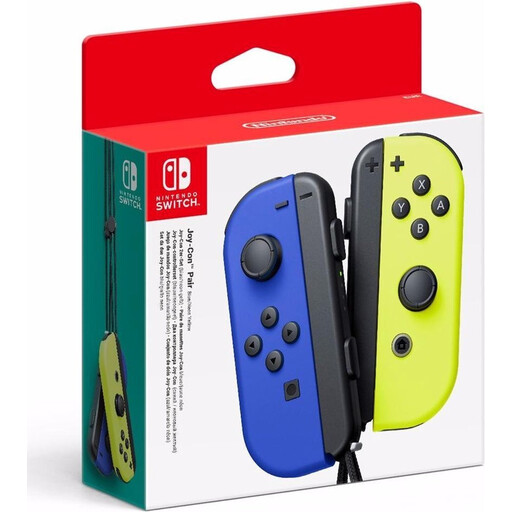 No image available
A pair to consider for Switch co-op if the game supports separate Joy-Con controls for each player.
Check the play style the game requires; using one Joy-Con per player won’t work in every co-op game.
 No image available
A full-size controller option for Switch games if you’d rather not use separate Joy-Con controls.
Before using it with Switch 2, check whether the specific game and controller features are supported.
 No image available
An option for co-op on PS5 or for PC games that support DualSense.
On PC, haptic feedback requires both game support and a USB connection.
 No image available
An option to consider for a PC or Switch setup; check whether the specific game supports the controller.
The product name also lists iOS and Android. Check which connection suits your device and desk setup.
Yes, if the game supports that style of play. For example, Nintendo lists one left or right Joy-Con or Joy-Con 2 per player for Mario Kart 8 Deluxe; check the controls for other adventure games separately.
Use 2.4GHz mode and, following the 8BitDo manual, plug the adapter into a USB port on a supported Windows PC. The controller can also be used in wired mode on Windows; 8BitDo lists Bluetooth for Android.
According to ACM ConsuWijzer, you have a legal guarantee that a product is of satisfactory quality, in addition to any commercial warranty. If a fault is covered by that guarantee, the seller must put it right free of charge; so assess any extended warranty based on the additional cover it offers.
According to ACM ConsuWijzer, online purchases of products are generally covered by a statutory cooling-off period that ends 14 days after delivery. Check which exceptions and returns conditions apply to your purchase.
No. Nintendo says Joy-Con 2 only works with Switch 2. Original Joy-Con can connect wirelessly to Switch 2, but can’t be attached to the system.