
Player still deciding on a system
You want to play together on Switch, Switch 2, PC or Xbox, and need to make sure you don’t buy a controller for the wrong platform.


First, choose a controller that works with both your gaming system and the game; then count how many separate controls you already have. On a Nintendo Switch, Joy-Cons can each be used as a separate controller in supported games, while a full-size wireless controller is for one player. A wired option is only practical if the cable reaches and suits your setup. Don’t assume a Switch controller will also work on PC or Xbox.
You want to play together on Switch, Switch 2, PC or Xbox, and need to make sure you don’t buy a controller for the wrong platform.
You want everyone around one screen to have their own controls, and first want to check whether any Joy-Cons you already have can be used separately.
You’re weighing up the freedom of wireless gaming against whether a cable from the console will reach your seat.
First check the platform and game, then count how many player controls you need and consider whether a cable or battery suits the place where you play.
| What to consider | What to look for | Who is it mainly for? |
|---|---|---|
| Compatibility | Check the exact controller model, system and game support. For Switch 2, check the game edition too. | I want to make sure my controller works with my system and game. Around 36% of consumers say compatibility is their top priority. |
| Number of player controls | Check whether the game supports separate Joy-Cons and count how many compatible controls you already have. | I want everyone around one screen to have their own controls, and first want to check whether my Joy-Cons are enough. Around 29% of consumers put the number of player controls first. |
| Wired or wireless | If you’re choosing a wired controller, check the cable route to your seat; for wireless play, remember to factor in charging. | I want to play comfortably from my seat without a cable crossing a walkway. Around 21% of consumers say their setup is the biggest consideration. |
| Purchase and aftercare | First count how many controls and charging accessories you’re missing. Also check the retailer’s returns policy. | I don’t want to buy more controllers or charging accessories than I need, and I want to know what I can do if something goes wrong. Around 14% of consumers say extra costs and aftercare are their main concern. |
8BitDo lists the 8BitDo Ultimate 2C Wireless for Windows and Android; Switch compatibility is listed for the Ultimate 2C Bluetooth. So, sharing a series name doesn’t mean the different versions are designed for the same systems.
Before you buy, compare the full model name and platform list for the exact version you’re considering.
Nintendo says Joy-Cons can be used separately in supported games. A Pro Controller is one full controller for one player.
Count the controls supported by the game, and factor in any Joy-Cons or controllers you already own.
According to PowerA, the PowerA Enhanced Wired Controller reviewed here has a 3-metre cable and is designed to be used with a Switch in its dock. At a dining table, the cable may not reach your seat or could cross a walkway.
Measure the route from the dock and keep walkways clear; otherwise, consider a compatible wireless controller.
According to ACM ConsuWijzer, statutory guarantee in the Netherlands depends on what you can reasonably expect from the product under normal use. It isn’t automatically the same as the manufacturer’s warranty period.
Keep your proof of purchase and contact the retailer if there’s a fault.
Nintendo offers Joy-Con controllers for supported local multiplayer on Switch, and a Pro Controller as a full controller for one player.
PowerA offers wired controllers for use with a docked Switch, among other options; features vary by version.
Microsoft lists Xbox consoles and Windows PCs among the platforms for the wireless Xbox controller reviewed here.
The listed platforms differ between the two 8BitDo Ultimate 2C versions reviewed here.
This selection mainly includes wireless and wired controllers listed for Switch or Switch 2, plus one model listed for Switch and PC. Before you buy, check that the exact version works with your system and game.
 No image available
A wireless option for playing from your seat without a controller cable; the product name lists Switch, Switch Lite, Switch OLED and Switch 2.
Bluetooth; stated range of up to 9 metres and battery life of up to 40 hours.
 No image available
A wired option if the USB connection and cable route suit your gaming space; the product name lists Switch and Switch 2.
The description mentions programmable rear buttons and a turbo function. The USB cable isn’t included, according to the product description.
 No image available
A wireless option for playing without a controller cable running to your seat; the product listing mentions Switch 2 and Switch OLED, and the description also mentions Switch.
The product name lists a 40-hour battery life and two programmable buttons.
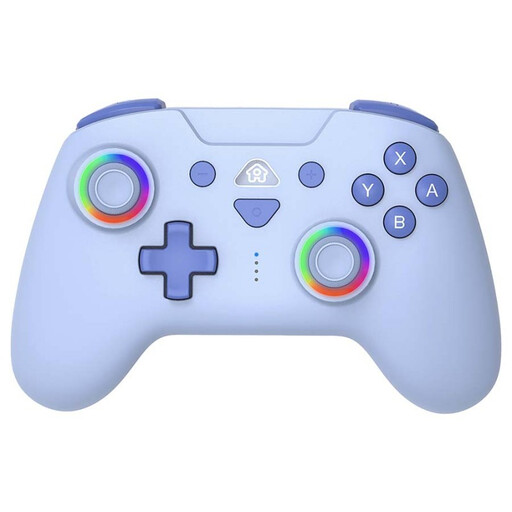 No image available
A wireless option for Switch or Switch Lite if you want to play from your seat without a controller cable.
The description lists motion sensors, adjustable vibration and a stated battery life of 9 to 10 hours.
 No image available
An option to consider if you play on Switch or PC; also check whether the specific game supports the controller.
The description lists Bluetooth 4.0, dual vibration, a 6-axis gyroscope, a range of over 10 metres and battery life of up to 10 hours.
Not necessarily: Nintendo describes a team of four, each with a Joy-Con, for the Switch version. In supported games, each Joy-Con can work as a separate controller; check how many you already have and pair them as individual controllers.
On the Switch, open ‘Controllers’ and then ‘Change Grip and Order’. Nintendo says to press the SL and SR buttons on each Joy-Con when using it horizontally to register it as a separate controller.
Don’t assume you can with this PowerA Enhanced Wired version: PowerA says it’s for use when the Switch is in its dock. Also check whether the stated 3-metre cable will reach your gaming space.
According to ACM ConsuWijzer, ordinary online purchases in the Netherlands usually come with a statutory cooling-off period of up to 14 days after delivery, subject to exceptions. Check the retailer’s terms too; a manufacturer’s warranty doesn’t limit your separate statutory guarantee to a fixed two-year period.