What should you consider when choosing?
First check your platform, then count the controls you already have. Finally, choose a controller that suits the game and the distance from your screen.
| What to consider |
What to look for |
Who is this important for? |
| Platform compatibility |
Check the full model name, console model, connection mode and whether the game supports it. |
If you’re playing on an existing PC or console, you’ll want to avoid buying a controller that won’t connect or work with the game. Around 33% of consumers say platform compatibility is their top priority. |
| Controls for every player |
Count the controllers you already have and check whether the game supports a shared keyboard or individual Joy-Cons. |
If everyone in your household wants to play, you’ll want enough usable controls without immediately buying an extra gamepad for everyone. Around 27% of consumers say having enough controls for every player is their top priority. |
| Cables and seating distance |
Measure the distance to your PC or dock, and check the cable length and whether the controller can only be used with the console docked. |
If players are sitting in different places, you’ll want the cable to work with your setup, or you may prefer a wireless controller. Around 20% of consumers say having a practical connection from their seat is their top priority. |
| Grip and ease of use |
Compare a standalone Joy-Con with a full-size gamepad, and check how the model you choose is powered. |
If you want to play for a long time or avoid unnecessary usage and warranty costs, consider the grip and the terms for the exact model. Around 20% of consumers say comfort and avoiding unnecessary costs are their top priorities. |
Joybuy products
This selection includes Joy-Con for Switch, wireless controllers for PlayStation 5 and Xbox Series/PC, and wired HORI controllers for Switch models. Check that each exact controller model suits your platform and preferred setup.
 No image available
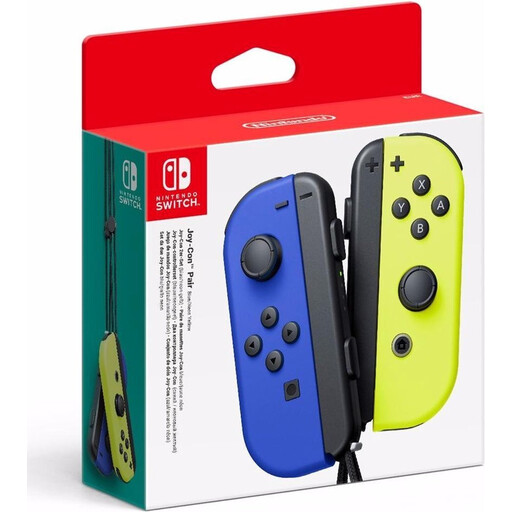
Nintendo Switch Joy-Con pair - Neon Blue/Neon Yellow
Suitable for Switch players who want two separate controls from one set, provided the game supports playing with individual Joy-Cons.
View at Joybuy
 No image available
PlayStation DualSense Wireless Controller - Marvel's Wolverine Battle Yellow Limited Edition
An option for a player who needs their own DualSense controller for a PS5 setup. Check game support if you want to use it with another device.
View at Joybuy
 No image available
Xbox Wireless Controller - Ice Breaker Special Edition, Xbox Series/PC
Suitable for a player who needs their own Xbox controller for Xbox Series or PC. Before using it with a PC, check that the connection and game are supported.
View at Joybuy
 No image available
HORI Wired Controller Horipad Turbo for Switch and Switch 2 - Pokémon Eevee Cottage Core Edition
A wired option for a player who needs their own controller for Switch or Switch 2 and is happy to use a cable connection.
The product information says the USB cable isn’t included, so bear that in mind when planning your setup.
View at Joybuy
 No image available
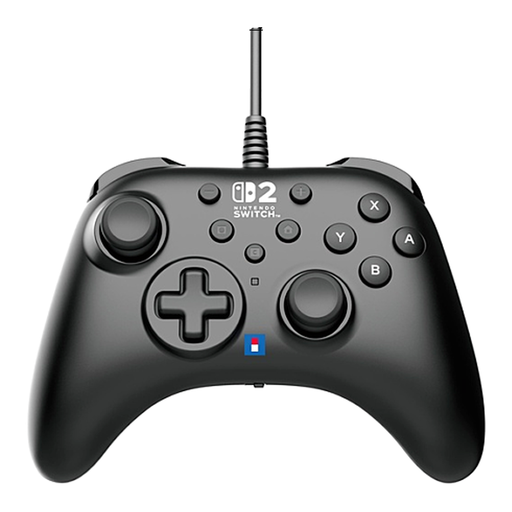
HORI Wired Controller Horipad Turbo for Switch 2 - Black
Suitable for a Switch 2 player who needs their own wired controller and can use a cable connection from their seat.
According to the product information, this model has a built-in USB cable.
View at Joybuy
Frequently asked questions
Does everyone need to buy a new controller for Overcooked! 2?
No, not always. Team17 says that two players can share a keyboard for local play on PC, Mac and Linux. First count the controls you can already use, then check what the game supports on your platform.
Can you use a Joy-Con as a standalone controller?
Yes, if the game supports that play style. Nintendo says you can hold a Joy-Con horizontally to use it as a standalone controller. Check which play styles the game supports, then sync the controller through the system menu.
Does a Switch 2 Pro Controller work with the original Switch?
No. Nintendo says that the Switch 2 Pro Controller only works with Switch 2. According to Nintendo, the original Switch Pro Controller can be synced wirelessly with Switch 2.
Can I use a wired PowerA controller when the Switch isn’t docked?
Not with the PowerA Wired Controller mentioned here: PowerA says this model can only be used when the Switch is docked. Before buying, also check that the 3 m cable will work with your seating arrangement.
Does a DualSense controller work with every PC game?
Not necessarily. Sony describes using it with compatible games on supported PCs and other devices, so check separately whether your device and game support the controller.


