
Switch group with extra players
You want to know whether the Joy-Con you already own provide enough separate controls. Nintendo says that in Overcooked! 2 on Switch, each chef can use a Joy-Con.


First, choose a controller that suits your console or PC and the game’s play style. Then work out how many separate player controls you still need. In Overcooked! 2 on Nintendo Switch, each player can use a Joy-Con, while a full gamepad offers a different way to play. Going wired avoids a wireless connection between the controller and console, but check that the cable can safely reach from the dock to the sofa. Bright light doesn’t affect compatibility: for readability, focus on your screen and the game’s display options.
You want to know whether the Joy-Con you already own provide enough separate controls. Nintendo says that in Overcooked! 2 on Switch, each chef can use a Joy-Con.
You’re looking for a full controller for each player. Check the exact platform and whether the game supports that controller: Sony and Microsoft list different platforms for their controllers.
Your choice also depends on the distance to the console and the space around your seat. PowerA says its wired Switch controller has a 3 m cable and only works with the Switch docked.
First check your system and game, then count how many player controls you need, and finally decide whether a cable will work with your seating arrangement.
Choose this when: you play Overcooked! 2 on Switch and players can use individual Joy-Con.
Consider: a horizontally held Joy-Con offers a different control layout from a full gamepad, so check the game’s play style.
Choose this when: you have a Switch 2 and a supported game offers separate Joy-Con 2 controls.
Consider: Nintendo says Joy-Con 2 don’t work with the original Switch.
Choose this when: each player would rather hold a full controller and it’s compatible with your platform and game.
Consider: Sony lists PS5 and PC for DualSense; Microsoft lists Xbox and Windows PC for the Xbox Wireless Controller. This doesn’t prove that they’re interchangeable between consoles.
Choose this when: your Switch is docked and the cable can reach your seat.
Consider: the PowerA controller reviewed here only works in docked mode and, according to PowerA, doesn’t support motion controls or HD Rumble.
| What to consider | What should you check? | Who is this important for? |
|---|---|---|
| System and game | Check the exact console or PC model, game edition and supported play style. | If I play on a particular system, I want to be sure that both the controller and game work with it. Around 36% of consumers put system and game compatibility first. |
| Number of controls | Count the players and the controls you already have; check whether the game supports individual Joy-Con. | When there are several chefs, I want to know whether everyone has their own controls, not just how many controllers are in the box. Around 29% of consumers prioritise the number of independent player controls. |
| Connection and seating | For a wired controller, measure the route from the dock and check that the cable can be placed safely. | On the sofa, I want to keep cables out of the way; a wired option will only work if the cable reaches my seat. Around 21% of consumers focus mainly on the connection and living-room setup. |
| Grip and power | Compare how the controller feels in your hands and check which features and power supply your game and setup require. | I want a controller that feels comfortable to hold and to know how it’s powered; extra features only matter if my game uses them. Around 14% of consumers prioritise comfort and power. |
Nintendo says Joy-Con 2 only work with Switch 2; original Joy-Con can be used wirelessly with Switch 2.
Before buying, check the full controller model and your console.
Nintendo says that in Overcooked! 2 on Switch, each chef can use a Joy-Con. A full gamepad doesn’t automatically offer the same option for controlling two players separately.
Count the players and the controls you already have, then check which play styles each game supports.
According to the manufacturer, the PowerA controller reviewed here has a 3 m cable and only works when the Switch is docked.
Measure the route from the dock to your seat and check that the cable can be placed safely.
8BitDo lists Windows and Android for the Ultimate 2C Wireless Controller, but Switch for the Ultimate 2C Bluetooth Controller. The versions aren’t necessarily interchangeable.
Compare the full version name with the manufacturer’s platform information.
A relevant option for players considering individual Joy-Con controls for Switch or Switch 2.
DualSense is a full gamepad for a PS5 setup and can also be used with compatible PCs.
An Xbox Wireless Controller may suit an Xbox or Windows PC setup.
A wired Switch controller may suit a docked console and a seat within reach.
The Ultimate 2C range includes versions for different systems, so the full version name matters.
This selection includes controllers for Nintendo Switch and Switch 2, plus a DualSense for PS5, with both wired and wireless options. Before buying, check that the exact version is right for your system and game.
 Image unavailable
A wired gamepad for a Switch or Switch 2 setup with a USB connection. The product information lists programmable rear buttons and a turbo function; it also says the USB cable isn’t included.
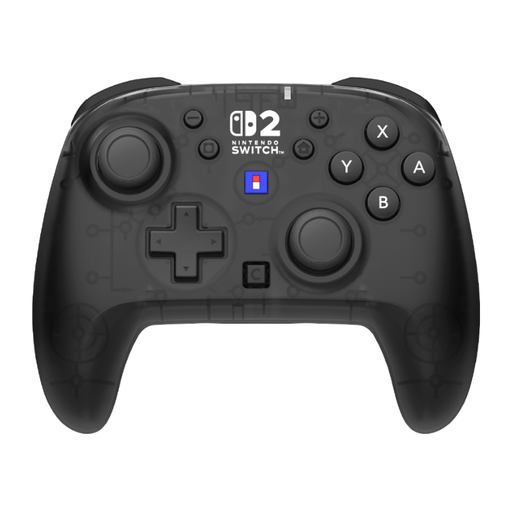 Image unavailable
For a Switch or Switch 2 setup where you want to play wirelessly. The product information lists programmable rear buttons and two customisable button profiles, and says this version doesn’t support HD Rumble 2 or vibration.
 Image unavailable
A wireless controller pair for the Switch systems listed. According to KONIX product information, this version has Bluetooth, a 6-axis gyroscope and dual vibration; the stated battery life is up to 8 hours.
 Image unavailable
A full gamepad for a PS5 setup. Sony also lists PC compatibility for DualSense; check that your PC game supports the controller. Haptic feedback and adaptive triggers depend on the game.
 Image unavailable
A Joy-Con pair for a Switch setup that supports separate controls. Nintendo says Overcooked! 2 on Switch supports one Joy-Con per chef; check the supported play style for other games.
Yes. Nintendo says that in Overcooked! 2 on Switch, each chef can use their own Joy-Con. For another game or edition, check the supported play style again.
No. Nintendo says Joy-Con 2 only work with Switch 2. According to Nintendo, original Joy-Con can be synced wirelessly with Switch 2.
First count the players and the separate controls you already have. Then check the game’s local multiplayer mode: Nintendo says Joy-Con can be used individually if the software supports that play style.
No, a controller won’t change what’s displayed on screen. For Overcooked! All You Can Eat, publisher Team17 lists a scalable interface and colour-blind options; also check how clearly you can see your screen from the sofa. Not every cooking game offers the same options.
It depends on the model. According to PowerA, the Wired Controller reviewed here only works while the Switch is docked. Check the requirements for the exact controller and make sure the cable can safely reach your seat.