What should you look for?
First check that the controller is compatible with your system and game. Then consider wireless play, the number of players and which controller feels comfortable in your hand.
| What to consider |
What should you check? |
Who might this matter to? |
| Compatibility |
Check the system generation, the full model name and whether the specific game supports the controller. |
If I don’t want to waste time with a controller that won’t work, I first check my console or PC and the game version. Around 33% of consumers say compatibility is their main concern. |
| Freedom to play from the sidelines |
Check whether a wireless connection is possible with your system and how the controller is powered or charged. |
If I want to play from a seat beside the screen, I look at wireless use and what I need to do to keep the controller charged or ready to use. Around 27% of consumers say freedom to move is their main consideration. |
| Number of players |
Count the players and available controllers, and check whether the game supports separate controllers. |
If several people are playing at once, I want to know whether we can use the controllers we already have. Around 27% of consumers prioritise the number of usable controllers. |
| Grip and controls |
Compare a single Joy-Con with a controller that offers a full grip, and check which features the game supports. |
What matters most to me is how the controller feels in my hand and whether its controls suit my preferences. Around 13% of consumers say grip or controls are their main consideration. |
Controllers at Joybuy
This Joybuy selection includes controllers for Nintendo Switch, Switch 2, Xbox, Windows PC and PS5. For PC games, always check that the game supports the controller you’ve chosen.
 Image unavailable
Xbox Wireless Controller, Robot White
A full-grip option for Xbox or Windows PC, provided the game supports the controller.
The product description lists Xbox Wireless and Bluetooth, a hybrid D-pad and AA battery power.
View at Joybuy
 Image unavailable
Nintendo Switch Pro Controller, Black
A full-grip controller for wireless play on Nintendo Switch.
The product description lists motion controls, HD Rumble, amiibo functionality and a built-in battery.
View at Joybuy
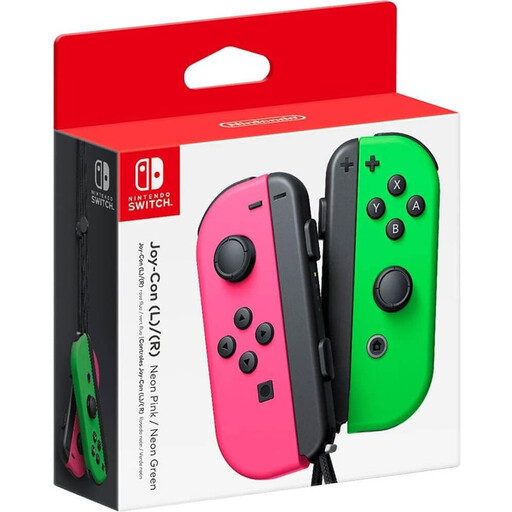 Image unavailable
Nintendo Switch Joy-Con pair, neon green/neon pink
A pair for Switch players who want to use the controllers separately, when the game supports that setup.
The product description says each Joy-Con can be used as a standalone controller. Nintendo specifies one Joy-Con per player for Overcooked! 2 on the original Switch; check other game versions separately.
View at Joybuy
 Image unavailable
Sony PlayStation 5 DualSense Wireless Controller, White
A wireless option for PS5; use on PC depends on support from the specific game or application.
Sony lists Bluetooth and USB-C for connecting to a PC.
View at Joybuy
 Image unavailable
Nintendo Switch 2 Joy-Con 2 pair, Light Blue/Light Red
A pair for Switch 2, provided the game supports the controller setup you want.
The product description lists left and right controllers, built-in batteries and wrist straps included. Nintendo says supported positions vary by software and requires the wrist straps to be attached when using separate Joy-Con 2 controllers.
View at Joybuy
Frequently asked questions
Can each player use one Joy-Con for Overcooked! 2 on Switch?
Yes. For Overcooked! 2 on the original Switch, Nintendo specifies one Joy-Con per player. Check the controller setup separately for other editions of the game.
How do I set up a single Joy-Con 2 for one player?
On Switch 2, open ‘CONTROLLERS’ and select ‘CHANGE GRIP/ORDER’; for horizontal use, press SL and SR on the relevant Joy-Con 2. Nintendo says the available positions vary by software and that the wrist straps must be attached when using the controllers separately.
Can an accessibility setting help if the cooking game feels too frantic?
According to publisher Team17, Overcooked! All You Can Eat has an assist mode with features including longer round times and slower recipe timers. This feature is part of that edition of the game, not the controller, and it isn’t necessarily available in Overcooked! 2 as a standalone release.
What are my rights if a controller bought online doesn’t fit my needs or breaks too soon?
For a standard online purchase, you generally have a statutory 14-day cooling-off period after receiving the item, subject to legal exceptions. If the controller breaks sooner than you could reasonably expect under normal use, the seller must offer an appropriate solution, according to ACM ConsuWijzer. In the Netherlands, there is no general fixed two-year period for the statutory guarantee.
What should I look for in a wireless controller in the Netherlands?
Check the product information and the CE marking on the specific controller. According to the Dutch Authority for Digital Infrastructure, the manufacturer applies the marking when radio equipment meets the relevant requirements; a CE marking doesn’t show that a particular game supports the controller.


