
Players with more than one console
Before you buy, you want to know whether the exact controller model works with your console or PC and the co-op game you want to play. Microsoft, Nintendo, Sony and 8BitDo list compatibility by system and model.


Start with your console or PC, then check how many players the co-op game supports and which controller layouts it works with. A Joy-Con that can be used on its own can be handy in supported Switch games, while PS5, Xbox and PC are best paired with a controller designed for that system. Wireless play gives you more freedom to move; with a wired controller, check the connection and cable route to the sofa.
Before you buy, you want to know whether the exact controller model works with your console or PC and the co-op game you want to play. Microsoft, Nintendo, Sony and 8BitDo list compatibility by system and model.
You’re weighing up a Joy-Con that can be used on its own against a full-size controller, and checking what the game supports for each player. Nintendo says Joy-Con 2 can be used individually in supported games.
Think about the connection from your seat, the route a cable would take and how the controller is powered. Xbox, 8BitDo and PowerA list different connection and power options for specific versions.
First, check that the controller works with your system and the game’s local multiplayer mode. Then work out how many controllers you need and whether a wireless or wired setup will suit your sofa.
| What to consider | What should you check? | Who should pay particular attention? |
|---|---|---|
| Compatibility with your system and game | Check your console or PC operating system, the controller’s full model name and whether it’s supported in the game you’ve chosen. | I want to be sure the controller works with my system and in the game’s local co-op mode. Around 36% of consumers prioritise system and game compatibility. |
| Controls for every player | Check how many controllers the game supports and which play styles are available; remember to count the controllers you already own. | When more players join in, I want to know whether everyone can use a Joy-Con or needs a full-size controller. Around 29% of consumers prioritise having suitable controls for every player. |
| Distance and freedom to move | Measure the cable route around furniture and walkways, or check the wireless connection on your chosen device. | I want to play from the sofa without an awkward cable getting in the way. Around 21% of consumers pay most attention to the setup and room to move. |
| Power and aftercare | Check how it charges, whether it needs batteries and what’s included in the box; note who the seller is. | I want to know how to keep the controller ready for a gaming session and who to contact if it develops a fault. Around 14% of consumers prioritise power and aftercare. |
Nintendo says Joy-Con 2 and the Switch 2 Pro Controller don’t work with the original Switch. Original Joy-Cons can be used wirelessly with Switch 2, but they can’t be attached to the console or charged directly from it.
Check which generation your console is and how you want to charge the controller before choosing an extra set.
A Joy-Con can only be used as a separate controller if the game supports that play style. Put two Joy-Cons in a grip and they work together as one traditional controller.
Check the play styles supported by the game and count controllers per player, not just per pack.
PowerA lists a 3 m cable for the Enhanced Wired Controller mentioned here. Whether that’s long enough depends on the route around your furniture and where you sit.
Measure the cable route and the space people walk through before choosing a wired setup.
ACM ConsuWijzer explains that your statutory guarantee applies alongside any commercial guarantee. Extra cover therefore doesn’t replace your statutory rights.
Check exactly what extra cover is offered and keep your proof of purchase.
Joy-Con, Joy-Con 2 and Switch 2 Pro Controllers are designed for different Switch generations and ways of playing.
DualSense is an extra full-size controller for PS5. Sony also says it can be used with compatible PC games and devices.
Xbox wireless controllers are an option for supported Xbox systems and Windows PCs.
The Ultimate 2C Wireless is a model-specific option for Windows and Android.
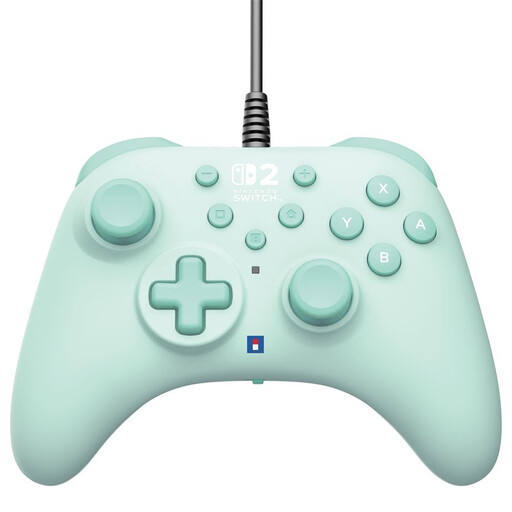
The Enhanced Wired version described here is a wired option for Switch and Switch 2, provided the cable works with your living room setup.
This selection includes wired and wireless controllers for different Switch systems, Xbox, Windows PC and PS5, as well as a pair of Joy-Cons. Check that each controller works with your system and co-op game.
 No image available
A wired option if you’re looking for a controller for Switch or Switch 2 and the cable route to the sofa is practical.
The product description lists a 3 m USB-A cable; check that it can be routed safely away from walkways.
 No image available
A full-size wireless controller to consider if you play on a supported Xbox system or Windows PC.
The product description lists AA batteries for wireless use. Check whether this version includes a USB-C cable before counting on wired play.
 No image available
A pair of Joy-Cons to consider if your Switch game supports using them individually.
First check how many players the game can support with this setup; a grip can also combine two Joy-Cons into one traditional controller.
 No image available
An extra wireless controller to consider for local multiplayer on PS5.
The product description lists haptic feedback and adaptive triggers; check whether your chosen game supports these features.
 No image available
A full-size controller to consider for a Switch 2 player who doesn’t want to play with Joy-Cons individually.
Check whether your chosen game supports local multiplayer with extra controllers.
No. Nintendo says Joy-Con 2 only works with Switch 2. Original Joy-Cons can be used wirelessly with Switch 2, but they can’t be attached to the console.
According to PlayStation, you need to pair the controller with a PS5 that’s switched on. Also check whether your chosen game supports local multiplayer with extra controllers.
Nintendo says original Joy-Cons can’t be attached to Switch 2 or charged directly from it. Use an original Switch or a suitable licensed charging accessory.
The Nintendo Store says a paid Nintendo Switch Online membership is required for online services. Check the terms for the specific game and mode before assuming local co-op requires a subscription.
ACM ConsuWijzer explains that statutory guarantee rights apply alongside any commercial guarantee, and there isn’t one fixed statutory guarantee period for all products. If a controller doesn’t meet what you could reasonably expect during normal use, the seller is responsible for providing an appropriate solution at no cost, such as a repair, replacement or refund.