Start by choosing the adventure games you want to play, then check whether each one supports local co-op, online co-op or both. Next, consider how many compatible controllers you’ll need, how much space you have, whether you want to use physical games and what online requirements apply. The right console depends on how all these factors come together.
Who should consider this choice?
Playing together at one desk
You want two people to play the same adventure on one console. In that case, the local co-op mode and the number of compatible controllers matter more than the console’s name alone. For example, Nintendo lists Split Fiction as a split-screen game for two players.
Co-op from a distance
You’re playing with someone elsewhere and want to know in advance whether your game supports online co-op and, if you’re using different devices, cross-play, as well as what online requirements apply. Xbox Support says cross-play varies by game.
A small study and flexible screen options
You want to switch between playing on a desk monitor and playing without one, or you don’t have much room for a permanent setup. Nintendo describes the Switch 2 as supporting tabletop mode and featuring a built-in screen.
What should you look for when choosing?
Nintendo Switch 2
Choose this option if: you want to play without a fixed external screen too, and the co-op games you want are available for Switch 2. Nintendo lists Split Fiction as a split-screen adventure for two.
Bear in mind: controller requirements vary by game. Nintendo says every player needs a compatible controller for Split Fiction.
PlayStation 5
Choose this option if: the co-op games you want are available on PS5 and you’re happy to play on a connected screen. Sony lists local multiplayer games for PS5.
Bear in mind: what’s included in the bundle and whether you choose a version with a disc drive or a digital edition. The Digital Edition reviewed here has no disc drive.
Xbox Series S or Series X
Choose this option if: the games you want are available for Xbox Series X|S and a fixed screen setup suits you. The Series S is all-digital; the black 1 TB Series X reviewed here has a disc drive.
Bear in mind: the exact model, game availability and online requirements. Xbox says cross-play is only available in games that support it.
| What to consider |
What should you look for? |
Who should factor this in? |
| Games and modes |
Check the exact console version, local or online co-op, player count and any cross-play support for each game. |
If I already have an adventure in mind, I want to know whether that particular version supports the mode we’re looking for. Around 29% of consumers give the game and mode top priority. |
| Playing together locally |
Check how many players are supported locally, which controller setup is required and what’s included in the bundle. |
When I’m playing with someone beside me, I want to check whether we can play together on one console and whether we have enough compatible controllers. Around 23% of consumers put local co-op first. |
| Screen and workspace |
Measure the space for the console, connections and screen, and consider whether two players will be able to follow the shared image comfortably. |
If my desk monitor is in use or the room is short on space, I want a setup that works for me. Around 18% of consumers prioritise screen space and flexibility. |
| Total cost |
Factor in controllers, games, storage and any subscriptions. Also check whether you want to use physical discs. |
When I want to understand the full cost of my gaming setup in advance, I compare more than just the console and include any extras I’ll need. Around 18% of consumers put total cost first. |
| Playing together online |
For the exact game, check online co-op, cross-play between your platforms, and account and subscription requirements. |
If my gaming partner is somewhere else, I want to know whether our game and platforms can connect. Around 12% of consumers give playing together remotely top priority. |
Common buying mistakes
-
Assuming every multiplayer game supports local co-op
The game must support the local mode you want. Nintendo describes Split Fiction on Switch 2 as a split-screen adventure for two and lists separate controller requirements.
Before deciding, check the requirements for the exact game version and what’s included with the console bundle you’ve chosen.
-
Choosing a digital console when you want to use discs
According to Sony, the PS5 Digital Edition reviewed here has no disc drive. Xbox describes the Series S as all-digital, while the Series X is available in versions with and without a disc drive.
Check the full model name and whether it has a disc drive, rather than relying on the console range alone.
-
Assuming a subscription includes every game you want
Microsoft says Game Pass titles, features and availability can vary by region, subscription, platform and time.
Before buying, check whether your specific game is available through your chosen subscription at that time, and what requirements apply to online play.
-
Assuming maximum video output guarantees the same for every game
Nintendo says that 4K and HDR on Switch 2 require a compatible screen and a game that supports these features. Those output capabilities alone don’t tell you what each co-op game will display.
Compare the capabilities of your chosen game with your screen, and consider whether two players will be able to follow the image comfortably.
Brands to compare
Nintendo
Nintendo describes the Switch 2 as having a built-in screen, with tabletop and TV modes. This could be useful if you want to adapt your setup and the games you’re interested in are available for Switch 2.
- Nintendo lists Split Fiction as a split-screen adventure for two players.
- Check the compatibility of existing games and the controller requirements for each title. Nintendo says GameChat requires a paid Nintendo Switch Online membership.
Sony PlayStation
The PS5 models reviewed here are designed for playing games on a connected screen. If you want to use discs, it’s important to choose between the model with a disc drive and the 825 GB Digital Edition.
- Sony lists local multiplayer games for PS5 and recommends an extra DualSense for playing together.
- The standard consoles reviewed here include one controller. The 825 GB Digital Edition has no disc drive; Sony says online multiplayer on the PS5 with disc drive reviewed here requires a paid PlayStation Plus subscription.
Microsoft Xbox
Xbox Series S and Series X are options for a fixed screen setup. The Series S is all-digital; disc drive and storage options vary by model.
- Microsoft describes Series S models with 512 GB and 1 TB of storage. The Series X range includes models with and without a disc drive.
- Check cross-play support for each game individually. Microsoft says Game Pass content and features vary by region, platform, subscription and time.
Joybuy products
This Joybuy selection includes PS5 and Nintendo Switch models, with options for disc or digital game libraries and consoles with handheld, tabletop or TV modes. Before buying, check which console version, controllers and game mode you need for your favourite co-op game.
 No image available
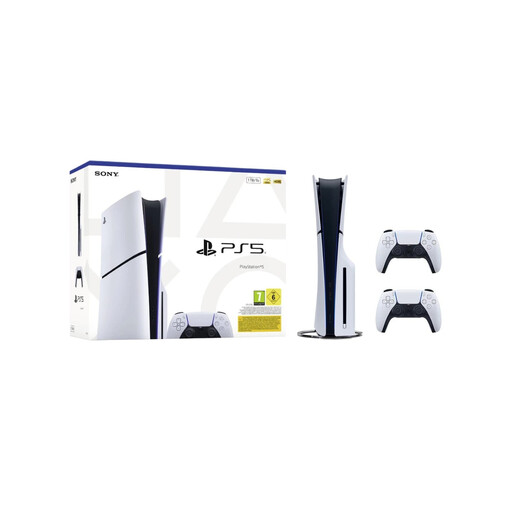
Sony PlayStation 5 Slim Disc Edition 1TB Console Bundle with 2 White DualSense Wireless Controllers – EU Version
Suitable for playing together locally on a PS5 when your chosen game supports local multiplayer.
Disc Edition with 1 TB SSD and two white DualSense wireless controllers; EU version.
View at Joybuy
 No image available
Nintendo Switch 2 – Nintendo Switch Sports Resort-bundel, 3 months Nintendo Switch Online
Ideal if you want to switch between playing on a connected screen, at a table and in handheld mode.
The product description lists 256 GB of storage and Joy-Con 2 controllers. The bundle name includes Nintendo Switch Sports Resort and 3 months Nintendo Switch Online.
View at Joybuy
 No image available
Nintendo Switch 2 Console With Easily Replaceable Battery – Black
Ideal if you want to switch between a connected screen and playing in handheld or tabletop mode.
The product description lists Joy-Con 2 controllers and handheld, tabletop and TV modes.
View at Joybuy
 No image available
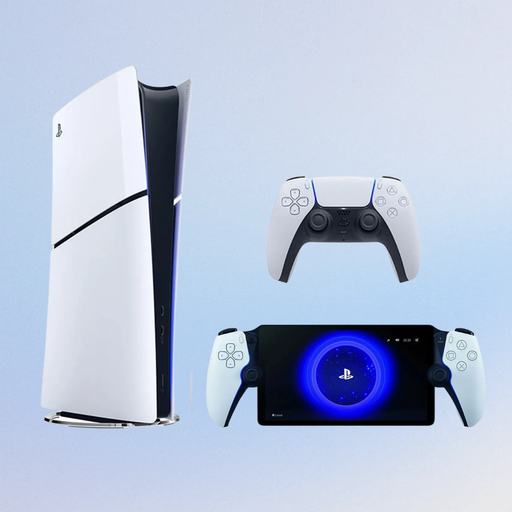
Sony PlayStation 5 Console Slim 825GB – Digital Edition + PlayStation Official Portal – Remote Player – White (PS5)
Could be suitable for remote play at home when the game supports it and playing over your home network is possible.
Digital Edition without a disc drive, with 825 GB of storage and PlayStation Portal. The product description lists remote play over home Wi-Fi for supported games.
View at Joybuy
 No image available
Nintendo Switch OLED Neon-Red/Blue
Ideal if you want the flexibility to play without relying on a fixed TV setup. Check whether your chosen game supports the multiplayer mode you want.
The product description lists a 7-inch OLED screen, 64 GB of storage, an adjustable stand, and handheld and tabletop modes.
View at Joybuy
Frequently asked questions
Is ‘multiplayer’ enough to know you can play together on one screen?
No. Check the exact game version to see whether it explicitly has a local co-op or split-screen mode, and how many players can join in. Nintendo lists Split Fiction on Switch 2 as a split-screen adventure for two and specifies separate controller requirements.
Do we need a second controller for local co-op?
That depends on the game and the supported controller setup. Sony says the standard PS5 consoles reviewed here come with one DualSense and recommends an extra DualSense for local multiplayer. Nintendo says every player needs a compatible controller for Split Fiction.
Can friends on Xbox, PlayStation and Nintendo always play together online?
No, cross-play isn’t available for every game. Xbox Support says some multiplayer games support cross-play; check the details for the specific game and the online requirements for both players.
Which storage expansion can I use with Switch 2?
Nintendo lists microSD Express for expanding game storage and says other microSD standards aren’t suitable for this purpose. Nintendo also says you’ll need a system update via the internet to use microSD Express.
What are the returns and warranty rules for online purchases in the Netherlands?
Online purchases generally come with a statutory cooling-off period of up to 14 days after delivery. ACM ConsuWijzer explains that there are exceptions for certain products, including some sealed digital products. The statutory guarantee is separate from the manufacturer’s warranty: according to the Netherlands Authority for Consumers and Markets, the seller is responsible if a consumer product doesn’t meet the expectations you’re entitled to have.


