Choose according to your computer’s available connections: a Bluetooth mouse can free up a USB port, while a wired USB mouse doesn’t need a separate battery or mouse charger, but does use a port. If you spend a long time working on your club website, consider the mouse’s shape and controls too, and remember to vary your posture and take microbreaks, as advised by Arboportaal.
Who is this guide for?
Website builder with limited connections
You work on your club’s website using a laptop and want to distinguish between having few wall sockets and having few USB ports. Bluetooth can free up a USB port; a wired mouse doesn’t need a separate mouse charger. Logitech and Kensington describe these different connection options.
Someone who spends a long time editing pages
You regularly click, scroll and edit for extended periods. In that case, fit, your workstation setup and changing tasks all matter, as well as the sensor specifications. Arboportaal highlights repetitive actions and static strain when working at a screen.
Club volunteer using multiple computers
You switch between devices and want to know in advance which connections a mouse supports and how it’s powered. Trust lists Bluetooth and a USB receiver as connection options for the Fyda Multi-device.
What should you consider when choosing?
Count wall sockets and computer ports separately. Then choose the power supply and controls that suit the club’s computers and working sessions.
| What to consider |
What should you check? |
Who should pay extra attention? |
| Connection and ports |
Check for Bluetooth support and count the available, compatible USB ports. A receiver or cable uses a computer port; that’s not the same as a wall socket. |
If you want to avoid using up a scarce computer port for your mouse, connection options should come first. Around 36% of consumers in this context prioritise this concern. |
| Comfort during long sessions |
Compare the shape, size and controls, and check whether the mouse is suitable for left- or right-handed use. A trackball works differently from a standard mouse. |
When you do a lot of clicking and scrolling, you’ll want controls and a workstation that suit you. Arboportaal also recommends changing posture and taking microbreaks. Around 29% of consumers prioritise comfort when using the mouse. |
| Batteries or charging |
Check the battery type, whether a battery is included and how a rechargeable mouse is charged. Only compare stated battery life when the conditions are like for like. |
If you want to avoid interruptions to charge your mouse, pay particular attention to how it’s powered. Around 21% of consumers prioritise this concern. |
| Switching between computers |
For each computer, check Bluetooth support, available ports and the connections supported by the exact model. Also check how to switch between devices. |
If you use several club computers, you’ll want to know whether the same mouse can connect to each one. Around 14% of consumers prioritise this choice of connection. |
Avoiding common buying mistakes
-
Treating wall sockets and USB ports as the same problem
A Bluetooth mouse without a receiver can free up a USB port, whereas a wired mouse or USB receiver uses one. So, having too few wall sockets doesn’t automatically mean you also have too few computer ports.
Before buying, count your available wall sockets and compatible USB ports separately, and check whether your computer supports Bluetooth.
-
Assuming products with the same series name are identical
The Trust Fyda Multi-device and Fyda 24727 have different stated connection and charging options. A business version of the M240 may also differ from the standard M240.
Check the full model name and connections on the product page, not just the series name.
-
Confusing a manufacturer’s warranty with your statutory rights
For a consumer purchase in the Netherlands, the seller is responsible for providing a solution if a product doesn’t meet what you could reasonably expect. An additional manufacturer’s warranty is a separate promise.
Check what any additional warranty covers and whether the club is buying as a consumer or as an organisation.
Brands to consider
Logitech
The M240 is a Bluetooth mouse with an AA battery, for anyone who doesn’t want to use a USB receiver.
- Logitech says the M240 connects via Bluetooth without a dongle and uses one AA battery.
- The stated battery life is based on the manufacturer’s figures. Don’t assume that features of the MX Anywhere 3S also apply to the M240 or a business version of the M240.
HP
The black HP 240 Bluetooth Mouse, variant 3V0G9AA#ABB, is an ambidextrous model for a computer with Bluetooth.
- For this variant, HP specifies Bluetooth 5.1, three buttons, a 1600dpi sensor and one AA battery.
- The HP page lists different battery life figures; don’t rely on either as a guaranteed usage time.
Trust
The Fyda Multi-device, model 25708, offers Bluetooth and a USB receiver as connection options.
- For model 25708, Trust lists a built-in rechargeable battery and adjustable cursor speed.
- According to Trust, the stated battery life is based on average use and varies depending on conditions. The Fyda 24727 is a different model.
Kensington
The wired Orbit Trackball with Scroll Ring K72337EU is a stationary alternative to a standard mouse for a cramped desk.
- Kensington specifies a 150 cm USB cable and no batteries required.
- The trackball uses a USB port and has different controls from a standard mouse.
Joybuy mice for different connection options
This Joybuy selection includes Bluetooth and USB receiver mice, rechargeable models and wired USB mice for different computer and workstation setups.
 No image available
HOFOTEK M311 2.4G+BT Silent Office Mouse
An option if you want to use Bluetooth but also want a USB receiver as an alternative connection.
Supports Bluetooth and a 2.4GHz USB receiver and, according to the product description, can connect to up to three devices. One AA battery is specified.
Joybuy
 No image available
HP 925 Ergonomic Vertical Mouse
Suitable if you’re looking for a vertical mouse for right-handed use with multiple connection options.
The product description lists Bluetooth, an HP Unifying receiver and connections to up to three devices. The built-in battery charges via USB-C.
Bear in mind its right-handed shape and that the built-in battery will need charging.
Joybuy
 No image available
Trust Ozaa+
A rechargeable option if you want to switch between devices and use either Bluetooth or a USB receiver.
The product description mentions connections to up to three devices via a USB receiver and two Bluetooth channels, as well as a side scroll wheel. According to the description, you can use the mouse while it’s charging.
The rechargeable battery charges via USB; using the RF receiver takes up a USB port.
Joybuy
 No image available
Trust Bayo II
A good fit for a fixed workstation if you don’t want to charge your mouse and are looking for a vertical mouse for right-handed use.
According to the product description, this wired USB mouse has a 57-degree vertical angle, adjustable DPI and two thumb buttons.
The cable uses a USB port; the stated shape is for right-handed use.
Joybuy
 No image available
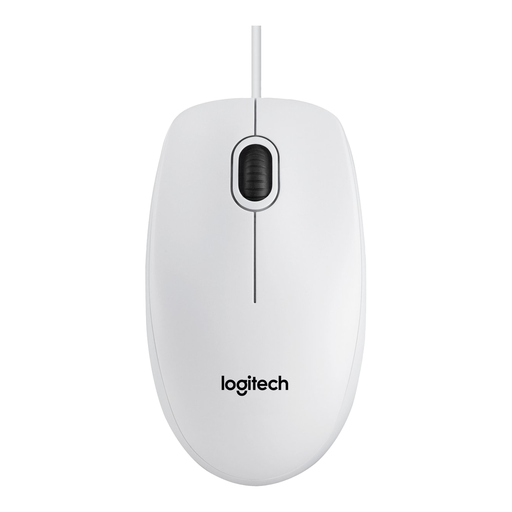
Logitech Mouse B100 White 910-003360
A wired option if you don’t want to use a separate mouse battery or charging cable and have a spare USB port.
The product description lists an optical sensor, an ambidextrous shape and plug-and-play setup.
The USB cable requires a spare USB port.
Joybuy
Frequently asked questions
Do I need an extra power socket for a wireless mouse?
Not always. The Bluetooth mice mentioned that use an AA battery don’t need charging; a rechargeable model will need to be charged at some point. Also check separately how many USB ports are available and whether your computer supports Bluetooth.
What should I check before setting up the mouse on a club computer?
Check which connection the exact model uses and whether the computer supports it. The black HP 240 uses Bluetooth; according to Trust, the Trust Fyda Multi-device also supports a 2.4GHz USB receiver. Check the available ports and stated system compatibility too.
What can I do during long sessions working on the club website?
Set up your workstation to suit you and break up your screen work with other tasks. Arboportaal recommends changing posture and taking microbreaks; switching to a different mouse is not, by itself, a proven solution for arm or wrist problems. Specific employer obligations relating to screen work don’t automatically apply to every volunteer.
Who can help if a mouse is faulty, and how should I dispose of an old mouse or battery?
For a consumer purchase, the seller must provide a solution if the product doesn’t meet what you could reasonably expect; a manufacturer’s warranty doesn’t replace this. The Dutch government states that private individuals can return an old, similar device when buying a new one, and that used batteries must not be put in the bin. Consumer rules don’t automatically apply in the same way when a club buys as an organisation.


