What should you look for when choosing?
USB desktop microphone
Choose this if: you’re recording in one place with a compatible computer or tablet.
Trade-off: you need to stay close enough to the microphone; a directional pickup pattern won’t remove echo.
Dynamic USB speech microphone
Choose this if: you can speak close to the microphone in a fixed position and there’s background noise.
Trade-off: check whether you need a stand or boom arm; XLR is only useful with compatible recording equipment.
Wireless clip-on microphone
Choose this if: you’ll be moving around or demonstrating something as you record.
Trade-off: check the receiver, connection and charging requirements; battery life also depends on how you use it.
USB/XLR handheld microphone
Choose this if: you want to record via USB and also use, or plan to use, a compatible XLR setup.
Trade-off: the extra connection offers no practical benefit if you only record via USB.
This comparison focuses on the main need for each type of user: clear speech, a fixed connection, freedom to move or USB/XLR flexibility.
| What to consider |
What should you look for? |
Who is this important for? |
| Clear speech despite echo and background noise |
Check the pickup pattern and placement, then make a test recording from your usual speaking distance. |
If I’m recording in a reverberant classroom, I want my voice to sound clear and close; around 36% of consumers say clear speech is their top buying priority. |
| Easy recording at a fixed computer setup |
Check the USB port and cable, the space available for a stand and whether you can monitor the recording. |
If I’m recording at a fixed computer, I want to record without a separate audio interface; around 29% of consumers say an easy, fixed connection is their top priority. |
| Freedom to move while presenting |
Check that the set includes a receiver for your device, how many speakers you’ll be recording and whether the battery life suits your recording. |
If I’m walking around the classroom during my voice-over, I want to wear the microphone; around 21% of consumers say freedom to move is their top priority. |
| Connection to XLR equipment |
Check which inputs your equipment has and which cables and mounting parts are included with the exact variant. |
If I want to use an existing or future XLR setup as well as USB, I want both connection options; around 14% of consumers say this flexibility is their top priority. |
Joybuy products for this recording setup
This selection includes wireless clip-on microphones for presenters who move around and USB microphones for a fixed computer setup.
 No image available
DJI Mic Mini 2S (2 TX + 1 RX + Charging Case)
Suitable for recording while you move; the title lists two transmitters, one receiver and a charging case.
The product information lists compatibility with cameras, smartphones and PCs. Check that the connection works with your recording device.
View at Joybuy
 No image available
USB condenser microphone with cardioid pickup pattern
Suitable for a fixed USB setup with a computer.
The product description lists a cardioid pickup pattern, headphone socket and included boom arm stand. Check that the connection works with your computer.
View at Joybuy
 No image available
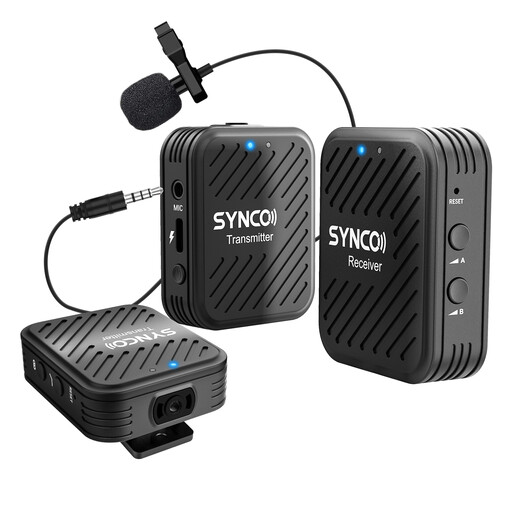
SYNCO G1(A2) 2.4G Dual Transmitter
Suitable for wireless recording when you want room to move; the title lists two transmitters.
The product information lists use with cameras, smartphones and tablets. Check which connection your device needs.
View at Joybuy
 No image available
DJI Mic 3 (1 TX + 1 RX)
Suitable for wireless recording with one speaker; the title lists one transmitter and one receiver.
The product information lists use with iPhone, cameras and Android devices. Check that the receiver connects to your recording device.
View at Joybuy
 No image available
Razer Seiren V3 Mini Quartz
Suitable for a fixed desktop setup for speech recording.
The product description lists a supercardioid pickup pattern and a tap-to-mute function.
View at Joybuy
Frequently asked questions
Can a microphone remove echo from a classroom?
No, a microphone won’t remove the room’s echo. Shure explains that a microphone cannot effectively separate direct speech from reflected speech. If possible, record at a quieter time, position the microphone close to the speaker and listen to a test recording first.
What should you check before recording a voice-over on your laptop?
Check that the USB connection and cable for the exact microphone variant are compatible with your laptop. RØDE lists a USB-C-to-USB-A cable included with the NT-USB Mini; Audio-Technica describes the AT2040USB as having a USB-C output and including a USB cable and adapter. Then make a test recording and listen back to it.
How can you stop a wireless recording from cutting out halfway through?
Charge the transmitter and receiver beforehand, check the connection to your recording device and make a short test recording. DJI measured the stated battery life of the Mic Mini with noise reduction switched off and in interference-free conditions; those results won’t necessarily apply to your recording location.
What are your rights if a microphone bought online disappoints or is faulty?
For online purchases made by consumers, you generally have a 14-day cooling-off period after delivery, subject to legal exceptions. ACM ConsuWijzer also explains that you have a statutory guarantee if, under normal use, a product doesn’t do what you could reasonably expect; if so, contact the seller. Different contractual terms may apply when a school buys as an organisation.
Can you record identifiable voices of pupils for your presentation?
A sound recording in which someone is identifiable may count as personal data. The Dutch Data Protection Authority says that a school must identify an appropriate GDPR legal basis before processing the data and inform pupils and parents about how it will be used. Make sure the purpose, recording and sharing comply with the school’s policy; consent isn’t the only possible legal basis in every situation.


