
Teacher recording at a table
If you’re recording recipe steps from one spot, you can place the microphone close to your mouth and listen back to the audio straight away.


If you stay in one place while recording, choose a microphone you can position close to your mouth. If you move around while cooking, a clip-on microphone with a receiver is a better fit. A microphone mounted on the camera can be handy for video, but even a directional microphone needs to be close enough to the speaker: its directional pickup alone won’t eliminate echo or classroom noise.
If you’re recording recipe steps from one spot, you can place the microphone close to your mouth and listen back to the audio straight away.
If you move between workstations while cooking, a wireless clip-on microphone can move with you as you speak.
If you’re filming and explaining at the same time, the distance to the microphone and its connection to your camera or phone need to suit your recording setup.
Choose this option: if you speak at a table or laptop and can keep the microphone close.
Bear in mind: your freedom to move is limited, and a cardioid pickup pattern won’t make a noisy classroom quiet.
Choose this option: if you move around during the demonstration and need the microphone to move with you.
Bear in mind: check the battery, pairing, clothing noise, receiver and number of transmitters.
Choose this option: if you’re recording video and narration at the same time and can position the microphone close to the speaker.
Bear in mind: if the camera is further away, the room acoustics will still affect the sound. You may need a separate cable for USB.
Choose this option: if you want to record without a computer or phone connected.
Bear in mind: consider placement, power, storage and transferring files. A recorder placed further away won’t solve background noise.
| What to consider | What should you check? | Who is this important for? |
|---|---|---|
| Clear speech | Record a test sentence from the intended speaking distance while the class is carrying on as usual, then listen back with headphones. | If I want recipe steps to be easy to follow despite classroom noise, I focus on microphone placement and listening back. Around 36% of consumers put clarity first. |
| Freedom to move | Check the number of transmitters, the receiver included and the connection to your recording device. | If I move between workstations while cooking, I want to keep speaking without having to stand by a table microphone. Around 29% of consumers prioritise freedom to move. |
| Connection to your device | Compare the port on your phone, camera or computer with the microphone connection and the cables included. | If I want to use my existing phone, camera or computer, the connection needs to work with my equipment. Around 21% of consumers prioritise device compatibility. |
| Checking and saving recordings | Make a test recording beforehand, listen back and check the power and storage options you’ve chosen. | If I want to make sure the recording is usable and saved, I need to be able to check the sound and find the file afterwards. Around 14% of consumers put checking and saving recordings first. |
A microphone placed far from the speaker can still pick up a lot of echo and classroom noise. Directional pickup is no substitute for positioning the microphone properly.
Make a test recording in the actual classroom from the intended speaking distance, then listen back.
When a school processes personal data, it has obligations including having an appropriate lawful basis and informing the people concerned. The Dutch Data Protection Authority explains these obligations for schools.
Agree the purpose, access and any publication with the school in advance, and only record what’s necessary.
The ATR2100x-USB is an example of a microphone for a fixed speaking position, with computer recording and the option of an XLR connection.
The Wireless ME is an example of a wireless setup, while the VideoMic GO II suits a camera or compatible USB setup.
The H1essential is an example of a portable recorder for anyone who doesn’t want to keep a computer or phone connected.
The P1X and P2X ranges include clip-on microphones with different connections; the P2XT is a Type-C version.
Shure is useful for general guidance on microphone direction, distance and placement, not as an endorsement of a specific model for this classroom recording.
These product choices suit recording from a fixed position, speaking wirelessly while cooking and recording independently with a portable recorder.
 No image available
Suited to a fixed desk setup if you want to listen back while recording.
The description lists a cardioid pickup pattern, gain control and a mute button.
The 3.5mm headphone socket is designed for monitoring.
 No image available
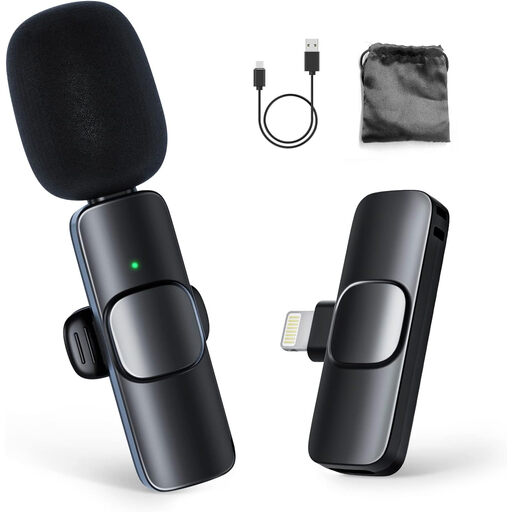
Suited to demonstrations where you want to move around and record using a compatible iPhone or iPad.
The description lists one transmitter and one receiver, with automatic pairing.
The stated battery life is up to 8 hours; compatibility is listed for iPhone and iPad.
 No image available
Suited to standalone recording if you don’t want to connect a separate microphone setup to a computer or phone.
The product information lists a built-in microphone and 128 GB of storage.
USB-C is listed for transferring files; the description also mentions timestamps.
 No image available
Suited to recording from a fixed computer setup if you can place the microphone close to where you speak.
The product information lists USB, a supercardioid pickup pattern and tap-to-mute controls.
The description lists compatibility with PC and Mac.
 No image available
Suited to close-range recording with a compatible smartphone if a wired clip-on microphone works for your setup.
The title lists a 3.5mm connection and an omnidirectional microphone.
The 6-metre cable keeps the microphone connected to the recording device and may limit how freely you can move.
Yes. A directional microphone should also be positioned at the intended speaking distance. Shure explains that a microphone can’t remove echo from a room after the recording; make a test recording in the classroom and listen back.
Check that the microphone fits your device’s input, that the right cable or receiver is connected and that the recording app is using the microphone’s signal. Make a short test recording and listen back. RØDE says additional cables are needed to use the VideoMic GO II via USB.
Before setting up to record, check that the cables you need are included and whether a standalone recorder needs power or storage. What you need depends on the equipment and connection you’ve chosen.
If the school processes personal data, it must comply with GDPR obligations, including having a valid lawful basis and informing the people concerned. The Dutch Data Protection Authority describes consent as one possible lawful basis; it isn’t automatically required or appropriate for every lesson recording. Agree the purpose, access, storage and any publication with the school in advance.
For a consumer purchase made at a distance, you generally have a statutory 14-day cooling-off period after delivery; ACM ConsuWijzer also lists exceptions. Check which terms apply to your purchase, particularly if the school is buying rather than a consumer.