Who is this guide for?

Organiser focusing on the classroom audience

Wants quiet recitals to be audible, even at the back of the room. Information from Phonak about hearing solutions in the classroom and from Shure about sound amplification can help you distinguish between amplification in the room and audio for a remote conversation.

Organiser with remote listeners

Wants to share the recital and responses from the classroom with online participants. The stated pickup distance of the specific version and its connection to the computer are important here; Jabra and HP Poly explain these points for their models.

Teacher with speakers in different positions

Wants to assess whether one device can pick up voices from different positions, without assuming that a tabletop model will pick up every pupil. Compare the furthest speaking position with the model’s specifications and, where necessary, take pupils’ accessibility needs into account.

What should you look for?

Classroom audience only

Choose this when: people in the room struggle to hear the speaker clearly, including at the back of the classroom.

Consider: sound amplification needs to be positioned appropriately and tested for feedback; Shure explains why the set-up and room are important.

Hybrid recital from a fixed position

Choose this when: the speaker and any other speakers can stay close enough to the speakerphone.

Consider: a stated pickup range doesn’t guarantee clear speech in a noisy classroom; also check the computer connection and audio settings.

Hybrid recital with speakers in different positions

Choose this when: pupils or speakers will talk from different places around the classroom.

Consider: a greater stated range won’t automatically solve poor audibility in the room or background noise; test from the furthest speaking position and consider a different microphone set-up if needed.

What to consider What should you check? Who is this important for?
Audibility in the classroom Have someone speak quietly from the intended position and listen from the back of the room. Decide whether you need amplification in the classroom, rather than just a microphone for an online conversation. If my main priority is for people in the classroom to hear the recital, I’ll look at amplification for the room first. Around 36% of consumers cite audibility for the classroom audience as their top buying priority.
Clear audio for online listeners Compare the speaker’s distance from the exact version with its stated microphone range, and ask someone joining remotely to listen in. For consumers who want online participants to hear the recital, pickup from the speaking position is crucial. Around 29% name this as their top buying priority.
Speakers in different positions Measure the distance to the furthest speaker and test from every planned position. Don’t assume compatibility with a hearing aid; check the relevant receiver separately. If different pupils will speak from different places, I want to know whether the microphone can pick them up there. Around 21% of consumers prioritise picking up voices from different positions.
Connecting and moving between rooms Check USB connectivity and Bluetooth support for the exact version and device. For a PC, also check whether a Bluetooth adapter is included. For consumers who move between devices or classrooms, it’s important that the set-up works with the equipment available. Around 14% prioritise easy connection and portability.

Common pitfalls

  • Confusing microphone range with sound amplification in the classroom

    A stated distance describes how far away speech can be picked up, not whether people at the back of the classroom will hear the recital.

    First decide whether the sound is for the classroom audience, online participants or both. Test amplification in the room from where the audience will be sitting.

  • Assuming every Bluetooth version works wirelessly with the school laptop

    Supported connections and included adapters can vary by model or version. For example, HP distinguishes between the Sync 40 and Sync 40+.

    Compare the exact version, ports and box contents with the laptop, and check that the connection works for your intended use.

  • Assuming the manufacturer’s warranty covers all your purchase rights

    For a school purchase, the consumer rights that apply depend in part on who buys the product and whether it is used mainly for business purposes.

    Check who the contractual buyer is, who the seller is and what service arrangements apply. The Netherlands Authority for Consumers and Markets explains the seller’s responsibility to provide a legal guarantee for a consumer purchase.

Brands to compare

Jabra

The Speak2 55 is a conference speakerphone for a hybrid set-up, with speakers close to the device.

  • Jabra lists four microphones, full-duplex audio and a microphone range of up to 2,3 m for the Speak2 55. According to Jabra, the model connects to a computer via USB and to a smartphone or tablet via Bluetooth.
  • These specifications don’t prove that the device is suitable for amplifying a recital throughout the classroom.

HP Poly

The Sync 40 series is designed for small, flexible meeting spaces; check which version you’re looking at.

  • HP lists a microphone range of up to 2,5 m for the Sync 40+. HP Netherlands describes USB connectivity to a PC and an included Bluetooth adapter for the Sync 40+.
  • Connections vary by version; check that the model suits the school laptop and the intended speaking distance.

AnkerWork

The PowerConf S3 A3302 is a portable conference speakerphone for calls with remote participants.

  • AnkerWork lists six microphones and USB-C connectivity to a computer, as well as Bluetooth for a phone.
  • The product information for this model doesn’t confirm that it’s suitable for amplifying sound throughout a classroom.

Yealink

Yealink describes the CP700 as a compact speakerphone for personal use and small group conversations.

  • Yealink lists meetings of up to four people as a use case for the CP700.
  • This description doesn’t show that one device can clearly pick up speakers from different positions around a classroom.

Phonak

Roger for Education isn’t a standard conference speakerphone, but it’s a separate option to consider when accessible listening in the classroom is a priority.

  • Phonak describes transmission to hearing aids fitted with Roger receivers.
  • Check separately whether the system is compatible with the relevant pupil’s hearing aid.

Joybuy products for this use

This selection includes a voice amplifier for the classroom audience and speakerphones for recitals that are streamed online.
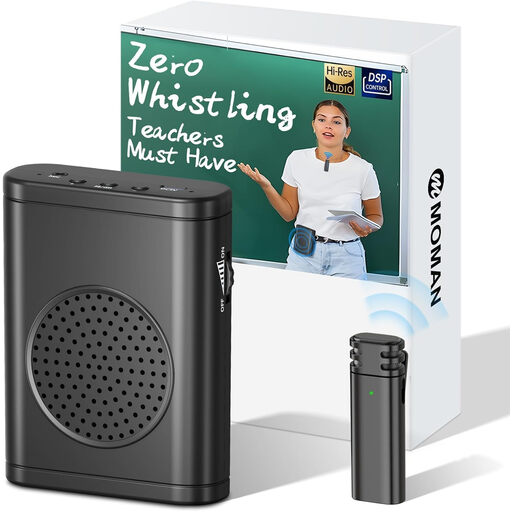
Moman S57 with wireless lavalier microphone

Moman S57 with wireless lavalier microphone

This voice amplifier is suited to a recital where the audience in the room needs to hear the speaker.

The product information lists 30 W output power and up to 12 hours of use; these are product claims, not independent measurements.

View at Joybuy

Insta360 Wave AI conference speakerphone, black

Insta360 Wave AI conference speakerphone, black

This conference speakerphone suits a fixed position in a hybrid set-up where the recital needs to be shared online.

The product information lists Bluetooth, eight microphones and a stated voice pickup distance of up to 16 ft. Take the distance between the speaker and device into account when setting it up.

View at Joybuy

Jabra SPEAK 510 MS, USB-A and Bluetooth, black

Jabra SPEAK 510 MS, USB-A and Bluetooth, black

This model is designed for conference calls and may suit a recital with online participants, with the speaker in a fixed position.

The product information lists USB-A, Bluetooth and up to 15 hours of battery life.

View at Joybuy

Jabra Speak2 55 MS Teams, dark grey

Jabra Speak2 55 MS Teams, dark grey

This speakerphone is designed for remote conversations; compare the speaking distance with the speaker’s fixed position.

Jabra lists four microphones, full-duplex audio and a microphone range of up to 2,3 m. The product information also states up to 12 hours of battery life.

View at Joybuy

Frequently asked questions

Can a speakerphone amplify the speaker’s voice for the whole class?

Don’t assume it can. A conference speakerphone is designed for conversation audio; if people in the room can’t hear the speaker clearly, consider sound amplification in the classroom and test the sound from the back.

How do you connect a speakerphone for an online recital?

Check the computer’s connection and the connection options for the exact version. Then select the intended recording and playback device in both the operating system and the meeting app.

What should you check about maintenance and service after buying?

Keep your purchase records and check who the seller is and what service arrangements apply. For a consumer purchase in the Netherlands, the seller is responsible for the legal guarantee if a product is faulty; if it’s used mainly for business purposes, you can’t automatically assume consumer protection applies.

Can the school record a recital or publish it online?

An audio recording in which a pupil can be identified may be personal data. The school must consider the GDPR and its duty to provide information; consent to an audio recording doesn’t automatically follow from an explanation about identifiable images. Set out the purpose, access and retention period in advance in line with school policy.

Does every online purchase come with a 14-day cooling-off period?

No. The Dutch government describes a 14-day cooling-off period for many consumer purchases made at a distance. Check whether an exception applies and whether the buyer is purchasing as a consumer; consumer protection isn’t automatic when a purchase is mainly for business use.
