For a performance with actors in different positions, a handheld stereo recorder is a sensible choice if you can position it well. For straightforward recording and focused playback, a compact voice recorder may be a better fit. Test quiet lines and loud passages from the actual speaking positions: an advanced recording format won’t compensate for reverberation caused by placing the microphone too far away. If voices are recognisable, the school should also agree in advance how recordings will be made, stored and shared.
Which recorder is right for you?
Teacher organising a group performance
You want to be able to hear different speakers in different positions clearly, so it’s worth testing the recorder in its intended location beforehand. Zoom, Tascam and Shure all describe microphone placement and distance as important factors.
Teacher supporting expressive performances
You want to capture both quiet lines and loud exclamations without having to keep adjusting the recording level during the performance. Zoom and Tascam list 32-bit float recording for specific models, but microphone placement still matters.
Teacher playing recordings back for students
You want to be able to find recordings easily, transfer them and play them back for feedback. Sony lists repeat playback for the ICD-UX570 series, while Philips describes MP3 or PCM recording for the VoiceTracer DVT4115.
What should you look for when choosing?
Handheld stereo recorder
Choose this when: you want to record a performance with different voices as one scene and can place the recorder in a suitable position.
Bear in mind: a single fixed position may not capture voices further away as clearly, so a test recording is still essential.
Compact voice recorder
Choose this when: your main priorities are recording speech, transferring files and listening back to sections.
Bear in mind: built-in memory and playback features alone don’t tell you how clearly distant voices will come through in a reverberant room.
| What to consider |
What should you check? |
Who is this important for? |
| Clarity from different speaking positions |
Check the microphone arrangement and record test lines from every performance position. Shure explains how distance and room reverberation can affect intelligibility. |
If you want to hear what performers are saying from different positions, test the recorder where they’ll be speaking. Around 36% of consumers prioritise clear audio from every performance position. |
| Quiet and loud passages |
Compare the supported recording formats and listen back to a test featuring the quietest and loudest passages. Don’t rely solely on manufacturers’ claims about a recording format. |
For expressive performances, you’ll want to capture both quiet lines and loud exclamations without constantly adjusting the settings. Around 29% of consumers prioritise this kind of variation in volume. |
| Listening back for feedback |
Check the playback features, file format and compatibility with the equipment used by the school. |
If you want to discuss lines with students, you’ll need to find recordings easily and replay sections. Around 21% of consumers prioritise focused playback for feedback. |
| Recording without an extra device |
Check whether the exact model has built-in memory or requires a card, and what power supply it needs. Create a test file beforehand. |
For a lesson, you’ll want to know that the recorder can record on its own and that the storage medium is ready to use. Around 14% of consumers prioritise standalone recording. |
Pitfalls to avoid when choosing
-
Assuming 32-bit float will solve reverberation
This recording format won’t stop a microphone placed far away from picking up a lot of reflected sound. As a result, speech may still be difficult to understand in a reverberant room.
First, assess where to place the recorder and make a test recording from the different speaking positions.
-
Getting a recorder with card storage ready without a memory card
According to the manual, the Zoom H1essential can’t record or play back without a microSD card inserted.
Check what’s included with the exact model, insert the card and test the recording before the performance.
If a compatible microSD card isn’t included, you’ll need to arrange one separately.
-
Assuming storage capacity means clear audio
Built-in storage doesn’t tell you how clearly quiet speech from a distance will be recorded in a reverberant room.
Make a test recording from the actual speaking distance and listen back to it. Also check whether the recording features suit the way you’ll use the device.
Brands to consider
Zoom
The H1essential is a compact XY stereo recorder for recording a performance from one chosen position.
- Zoom lists 32-bit float recording, a microphone input and playback options for this model.
- According to the manual, a microSD card must be inserted to record and play back. The recorder also needs to be positioned well in relation to the speakers.
Tascam
The DR-05XP is a handheld option for recording performances and speech in stereo.
- Tascam lists built-in omnidirectional microphones, 32-bit float recording and an input for an external microphone.
- These features don’t tell you how clearly audio will come through in a particular classroom, so test the intended placement.
Sony
The ICD-UX570 series is worth considering for recording speech and listening back to specific sections.
- Sony lists built-in memory, PCM and MP3 recording, and A-B repeat for this series.
- These features don’t determine how clearly a distant speaker will come through in a reverberant room.
Philips VoiceTracer
The DVT4115 is a voice recorder with built-in storage and MP3 or PCM recording.
- Philips lists three microphones, 8 GB of built-in memory and a rechargeable battery for this model.
- The listed features alone don’t tell you how clearly distant voices will come through in a classroom, so make a test recording.
Recorder options at Joybuy
These Joybuy products are mainly suited to compact voice recording, playback and transcription features.
 No image available
64 GB digital voice recorder with transcription function
An option for anyone who wants to turn voice recordings into text.
64 GB; transcription function.
View at Joybuy
 No image available
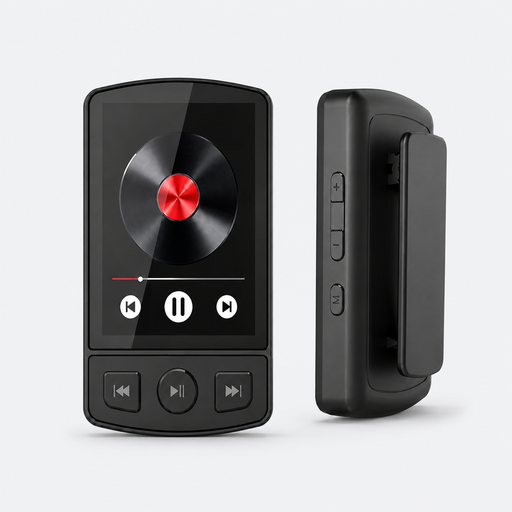
MP3 player with Bluetooth 5.2, clip and 64 GB
The product name mentions voice recording, for anyone who wants to record voices as well as music.
Bluetooth 5.2; clip; 64 GB; voice recording.
View at Joybuy
 No image available
Digital audio player with 1.8-inch screen and voice recording
A player with a recording function for anyone looking for one device for audio playback and voice recording.
1.8-inch screen; Bluetooth; voice recording.
View at Joybuy
 No image available
64 GB AI dictation device with transcription and summarising functions
An option for anyone who wants to record speech and use transcription and summarising features.
64 GB; transcription and summarising functions.
View at Joybuy
 No image available
Rexsun L357 portable digital voice recorder, 128 GB
The product description lists classrooms as a possible setting and A-B repeat for listening back to sections.
128 GB; LCD screen; MP3 and WAV recording; A-B repeat.
View at Joybuy
Frequently asked questions
Where should you put the recorder if performers move around the room?
First, make a test recording from every speaking position and, where possible, place the microphone closer to the voices that need to be heard clearly. Shure explains how distance and room reverberation can affect intelligibility. For the Zoom H1essential, Zoom recommends considering a tripod rather than placing the recorder directly on a table.
Can you record straight away with the Zoom H1essential?
Not without a microSD card inserted: according to the manual, the H1essential can’t record or play back without one. Also check the power supply and create a test file before the lesson.
Can a school record and share recognisable students’ voices?
According to the Dutch Data Protection Authority, a sound recording in which someone is recognisable may count as personal data. If the school processes this kind of data, it must decide on an appropriate legal basis in advance, inform the people concerned and take suitable security measures. Assess recording and further sharing in light of the specific purpose and circumstances; rules for images don’t automatically apply in the same way to audio alone.
What if a newly purchased recorder doesn’t work properly?
In the Netherlands, products must be of satisfactory quality. According to the Dutch government, the retailer is your point of contact if there’s a problem. A manufacturer’s guarantee is in addition to your statutory rights and doesn’t replace them.


