
Producer of a bulletin with one presenter
You record one voice at a fixed desk each time and want to keep microphone placement and volume levels simple to manage.


For one newsreader speaking close to a fixed desk, a USB desk microphone is a good fit. For interviews or on-the-move reports, the number of microphones, the receiver and the connection matter more. None of these setups will automatically silence a noisy classroom, so test the placement with a recording at the actual recording location.
You record one voice at a fixed desk each time and want to keep microphone placement and volume levels simple to manage.
You record conversations or people taking turns to speak, and want to know whether one shared microphone will do or whether you need several.
You record in different locations and need to match the mobile setup to the device the class is using.
Choose this when: one pupil speaks close to the microphone in the same spot each time.
Bear in mind: the speaker needs to stay close; check whether a suitable stand or boom arm is included.
Choose this when: you’re recording one speaker and want an easy connection and headphone monitoring.
Bear in mind: a directional pickup pattern won’t automatically prevent other voices or echo from being picked up.
Choose this when: pupils move around while reporting and the microphone needs to stay with the speaker.
Bear in mind: check the number of transmitters, the receiver and the connection on the exact kit you’re buying.
Choose this when: the class records in different places, including without a computer nearby.
Bear in mind: the built-in microphones need to be positioned carefully and are not the same as having a separate microphone close to each speaker.
| What to consider | What should you check? | Who is this important for? |
|---|---|---|
| Clarity for one newsreader | Check the microphone type and placement, and whether you can monitor the recording through headphones. | If I’m recording one pupil at a fixed desk, I want to be able to follow their voice clearly without assuming the microphone will remove classroom noise. Around 36% of consumers say clarity for one newsreader in a fixed position is their top priority. |
| Multiple speakers | Check the number of microphones or transmitters, the receiver output and how the recording device handles multiple inputs. | For an interview, I want to know whether both pupils can take turns speaking into one microphone or whether they need separate microphones. Around 29% of consumers prioritise clarity for multiple speakers. |
| Connection and controls | Check the device port, recording app, included cables and whether you can monitor the recording. | If I’m recording with a school laptop, tablet, phone or camera, I want a connection that works with that device. For around 21% of consumers, device compatibility and ease of use are the top priorities. |
| Recording in different locations | Choose between a standalone recorder and a clip-on microphone kit; check what’s included, the power supply and storage. | When the reporter walks around the classroom, I want a setup that moves with them or can record independently. Around 14% of consumers prioritise mobile reporting. |
A directional pickup pattern or electronic noise processing does not guarantee clear recordings in your classroom.
Make test recordings where you plan to record the bulletin, then listen back with the intended speakers.
Wireless kits come in different versions. Certain USB connections for the RØDE VideoMic GO II require additional cables.
First, note which recording device you use. Then check the port, receiver and contents of the kit you’re considering.
Depending on the setup you choose, you may need a suitable cable or receiver.
A recorder with built-in X/Y microphones and a kit with separate wireless transmitters need different placement and connections.
Decide in advance where the speakers will stand and whether they can take turns speaking close to one microphone.
Separate microphones may require additional microphones or recording inputs.
RØDE offers, among other products, a USB/XLR microphone for a presenter in a fixed position and a directional microphone for camera or USB setups.
According to its manual, the MV7+ is a dynamic microphone for close-up speech, with USB-C and XLR connections.
The AT2020USB-X is a cardioid USB-C condenser microphone for a fixed recording position.
The LARK M2 range includes wireless clip-on microphones in different phone and camera versions for speakers on the move.
The H1essential is a handheld recorder with built-in X/Y microphones and a USB microphone function.
These products are suited to wireless interviews with multiple speakers and fixed USB recording setups.
 No image available
Suited to an interview setup with two speakers and a wireless receiver.
The kit includes 2 transmitters and 1 receiver, a charging case and 32-bit float internal recording.
The description lists cameras, smartphones and PCs as compatible devices; check the connection for your recording device.
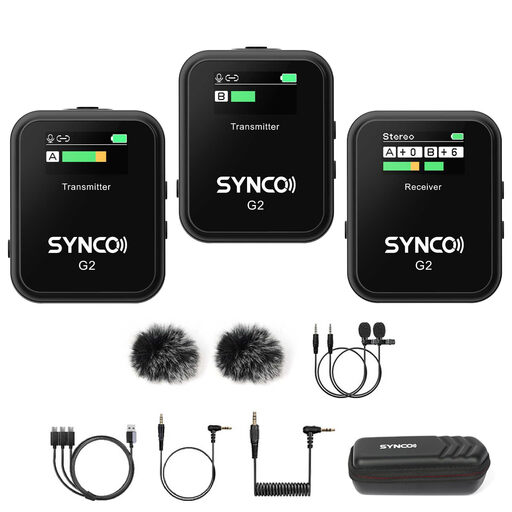 No image available
Suited to an interview with two speakers, provided the connection works with your recording device.
The description lists two transmitters and one receiver, with support for cameras, smartphones, PCs and tablets.
 No image available
Suited to a wireless interview with two speakers; check that the receiver connects to your recording device.
The description lists two transmitters, one receiver and a 3.5mm headphone socket on the receiver.
Adjustable noise reduction is mentioned; test the results with a recording in your classroom.
 No image available
Suited to conversations with two speakers when the connections match the recording device.
The kit includes two transmitters and one receiver with a charging case; the description lists cameras, smartphones and computers as compatible devices.
 No image available
Suited to one presenter at a fixed computer workstation.
The description lists a USB connection, a supercardioid pickup pattern, tap-to-mute controls and compatibility with PC and Mac.
First, consider the purpose of publication and the applicable legal basis for processing. The Dutch Data Protection Authority says schools must inform pupils and parents about the processing of personal data; Kennisnet emphasises that this requires a purpose and a legal basis. Ask the school to assess the proposed audio recording and distribution in line with its privacy policy.
Make a short test recording where the bulletin will take place, then listen back with the intended speakers. For USB, check the cable and recording input; for a wireless kit, check the exact receiver; and for a handheld recorder, check the storage and power supply.
Not always: if the pupils can take turns speaking close to one shared microphone, that setup may be enough. If they speak at the same time or in different places, check whether the kit has enough separate microphones or transmitters. The Hollyland LARK M2 is available in several kit versions.
According to the Dutch government, when a consumer buys a product, the seller must offer a solution under the statutory guarantee; this is not solely the manufacturer’s responsibility. Check separately which terms apply if the school makes a business purchase; consumer purchase guidance does not determine those terms.