For a remote conversation with a mentor using a computer, a computer headset is suitable. If the whole class needs to hear you through speakers, you’ll need a microphone system that connects to the sound system. Then decide whether you want to keep one ear free, check the connection and test that the right microphone is selected before the session.
Who is this guide for?
Taking part in a hybrid mentoring session
You’re in the classroom and talking to a mentor online. You want to follow the conversation while still hearing what people around you are saying. Lenovo Netherlands and HP outline things to consider when choosing headsets for online learning and computer-based conversations.
Speaking to the group in the room
You want to be heard clearly online and through the classroom sound system. Shure describes a headset microphone system with a transmitter and receiver for this purpose.
Taking part in a long session
You’ll be wearing the headset for several discussion or lesson blocks, so fit and comfortable listening volume matter. VeiligheidNL recommends paying attention to fit and listening volume.
What should you look for?
First, decide whether you’ll only be talking to the mentor through a computer or whether you’ll also be addressing the whole class. Then consider how much you want to stay connected with the class, the connection type and wearing comfort.
| What to consider |
What to look for when buying |
Who is this important for? |
| Speaking clearly to the mentor |
Check the microphone boom, any mute controls and which microphone is selected in the calling app. Test the microphone where you’ll be taking part in the session. |
When I’m speaking remotely, I want my voice to come through clearly and the app to use the right microphone. Around 25% of consumers put being heard clearly at a distance first. |
| Staying connected with the class |
Decide whether you want to keep one ear free and check that the version you choose is actually mono. HP describes mono and stereo as separate wearing options in the Blackwire 3200 series. |
I want to hear people sitting next to me while following the mentor. Around 25% of consumers prioritise staying connected with the class. |
| Connecting to your device |
Check whether your device uses USB-A, USB-C, Bluetooth or a 3.5mm connection. Once connected, select the right audio input and output too. |
When I connect the headset for my session, I want to be sure it’s compatible with my device. Compatibility with the device being used is the top priority for around 19% of consumers. |
| Amplifying your voice for the group |
Ask what input the sound system has and which components are already in place. For a wireless system, check the exact frequency version and the conditions for use in the Netherlands. |
If I want to address the whole group, my voice needs to come through the room’s sound system. Around 19% of consumers prioritise amplification for the group. |
| Wearing comfort and listening volume |
Look for adjustability and well-fitting ear cushions. Start at a low volume, and consider whether you need to be able to keep hearing the class. |
For a long session, I want a comfortable headset that doesn’t make me keep turning up the volume. Wearing comfort and a safe listening volume are the top priority for around 12% of consumers. |
Common buying pitfalls
-
Buying a computer headset when the whole class needs to hear you
A USB headset is designed for computer-based conversations. It won’t automatically amplify your voice through the classroom speakers.
Ask what sound system is available and decide whether you’ll be communicating online, addressing the class or doing both. Then check that the microphone, transmitter and receiver can connect to the system.
-
Assuming the connection or wearing style from the product range name alone
A product range may include versions with different connections, or with mono and stereo wearing styles. That means the version you choose might not work with your device or suit your preference for keeping one ear free.
Check the full product variant, your device’s port and whether the headset you’ve chosen is actually mono or stereo.
-
Assuming noise cancellation guarantees everyone will hear you
A manufacturer’s description doesn’t tell you how clearly your voice will come through in your classroom. Microphone placement, settings and background noise all play a part.
Test the microphone with the calling app you’ll be using and from your usual spot. Don’t treat the manufacturer’s claims as a test of the room’s acoustics.
-
Turning the volume up to drown out classroom noise
VeiligheidNL recommends choosing headphones that fit well and using volume limits to avoid unnecessarily loud listening. In a classroom, you may also need to keep hearing instructions.
Start at a low volume and decide in advance how much you need to stay connected with the room during the session. Check what volume limits your device offers.
Brands to compare
Logitech
Logitech offers computer headsets for conversations on a device, including both wired and wireless models.
- For the H390, Logitech lists on-cable volume and mute controls. Check that the USB version is compatible with your device.
- For the Zone 300, Logitech lists Bluetooth connectivity and a quoted talk time. The headset needs charging, and the stated battery life isn’t guaranteed for every use case.
HP Poly
The wired Blackwire 3200 series is designed for computer-based conversations and includes different wearing styles and connection options.
- HP describes mono as a wearing option that leaves one ear free, with stereo available as a separate version.
- Don’t assume the plug type or wearing style from the series name alone; check the specific version. Comfort claims come from the manufacturer.
Jabra
The Evolve2 30 SE is a range designed for conversations on collaboration platforms, with versions including one for Microsoft Teams.
- Jabra lists two microphones and sound-isolating ear cushions for the product range.
- Check the exact version and consider whether you need to hear people in the room during the session. Claims about voice quality and concentration are made by the manufacturer.
Lenovo
Lenovo offers the wired VoIP Headset 5000 (Teams), among other products, for computer-based conversations.
- For model 4XD1R88995, Lenovo lists a USB-C plug with a USB-A converter and a microphone boom that can be worn on either the left or right.
- According to Lenovo, the AI noise cancellation mentioned uses LADM software. Don’t assume it will work without the required software and settings.
Shure
Shure offers headset microphone systems for speaking through sound equipment. This is a different function from listening through a computer headset.
- According to Shure, the BLX14/PGA31 set includes a headset microphone, bodypack transmitter and receiver.
- The set doesn’t include headphones for listening to the mentor. Check that it connects to your existing sound system and confirm the frequency version. The Dutch Authority for Digital Infrastructure describes both licence-exempt frequencies and bands that require a licence.
Joybuy products
This selection includes computer headsets for conversations on a device. They’re suitable for online conversations, but won’t amplify your voice for the whole class on their own.
 No image available
Logitech PC 960 USB headset
Designed for computer-based conversations, with an adjustable microphone boom and on-cable volume and mute controls.
View at Joybuy
 No image available
Logitech H340 USB headset, black, wired
A wired USB headset for internet calls, with an adjustable microphone and headband.
View at Joybuy
 No image available
Jabra Evolve2 65 USB-A Black MS Mono
The mono version leaves one ear free during a conversation. The product description lists a microphone and a USB-A Bluetooth adapter included in the box.
The wireless headset needs charging. Its stated talk time is up to 35 hours.
View at Joybuy
 No image available
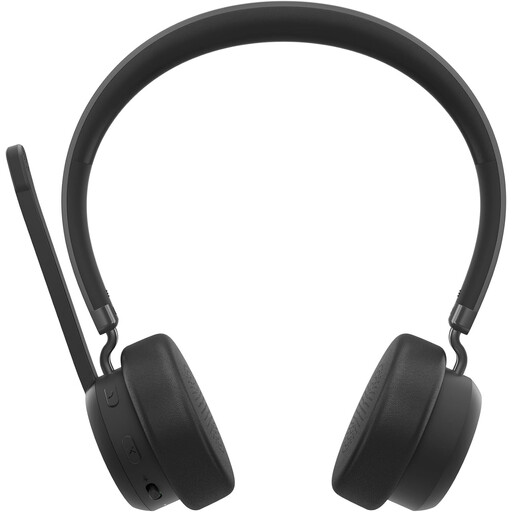
Lenovo 4XD1Q30302 wireless headset
For computer-based conversations, the product description lists Bluetooth, a foldable microphone and call and mute controls.
The headset is battery-powered, with a stated talk time of up to 31 hours. The description specifies an over-ear wearing style.
View at Joybuy
 No image available
Logitech H150 white, 981-000350
Wired headset for conversations, with an adjustable microphone and on-cable volume and mute controls.
It uses a 3.5 mm connection. If your device has separate headphone and microphone ports, you may need a splitter; the product description says one isn’t included.
View at Joybuy
Frequently asked questions
Do I need a laptop headset or a microphone system for the classroom?
For speaking and listening through a computer, choose a computer headset. If the group in the room needs to hear you through speakers, check whether a headset microphone, transmitter and receiver can connect to the existing sound system. A standard USB headset won’t do this on its own.
How do I get my headset ready for the session?
Connect or pair the headset before the session starts, then select the microphone and speaker you want to use in the calling app. Test your voice and the mute control from your usual spot. If you’re using a wireless computer headset, check that the battery is sufficiently charged too.
What are my rights if a headset I bought online breaks too soon?
According to ACM ConsuWijzer, a product must do what you could reasonably expect when used normally. If it doesn’t, the seller must put the fault right. When buying remotely, you’ll usually also have a 14-day cooling-off period, subject to legal exceptions. The rules that apply depend on your circumstances.
Can I use any wireless headset microphone in the Netherlands without a licence?
No. You can’t assume this applies to every frequency version. The Dutch Authority for Digital Infrastructure lists both licence-exempt frequencies and bands that require a licence. Check the frequency of the exact system and where you’ll be using it before you do so.
Can a mentoring session in the classroom be recorded without permission?
Using a headset doesn’t automatically make a recording permissible. According to the Dutch Data Protection Authority, schools and universities must minimise the impact on privacy when making video calls online. Whether a particular recording is allowed depends on how the session is set up and the arrangements in place.


