
You speak online yourself
You’re joining from the classroom and want remote participants to hear mainly your voice. Microsoft Learn distinguishes personal headsets from audio equipment designed for shared spaces.


A personal headset is a good fit if you’ll mainly be speaking to remote participants from the classroom. Check the microphone, mute controls, fit and connection. If several people in the room need to join the same meeting, consider shared microphone and speaker equipment instead: a headset designed for one wearer won’t automatically pick up everyone else’s voice.
You’re joining from the classroom and want remote participants to hear mainly your voice. Microsoft Learn distinguishes personal headsets from audio equipment designed for shared spaces.
You don’t want to stay next to your laptop every time you speak. Logitech and Jabra offer wireless headset models; check that the connection and battery life suit the way you’ll use yours.
More than one person in the classroom needs to be heard through the same meeting connection. Microsoft Learn describes shared audio devices as a different option from a headset for one wearer.
Choose this if: you’re the only person speaking remotely, you’ll stay by your laptop and you don’t want to manage a battery. Check whether the version has USB-A or USB-C.
Bear in mind: a cable limits how far you can move; this headset isn’t designed to pick up classmates sitting around the room through a single microphone.
Choose this if: you want to move around the classroom while you speak and your computer supports the connection used by the version you’re considering.
Bear in mind: you’ll need to charge it. Bluetooth, battery life and any Teams features can vary by device and version.
Choose this if: several people in the classroom need to speak through one meeting connection. Choose a solution that suits the room and the distance to the speakers.
Bear in mind: this is a different product category from a personal headset. Check which microphone and speaker are selected in your meeting software.
| What to consider | What should you check? | Who is this important for? |
|---|---|---|
| Making your voice easy to understand | Check the microphone and mute controls. Microphone noise reduction and ANC for what you hear are different features; assess the microphone in the room where you’ll be meeting. | If I’m speaking, I want remote participants to follow me without classroom noise distracting them. Around 31% of consumers give the clarity of their own voice top priority. |
| Several voices from the classroom | Work out how many people need to speak online. For shared equipment, check that the stated room size and operating distance are suitable for your classroom; Microsoft Learn highlights this distinction for shared devices. | If more than one person in the classroom needs to join in, I may need audio equipment for shared use. Around 25% of consumers prioritise transmitting several voices from the room. |
| Connection and controls | Compare the connection on the exact version with your computer’s ports. Also check how to mute the microphone and which microphone and speaker are selected in your meeting software. | I want the headset to connect to my computer and the controls to be easy to find during a meeting. Around 19% of consumers make device compatibility their top priority when choosing. |
| Comfort | Check whether the model is on-ear, mono or stereo, and look at its adjustability and stated weight. Try the headset on if possible: the specifications can’t tell you how it will feel on your head. | If I’m wearing the headset throughout the meeting, I want a version that suits my preferred fit and listening experience. Around 13% of consumers put comfort first. |
| Freedom to move | For wireless use, check the connection on the exact version and the stated talk time under the relevant conditions of use. A stated range doesn’t guarantee a connection in every classroom. | If I want to walk around while I’m speaking, I don’t want to be tethered by a cable, and I’ll need to factor in charging. Around 12% of consumers give freedom to move top priority. |
A headset is designed for its wearer. If several people need to speak, you may need shared microphone and speaker equipment; Microsoft Learn also highlights room size and operating distance as considerations.
Before choosing, work out how many people in the classroom need to be heard online.
If several people need to speak, you may still need shared microphone and speaker equipment as well as a personal headset.
ANC affects what you hear; the microphone determines what is sent to the other participants. So having one feature doesn’t prove that the other is included.
Check the microphone specifications if it’s important that remote participants can hear you clearly.
The connection, included receiver and software features can vary between versions. A model name alone won’t always tell you whether the headset will connect to your computer.
Compare the full version and package contents with the ports and software you use.
If the connection isn’t compatible, you may need to buy a suitable adapter or receiver separately.
The wired H390 and wireless Zone 300 are two different personal headset options. Check the connection and version you’re considering.
The Ayda USB-ENC is a wired on-ear headset for calls; check which USB version is being offered.
The specifications reviewed apply to the Blackwire 3220 USB-A version, not automatically to every version with a similar model name.
The Evolve2 55 is a wireless business headset range with mono and stereo versions; according to Jabra, Teams certification depends on the version.
This selection focuses on personal headsets for speaking during your own online team meetings. If several people need to speak through one connection, also consider audio equipment designed for shared spaces.
 No image available
A wired option if you speak online yourself and use a USB-A connection on your computer.
The product description lists two integrated microphones, stereo sound and controls for volume, mute and calls.
USB-A connection; compatibility with USB-C is listed when used with a USB-C adapter.
The description mentions an adjustable headband and memory foam ear cushions.
 No image available
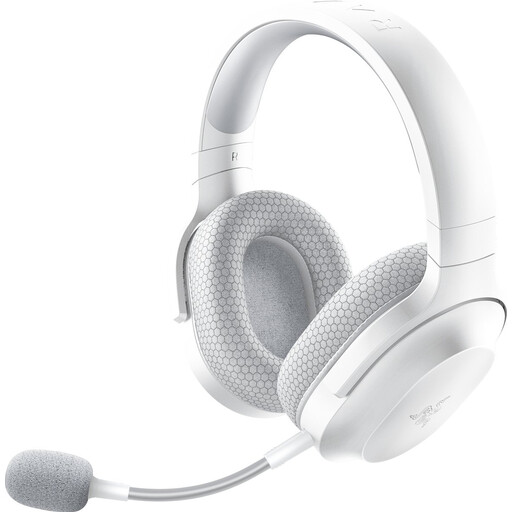
A wireless option if you want to move around while you speak and have checked that it connects to your computer.
The product description lists Bluetooth and 2.4 GHz wireless connectivity, plus a detachable HyperClear microphone.
Stated weight: 250 g; the description mentions memory foam ear cushions.
The headset needs to be charged.
 No image available
A wireless option if you’re speaking yourself; check that the connections and software features suit your computer.
The product description lists Bluetooth, connection to two devices and USB-A.
The description mentions eight beamforming microphones and ANC for listening; these features serve different purposes.
The wireless headset has a battery that needs to be charged.
 No image available
A wired USB option if you’ll stay at your computer during the meeting.
The product description mentions an adjustable microphone boom and in-line controls.
Microphone mute and volume control are listed as features.
The cable limits how far you can move.
 No image available
A wired stereo headset for speaking during your own calls and conferences.
The product description lists a USB connection and in-line volume control.
The description mentions a noise-isolating microphone and acoustic echo cancellation.
The headset is wired, so the cable limits how far you can move.
Don’t assume so: a personal headset is designed for its wearer, while shared audio equipment may be intended for several speakers. Microsoft Learn highlights room size and operating distance as considerations for shared devices. First, work out who needs to be heard online.
Select the right microphone and speaker in Teams and make a test call. You may also want to check the noise reduction setting; it doesn’t guarantee that a headset will eliminate all the noise in the classroom.
A wireless headset with a built-in battery needs to be charged. Compare the stated talk time under the specified conditions of use; Jabra gives different talk times for the Evolve2 55 depending on whether ANC and other features are enabled.
No. According to the Dutch government, there is no fixed statutory warranty period in the Netherlands; what you can expect from a product depends on the circumstances. If a product is faulty, contact the seller.
The Dutch Authority for Digital Infrastructure lists European requirements for electrical, electronic and radio equipment, including the requirement for CE marking when products are placed on the market. For a specific listing, check the product identity and conformity information; Teams certification is different from legal product compliance.