
Individual speaking exercises
If you’re a teacher who wants to replay each pupil’s recording on a computer, a microphone close to the speaker can help. Logitech describes the H390 as a USB headset with an adjustable microphone boom.


Choose based on who is speaking and where you’re recording: a headset keeps the microphone close to one speaker, a tabletop microphone picks up sound from all around, and a wireless set moves with the speaker. If you want to record without a computer, a standalone recorder is another option. Check the connection and agree how identifiable pupil recordings will be handled.
If you’re a teacher who wants to replay each pupil’s recording on a computer, a microphone close to the speaker can help. Logitech describes the H390 as a USB headset with an adjustable microphone boom.
When people are talking around a table, picking up multiple voices matters. An omnidirectional microphone and a speakerphone designed for conversations are different options, each suited to a different situation. Audio-Technica and Jabra describe their models in different ways.
If speakers are moving around or you want to record without a computer, consider the transmitters, power supply, connection and file storage. RØDE describes a wireless set with two transmitters, while Zoom describes a recorder that can record on its own.
Start with the recording setup: one speaker, several voices around a table, speakers on the move, or recording without a computer. Then check that the connection and setup suit your classroom and recording location.
| What to consider | What should you check? | Who is this important for? |
|---|---|---|
| Recording one voice | Check the distance from the microphone, the connection and the recording input on the computer. | If I ask pupils to record individually, I want to be able to replay the intended voice clearly. Around 33% of consumers with this recording need prioritise individual recordings. |
| Conversation around a table | Check the recording pattern, where the microphone will sit between the speakers and how it sounds in the actual recording location. | For a dialogue, I want to capture more than one voice without only hearing the pupil next to the computer. Around 25% of consumers prioritise recording voices around a single table. |
| Speaker on the move | Check how many transmitters are included, whether the receiver is compatible with the recording device and how to charge the set. | If a speaker moves around the classroom, I want to know whether the microphone moves with them. Around 17% of consumers prioritise this freedom of movement. |
| Recording without a computer | Check memory card compatibility, the power supply and how you’ll transfer and store files after the lesson. | If I want to record in different places without a computer connected, storage and file transfer are important too. Around 17% of consumers prioritise standalone recording. |
| Remote participant | Check that the software and connection are suitable, and that a test recording captures the speech details you want to hear again. | If someone is joining a conversation remotely, I want to be able to hear them and let them speak. Around 8% of consumers prioritise communicating with a remote participant. |
A headset keeps the microphone close to the wearer, while an omnidirectional tabletop microphone picks up sound from all around. They won’t necessarily capture the same parts of a conversation.
Decide in advance whether you want to hear one voice or several, and compare test recordings from the intended seating positions.
For the Speak2 55, Jabra describes noise cancellation and automatic adjustment of voice levels for conversations. These product specifications don’t show that every nuance of pronunciation will be retained in a recording.
Test the recording with the software you plan to use and check that it’s suitable for the way you want to listen back.
To record independently with the Zoom H1essential, you’ll need a suitable microSD card and an appropriate power source. You’ll also need to decide how to transfer files afterwards.
Check card compatibility and make a list in advance of the equipment and steps needed for your recording setup.
According to the Dutch Data Protection Authority, identifiable audio recordings can be personal data. When a school processes them, this includes informing the people concerned and protecting their data.
Before you start, agree with the school why you’re recording, who will have access and how long the files will be kept.
The H390 is a USB headset for one person speaking at a computer.
The ATR4697-USB is a boundary microphone for voices around a table; the ATR2100x-USB is a directional handheld microphone.
The H1essential is a standalone recorder with built-in microphones and a USB microphone function.
The Wireless ME Dual is a wireless set for speakers who move around.
The Speak2 55 is a speakerphone for conversations with several people in the room and, potentially, a remote participant.
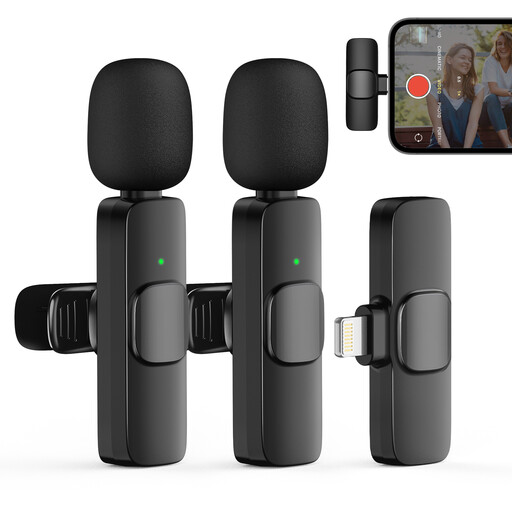
This selection includes wireless clip-on microphones, a conference speakerphone, a digital voice recorder and wired headsets for different recording setups.
 No image available
Could suit a recording where one or two speakers move around; the product description mentions use with iPhone and iPad devices.
The title lists two transmitters and one receiver. The product description mentions omnidirectional recording.
 No image available
Could suit a recording setup for several speakers; the product description also mentions recording audio directly on the device.
The product description lists eight microphones, 32 GB of storage, and omnidirectional and beamforming recording patterns.
 No image available
Could suit a recording you want to listen back to later; the product description lists classrooms as a possible use.
The product information lists 128 GB of storage, WAV and MP3 recording, and a USB-C connection. It also mentions A-B repeat and fast-forward and rewind.
 No image available
Could suit a pupil recording individually on a computer, with the microphone close to the wearer.
The product description lists USB-A, a USB-C adapter cable and a microphone that can be raised to mute it.
 No image available
Could suit a recording or interview setup; the product description lists interviews and video calls as possible uses.
The title lists two microphones and a Type-C interface. The product information mentions a battery.
Consent isn’t automatically required as the legal basis for every recording under the GDPR; it’s one possible legal basis. According to the Dutch Data Protection Authority, an identifiable audio recording can be personal data. For each specific instance of processing, the school must establish an appropriate legal basis, inform the people concerned and protect their data.
The school remains responsible for personal data when it outsources the processing. The Dutch Data Protection Authority explains that the school must have a data processing agreement with the processor; assess this separately from your choice of microphone.
First check that your computer has the right connection and uses the microphone as its recording input. The Logitech H390 described here has USB-A; the Audio-Technica ATR4697-USB has USB-C and comes with a USB-A adapter. Make a test recording in the intended location too.
Zoom describes support for 4–32 GB microSDHC cards or 64 GB–1 TB microSDXC cards, with battery or USB power. Check card compatibility, test the recording and plan how you’ll transfer the files after the lesson.
Check which memory card, power supply, cables or adapters your setup needs. The Dutch government states that the Netherlands has no fixed statutory warranty period and explains your right to a product that works as it should. If you’re buying on behalf of a school, also check the terms that apply to that purchase.